Top Quality 70-411 Free Practice Questions 2021
We provide microsoft 70 411 which are the best for clearing 70-411 test, and to get certified by Microsoft Administering Windows Server 2012. The 70 411 pdf covers all the knowledge points of the real 70-411 exam. Crack your Microsoft 70-411 Exam with latest dumps, guaranteed!
Free demo questions for Microsoft 70-411 Exam Dumps Below:
NEW QUESTION 1
Your network contains an Active Directory domain named contoso.com. The domain contains a domain controller named DC1 that runs Windows Server 2012 R2.
You create an Active Directory snapshot of DC1 each day.
You need to view the contents of an Active Directory snapshot from two days ago. What should you do first?
- A. Run the dsamain.exe command.
- B. Stop the Active Directory Domain Services (AD DS) service.
- C. Start the Volume Shadow Copy Service (VSS).
- D. Run the ntdsutil.exe command.
Answer: A
Explanation: Dsamain.exe exposes Active Directory data that is stored in a snapshot or backup as a Lightweight Directory Access Protocol (LDAP) server.
Reference: http://technet.microsoft.com/en-us/library/cc772168.aspx
NEW QUESTION 2
HOTSPOT
Your network contains one Active Directory forest named contoso.com.
All client computers for the sales department are in an organizational unit (OU) named Sales. All of the sales department computers run Windows 8.1.
You plan to use Group Policy preferences to map several drives on the sales department computers.
You need to perform the following actions:
• Create a drive mapping on all of the sales department computers for drive X. If drive X already exists, the current drive mapping should NOT be modified.
• Create a drive mapping on all of the sales department computers for drive Y. If drive Y already exists, the UNC path must be modified, but all other settings must be maintained.
Which action should you use for each drive mapping? To answer, select the appropriate options in the answer area.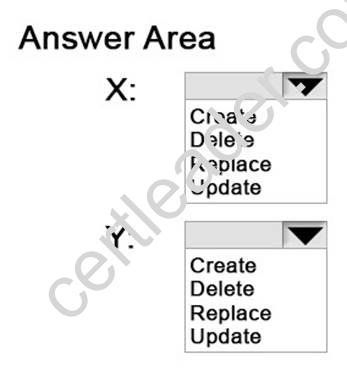
Answer:
Explanation: Create – If a drive mapping doesn’t exist for this user for the share “shareuserDocuments”, then create one. If there already is one, don’t do anything! It’s a kind, gentle sort of policy, it won’t overwrite anything you already have, so it has a Green icon associated in the UI. Update – If that drive mapping exists, it will be updated with the settings specified here. If there are other settings associated with the drive mapping that aren’t specified here, they will be maintained. If no drive mapping exists for this share, create it. https://blogs.technet.microsoft.com/grouppolicy/2009/10/26/group-policy-preferences-colorful-and-mysteriously-powerful-just-like-windows-7/
NEW QUESTION 3
HOTSPOT
Your network contains a DNS server named Server1 that runs Windows Server 2012 R2. Server1 has a zone named contoso.com. The network contains a server named Server2 that runs Windows Server 2008 R2. Server1 and Server2 are members of an Active Directory domain named contoso.com.
You change the IP address of Server2.
Several hours later, some users report that they cannot connect to Server2.
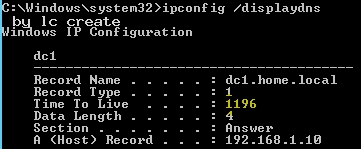
On the affected users' client computers, you flush the DNS client resolver cache, and the users successfully connect to Server2.
You need to reduce the amount of time that the client computers cache DNS records from contoso.com.
Which value should you modify in the Start of Authority (SOA) record? To answer, select the appropriate setting in the answer area.
Answer:
Explanation: The Default TTL, is just that a default for newly created records. Once the records are created their TTL is independent of the Default TTL on the SOA. Microsoft DNS implementation copies the Default TTL setting to all newly created records their by giving them all independent TTL settings.
SOA Minimum Field: The SOA minimum field has been overloaded in the past to have three different meanings, the minimum TTL value of all RRs in a zone, the default TTL of RRs which did not contain a TTL value and the TTL of negative responses.
Despite being the original defined meaning, the first of these, the minimum TTL value of all RRs in a zone, has never in practice been used and is hereby deprecated. The second, the default TTL of RRs which contain no explicit TTL in the master zone file, is relevant only at
the primary server. After a zone transfer all RRs have explicit TTLs and it is impossible to determine whether the TTL for a record was explicitly set or derived from the default after a zone transfer. Where a server does not require RRs to include the TTL value explicitly, it should provide a mechanism, not being the value of the MINIMUM field of the SOA record, from which the missing TTL values are obtained. How this is done is implementation dependent.
TTLs also occur in the Domain Name System (DNS), where they are set by an authoritative name server for a particular resource record. When a caching (recursive) nameserver queries the authoritative nameserver for a resource record, it will cache that record for the time (in seconds) specified by the TTL. If a stub resolver queries the caching nameserver for the same record before the TTL has expired, the caching server will simply reply with the already cached resource record rather than retrieve it from the authoritative nameserver again.
Shorter TTLs can cause heavier loads on an authoritative nameserver, but can be useful when changing the address of critical services like Web servers or MX records, and therefore are often lowered by the DNS administrator prior to a service being moved, in order to minimize disruptions.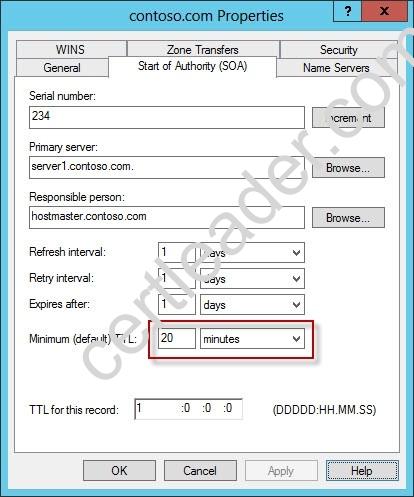

NEW QUESTION 4
Your network contains an Active Directory domain named contoso.com. Network Policy Server (NPS) is deployed to the domain.
You plan to deploy Network Access Protection (NAP).
You need to configure the requirements that are validated on the NPS client computers. What should you do?
- A. From the Network Policy Server console, configure a network policy.
- B. From the Network Policy Server console, configure a health policy.
- C. From the Network Policy Server console, configure a Windows Security Health Validator (WSHV) policy.
- D. From a Group Policy object (GPO), configure the NAP Client Configuration security setting.
- E. From a Group Policy object (GPO), configure the Network Access Protection Administrative Templates setting.
Answer: C
NEW QUESTION 5
Your network contains an Active Directory domain named contoso.com. All users have client computers that run Windows 8.1.
All computer accounts reside in an organizational unit (OU) named OU1. All of the computer accounts for the marketing department are members of a group named Marketing. All of the computer accounts for the human resources department are members of a group named HR Computers.
You create a Group Policy object (GPO) named GPO1. You link GPO1 to OU1. You configure the Group Policy preferences of GPO1 to add two shortcuts named Link1 and Link2 to the desktop.
You need to ensure that Link1 only appears on the desktop of client computers that have more than 80 GB of free disk space and that Link2 only appears on the desktop of client computers that have less than 80 GB of free disk space.
What should you configure?
- A. WMI Filtering
- B. Group Policy Inheritance
- C. Item-level targeting
- D. Security Filtering
Answer: C
Explanation: References: https://technet.microsoft.com/en-us/library/dn789189(v=ws.11).aspx
NEW QUESTION 6
Your network contains an Active Directory domain named contoso.com. The domain contains a server named Server1 that runs Windows Server 2012 R2 and has the Network Policy Server role service installed.
You need to enable trace logging for Network Policy Server (NPS) on Server1. Which tool should you use?
- A. The tracert.exe command
- B. The Network Policy Server console
- C. The Server Manager console
- D. The netsh.exe command
Answer: D
Explanation: NPS trace logging files
You can use log files on servers running Network Policy Server (NPS) and NAP client computers to help troubleshoot NAP problems. Log files can provide the detailed information required for troubleshooting complex problems.
You can capture detailed information in log files on servers running NPS by enabling remote access tracing. The Remote Access service does not need to be installed or running to use remote access tracing. When you enable tracing on a server running NPS, several log files are created in %windir%tracing.
The following log files contain helpful information about NAP:
IASNAP. LOG: Contains detailed information about NAP processes, NPS authentication, and NPS authorization.
IASSAM. LOG: Contains detailed information about user authentication and authorization.
Membership in the local Administrators group, or equivalent, is the minimum required to enable tracing. Review details about using the appropriate accounts and group memberships at Local and Domain Default Groups (http: //go. microsoft. com/fwlink/?LinkId=83477).
To create tracing log files on a server running NPS
✑ Open a command line as an administrator.
✑ Type netshras set tr * en.
✑ Reproduce the scenario that you are troubleshooting.
✑ Type netshras set tr * dis.
✑ Close the command prompt window.
Reference: http: //technet. microsoft. com/en-us/library/dd348461%28v=ws. 10%29. aspx
NEW QUESTION 7
Your network contains an Active Directory domain named contoso.com. All domain controllers run Windows Server 2012 R2.
A domain controller named DO has the ADMX Migrator tool installed. You have a custom Administrative Template file on DC1 named Template1.adm.
You need to add a custom registry entry to Template1.adm by using the ADMX Migrator tool.
Which action should you run first?
- A. Load Template
- B. New Policy Setting
- C. Generate ADMX from ADM
- D. New Category
Answer: C
Explanation: The ADMX Migrator provides two conversion methods — through the editor or through a command-line program. From the ADMX Editor, choose the option to Generate ADMX from ADM. Browse to your ADM file, and the tool quickly and automatically converts it. You then can open the converted file in the editor to examine its values and properties and modify it
if you wish. The ADMX Migrator Command Window is a little more complicated; it requires you to type a lengthy command string at a prompt to perform the conversions. However, it includes some options and flexibility not available in the graphical editor.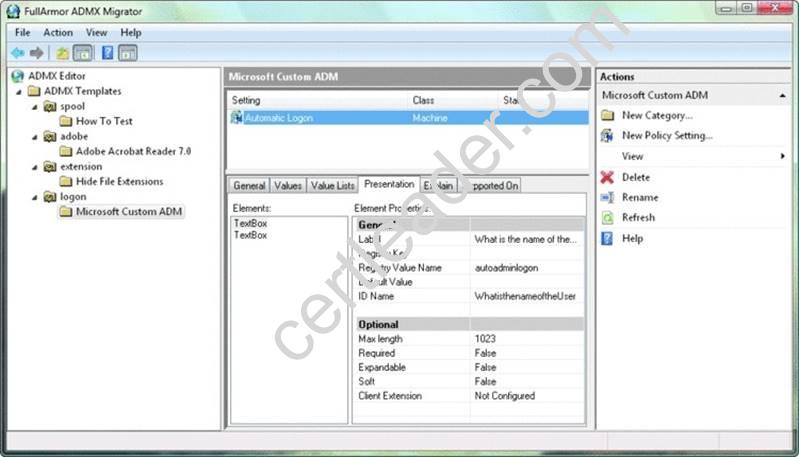
References:
http: //technet. microsoft. com/pt-pt/magazine/2008. 02. utilityspotlight%28en-us%29. aspx http: //technet. microsoft. com/pt-pt/magazine/2008. 02. utilityspotlight%28en-us%29. aspx
NEW QUESTION 8
Your network contains an Active Directory domain named contoso.com. The domain contains a server named Server1 that runs Windows Server 2012 R2. Server1 has the File Server Resource Manager role service installed.
You configure a quota threshold as shown in the exhibit. (Click the Exhibit button.)
You need to ensure that a user named User1 receives an email notification when the threshold is exceeded.
What should you do?
- A. Create a performance counter alert.
- B. Create a classification rule.
- C. Modify the members of the Performance Log Users group.
- D. Configure the File Server Resource Manager Options.
Answer: D
Explanation: When you create quotas and file screens, you have the option of sending e-mail notifications to users when their quota limit is approaching or after they have attempted to save files that have been blocked. If you want to routinely notify certain administrators of quota and file screening events, you can configure one or more default recipients.
To send these notifications, you must specify the SMTP server to be used for forwarding the e-mail messages.
To configure e-mail options
In the console tree, right-click File Server Resource Manager, and then click Configure options. The File Server Resource Manager Options dialog box opens.
On the E-mail Notifications tab, under SMTP server name or IP address, type the host name or the IP address of the SMTP server that will forward e-mail notifications.
If you want to routinely notify certain administrators of quota or file screening events, under Default administrator recipients, type each e-mail address.
Use the format account@domain. Use semicolons to separate multiple accounts. To test your settings, click Send Test E-mail.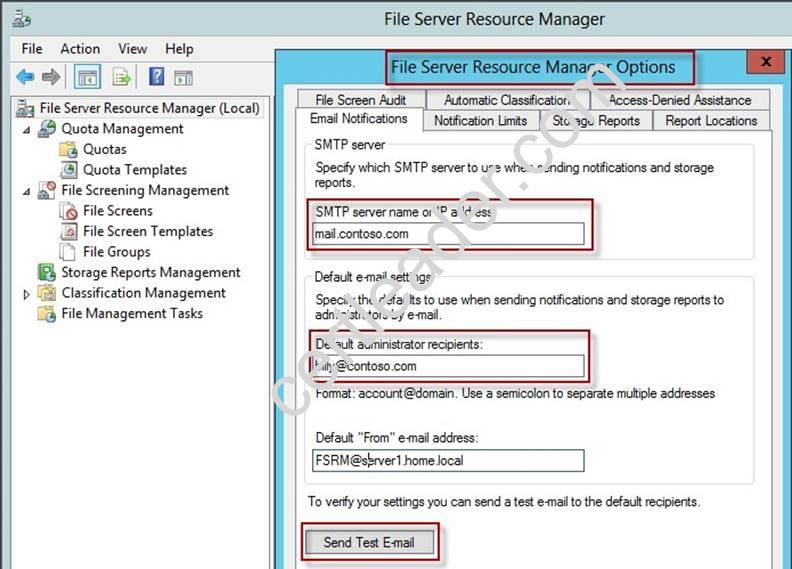

NEW QUESTION 9
You have a DNS server named Server1 that runs Windows Server 2012 R2. On Server1, you create a DNS zone named contoso.com.
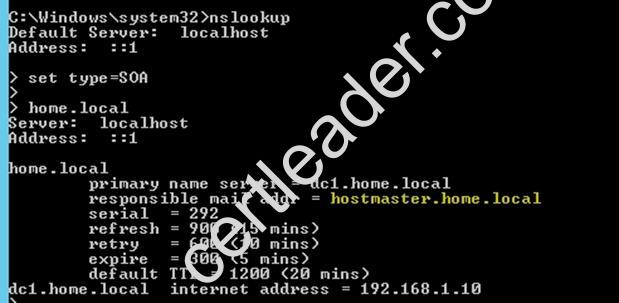
You need to specify the email address of the person responsible for the zone. Which type of DNS record should you configure?
- A. Start of authority (SOA)
- B. Host information (HINFO)
- C. Mailbox (MB)
- D. Mail exchanger (MX)
Answer: A
Explanation: A SOA-record defines the responsible person for an entire zone, but a zone may contain many individual hosts / domain names for which different people are responsible. The RP- record type makes it possible to identify the responsible person for individual host names contained within the zone.
NEW QUESTION 10
Your network contains an Active Directory domain named contoso.com. The domain contains a file server named Server1 that runs Windows Server 2012 R2.
You view the effective policy settings of Server1 as shown in the exhibit. (Click the Exhibit button.)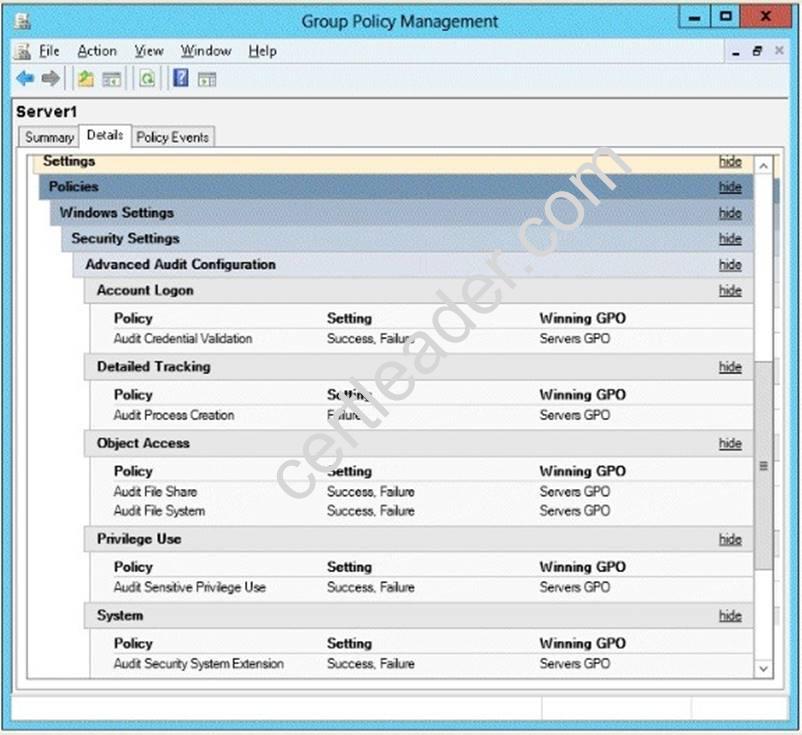
On Server1, you have a folder named C:Share1 that is shared as Share1. Share1 contains confidential data. A group named Group1 has full control of the content in Share1.
You need to ensure that an entry is added to the event log whenever a member of Group1 deletes a file in Share1.
What should you configure?
- A. the Audit File Share setting of Servers GPO
- B. the Sharing settings of C:Share1
- C. the Audit File System setting of Servers GPO
- D. the Security settings of C:Share1
Answer: D
Explanation: You can use Computer Management to track all connections to shared resources on a Windows Server 2008 R2 system.
Whenever a user or computer connects to a shared resource, Windows Server 2008 R2 lists a connection in the Sessions node.
File access, modification and deletion can only be tracked, if the object access auditing is enabled you can see the entries in the event log.
To view connections to shared resources, type net session at a command prompt or follow these steps:
✑ In Computer Management, connect to the computer on which you created the
shared resource.
✑ In the console tree, expand System Tools, expand Shared Folders, and then select Sessions. You can now view connections to shares for users and computers.
To enable folder permission auditing, you can follow the below steps:
✑ Click start and run "secpol. msc" without quotes.
✑ Open the Local PoliciesAudit Policy
✑ Enable the Audit object access for "Success" and "Failure".
✑ Go to target files and folders, right click the folder and select properties.
✑ Go to Security Page and click Advanced.
✑ Click Auditing and Edit.
✑ Click add, type everyone in the Select User, Computer, or Group.
✑ Choose Apply onto: This folder, subfolders and files.
✑ Tick on the box “Change permissions”
✑ Click OK.
After you enable security auditing on the folders, you should be able to see the folder permission changes in the server's Security event log. Task Category is File System.
References:
http: //social. technet. microsoft. com/Forums/en-US/winservergen/thread/13779c78-0c73- 4477-8014-f2eb10f3f10f/
http: //technet. microsoft. com/en-us/library/cc753927(v=ws. 10). aspx
http: //social. technet. microsoft. com/Forums/en-US/winservergen/thread/13779c78-0c73- 4477-8014-f2eb10f3f10f/
http: //support. microsoft. com/kb/300549
http: //www. windowsitpro. com/article/permissions/auditing-folder-permission-changes http: //www. windowsitpro. com/article/permissions/auditing-permission-changes-on-a- folder
NEW QUESTION 11
Your network contains an Active Directory domain named contoso.com. Network Access Protection (NAP) is deployed to the domain.
You need to create NAP event trace log files on a client computer. What should you run?
- A. logman
- B. Register-ObjectEvent
- C. tracert
- D. Register-EngineEvent
Answer: A
Explanation: You can enable NAP client tracing by using the command line. On computers running Windows Vista®, you can enable tracing by using the NAP Client Configuration console. NAP client tracing files are written in Event Trace Log (ETL) format. These are binary files representing trace data that must be decoded by Microsoft support personnel. Use the –o option to specify the directory to which they are written. In the following example, files are written to %systemroot%tracingnap. For more information, see Logman (http: //go. microsoft.com/fwlink/?LinkId=143549).
To create NAP event trace log files on a client computer
✑ Open a command line as an administrator.
✑ Type
logman start QAgentRt -p {b0278a28-76f1-4e15-b1df-14b209a12613} 0xFFFFFFFF 9 -o
%systemroot%tracingnapQAgentRt. etl –ets.
Note: To troubleshoot problems with WSHA, use the following GUID: 789e8f15-0cbf-4402- b0ed-0e22f90fdc8d.
✑ Reproduce the scenario that you are troubleshooting.
✑ Type logman stop QAgentRt -ets.
✑ Close the command prompt window.
References:
http: //technet. microsoft. com/en-us/library/dd348461%28v=ws. 10%29. aspx
NEW QUESTION 12
You have a server named Server1 that runs Windows Server 2012 R2.
You need to configure Server1 to create an entry in an event log when the processor usage exceeds 60 percent.
Which type of data collector should you create?
- A. An event trace data collector
- B. A performance counter alert
- C. A performance counter data collector
- D. A configuration data collector
Answer: B
Explanation: Performance alerts notify you when a specified performance counter exceeds your configured threshold by logging an event to the event log. But rather than notifying you immediately when the counter exceeds the threshold, you can configure a time period over which the counter needs to exceed the threshold, to avoid unnecessary alerts.
NEW QUESTION 13
You have a DNS server named DN51 that runs Windows Server 2012 R2. On DNS1, you create a standard primary DNS zone named adatum.com.
You need to change the frequency that secondary name servers will replicate the zone from DNS1.
Which type of DNS record should you modify?
- A. Name server (NS)
- B. Start of authority (SOA)
- C. Host information (HINFO)
- D. Service location (SRV)
Answer: B
Explanation: The time to live is specified in the Start of Authority (SOA) record
Note: TTL (time to live) - The number of seconds a domain name is cached locally before expiration and return to authoritative nameservers for updated information.
NEW QUESTION 14
Your network contains three Network Policy Server (NPS) servers named NPS1, NPS2, and NPS3.
NP51 is configured as a RADIUS proxy that forwards connection requests to a remote RADIUS server group named Group1.
You need to ensure that NPS2 receives connection requests. NPS3 must only receive connection requests if NPS2 is unavailable.
How should you configure Group1?
- A. Change the Priority of NPS3 to 10.
- B. Change the Weight of NPS2 to 10.
- C. Change the Weight of NPS3 to 10.
- D. Change the Priority of NPS2 to 10.
Answer: A
Explanation: Priority. Priority specifies the order of importance of the RADIUS server to the NPS proxy server. Priority level must be assigned a value that is an integer, such as 1, 2, or 3. The lower the number, the higher priority the NPS proxy gives to the RADIUS server. For example, if the RADIUS server is assigned the highest priority of 1, the NPS proxy sends connection requests to the RADIUS server first; if servers with priority 1 are not available, NPS then sends connection requests to RADIUS servers with priority 2, and so on. You can assign the same priority to multiple RADIUS servers, and then use the Weight setting to load balance between them.
NEW QUESTION 15
HOTSPOT
Your network contains an Active Directory domain named contoso.com.
You need to create a certificate template for the BitLocker Drive Encryption (BitLocker) Network Unlock feature.
Which Cryptography setting of the certificate template should you modify? To answer, select the appropriate setting in the answer area.
Answer:
Explanation: References:
http: //technet.microsoft.com/en-us/library/jj574173.aspx
NEW QUESTION 16
You have a file server named Server1 that runs Windows Server 2012 R2. Server1 has the File Server Resource Manager role service installed.
Files created by users in the human resources department are assigned the Department classification property automatically.
You are configuring a file management task named Task1 to remove user files that have not been accessed for 60 days or more.
You need to ensure that Task1 only removes files that have a Department classification property of human resources. The solution must minimize administrative effort.
What should you configure on Task1?
- A. Configure a file screen
- B. Create a condition
- C. Create a classification rule
- D. Create a custom action
Answer: B
Explanation: Create a File Expiration Task
The following procedure guides you through the process of creating a file management task for expiring files. File expiration tasks are used to automatically move all files that match certain criteria to a specified expiration directory, where an administrator can then back those files up and delete them. Property conditions. Click Add to create a new condition based on the file’s classification. This will open the Property Condition dialog box, which allows you to select a property, an operator to perform on the property, and the value to compare the property against. After clicking OK, you can then create additional conditions, or edit or remove an existing condition.
NEW QUESTION 17
Your network contains an Active Directory domain named contoso.com. The domain contains a member server named Server1. Server1 runs Windows Server 2012 R2 and has the Hyper-V server role installed.
Server1 hosts 10 virtual machines. A virtual machine named VM1 runs Windows Server 2012 R2 and hosts a processor-intensive application named App1.
Users report that App1 responds more slowly than expected.
You need to monitor the processor usage on VM1 to identify whether changes must be made to the hardware settings of VM1.
Which performance object should you monitor on Server1?
- A. Processor
- B. Hyper-V Hypervisor Virtual Processor
- C. Hyper-V Hypervisor Logical Processor
- D. Hyper-V Hypervisor Root Virtual Processor
- E. Process
Answer: C
Explanation: In the simplest way of thinking the virtual processor time is cycled across the available logical processors in a round-robin type of fashion. Thus all the processing power gets used over time, and technically nothing ever sits idle.
To accurately measure the processor utilization of a guest operating system, use the “Hyper-V Hypervisor Logical Processor (Total)% Total Run Time” performance monitor counter on the Hyper-V host operating system.
NEW QUESTION 18
Your network contains an Active Directory domain named contoso.com. The domain contains a file server named Server1 that runs Windows Server 2012 R2.
You view the effective policy settings of Server1 as shown in the exhibit. (Click the Exhibit button.)
You need to ensure that an entry is added to the event log whenever a local user account is created or deleted on Server1.
What should you do?
- A. In Servers GPO, modify the Advanced Audit Configuration settings.
- B. On Server1, attach a task to the security log.
- C. In Servers GPO, modify the Audit Policy settings.
- D. On Server1, attach a task to the system log.
Answer: A
Explanation: When you use Advanced Audit Policy Configuration settings, you need to confirm that these settings are not overwritten by basic audit policy settings. The following procedure shows how to prevent conflicts by blocking the application of any basic audit policy settings.
Enabling Advanced Audit Policy Configuration
Basic and advanced audit policy configurations should not be mixed. As such, it’s best practice to enable Audit: Force audit policy subcategory settings (Windows Vista or later) to override audit policy category settings in Group Policy to make sure that basic auditing is
disabled. The setting can be found under Computer ConfigurationPoliciesSecurity SettingsLocal PoliciesSecurity Options, and sets the SCENoApplyLegacyAuditPolicy registry key to prevent basic auditing being applied using Group Policy and the Local Security Policy MMC snap-in.
In Windows 7 and Windows Server 2008 R2, the number of audit settings for which success and failure can be tracked has increased to 53. Previously, there were nine basic auditing settings under Computer ConfigurationPoliciesWindows SettingsSecurity SettingsLocal PoliciesAudit Policy. These 53 new settings allow you to select only the behaviors that you want to monitor and exclude audit results for behaviors that are of little or no concern to you, or behaviors that create an excessive number of log entries. In addition, because Windows 7 and Windows Server 2008 R2 security audit policy can be applied by using domain Group Policy, audit policy settings can be modified, tested, and deployed to selected users and groups with relative simplicity.
Audit Policy settings
Any changes to user account and resource permissions. Any failed attempts for user logon.
Any failed attempts for resource access. Any modification to the system files.
Advanced Audit Configuration Settings
Audit compliance with important business-related and security-related rules by tracking precisely defined activities, such as:
✑ A group administrator has modified settings or data on servers that contain finance
information.
✑ An employee within a defined group has accessed an important file.
✑ The correct system access control list (SACL) is applied to every file and folder or registry key on a computer or file share as a verifiable safeguard against undetected access.
In Servers GPO, modify the Audit Policy settings - enabling audit account management setting will generate events about account creation, deletion and so on.
Advanced Audit Configuration Settings
Advanced Audit Configuration Settings ->Audit Policy
-> Account Management -> Audit User Account Management
In Servers GPO, modify the Audit Policy settings - enabling audit account management setting will generate events about account creation, deletion and so on.
ence:
http://blogs.technet.com/b/abizerh/archive/2010/05/27/tracing-down-user-and-computer-account-deletion-in-active-directory. aspx
http: //technet. microsoft. com/en-us/library/dd772623%28v=ws. 10%29. aspx
http: //technet. microsoft. com/en-us/library/jj852202(v=ws. 10). aspx
http: //www. petri. co. il/enable-advanced-audit-policy-configuration-windows-server. htm
http: //technet. microsoft. com/en-us/library/dd408940%28v=ws. 10%29. aspx
http: //technet. microsoft. com/en-us/library/dd408940%28v=ws. 10%29. aspx#BKMK_step2
NEW QUESTION 19
Your network contains an Active Directory domain named adatum.com. The domain contains 10 domain controllers that run Windows Server 2012 R2.
You plan to create a new Active Directory-integrated zone named contoso.com. You need to ensure that the new zone will be replicated to only four of the domain
controllers.
What should you do first?
- A. Create an application directory partition.
- B. Create an Active Directory connection object.
- C. Create an Active Directory site link.
- D. Change the zone replication scope.
Answer: A
Explanation: Application directory partitions
An application directory partition is a directory partition that is replicated only to specific domain controllers. A domain controller that participates in the replication of a particular application directory partition hosts a replica of that partition. Only domain controllers running Windows Server 2003 can host a replica of an application directory partition.
NEW QUESTION 20
HOTSPOT
Your network contains an Active Directory domain named contoso.com. All servers run Windows Server 2012 R2.
You need to audit successful and failed attempts to read data from USB drives on the servers.
Which two objects should you configure? To answer, select the appropriate two objects in the answer area.
Answer:
Explanation: 
P.S. Easily pass 70-411 Exam with 294 Q&As Certleader Dumps & pdf Version, Welcome to Download the Newest Certleader 70-411 Dumps: https://www.certleader.com/70-411-dumps.html (294 New Questions)