Microsoft 70-411 Exam Questions 2021
We offers exam ref 70 411 administering windows server 2012 r2 pdf. "Administering Windows Server 2012", also known as 70-411 exam, is a Microsoft Certification. This set of posts, Passing the 70-411 exam with 70 411 exam, will help you answer those questions. The mcsa 70 411 covers all the knowledge points of the real exam. 100% real 70 411 exam and revised by experts!
Free demo questions for Microsoft 70-411 Exam Dumps Below:
NEW QUESTION 1
HOTSPOT
Your network contains an Active Directory forest named contoso.com. The forest contains a single domain. All domain controllers run Windows Server 2012 R2 and are configured as DNS servers. All DNS zones are Active Directory-integrated. Active Directory Recycle Bin is enabled.
You need to modify the amount of time deleted objects are retained in the Active Directory Recycle Bin.
Which naming context should you use? To answer, select the appropriate naming context in the answer area.
Answer:
Explanation: Starting in Windows Server 2008 R2, Active Directory now implements a true recycle bin. No longer will you need an authoritative restore to recover deleted users, groups, OU’s, or other objects. Instead, it is now possible to use PowerShell commands to bring back objects with all their attributes, backlinks, group memberships, and metadata.
The amount of time that an object can be recovered is controlled by the Deleted Object Lifetime (DOL). This time range can be set on the msDS-deletedObjectLifetime attribute. By default, it will be the same number of days as the Tombstone Lifetime (TSL). The TSL set for a new forest since Windows Server 2003 SP1 has been 180 days*, and since by default DOL = TSL, the default number of days that an object can be restored is therefore 180 days. If tombstoneLifetime is NOT SET or NULL, the tombstone lifetime is that of the Windows default: 60 days. This is all configurable by the administrator.
Set-ADObject -Identity "CN=Directory Service,CN=Windows NT,CN=Services,CN=Configuration,DC=contoso,DC=com" -Partition "CN=Configuration,DC=contoso,DC=com" -Replace: @("msDS-DeletedObjectLifetime" = 365)
msDS-deletedObjectLifetime New to Windows Server 2008 R2
Is set on the “CN=Directory Service,CN=Windows NT, CN=Services, CN=Configuration, DC=COMPANY,DC=COM” container
Describes how long a deleted object will be restorable To modify the deleted object lifetime by using Ldp.exe
To open Ldp.exe, click Start, click Run, and then type ldp.exe.
To connect and bind to the server hosting the forest root domain of your Active Directory environment, under Connections, click Connect, and then click Bind.
In the console tree, right-click the CN=Directory Service,CN=Windows NT,CN=Services,CN=Configuration container, and then click Modify.
In the Modify dialog box, in Edit Entry Attribute, type msDS-DeletedObjectLifeTime.
In the Modify dialog box, in Values, type the number of days that you want to set for the tombstone lifetime value. (The minimum is 3 days.)
In the Modify dialog box, under Operation click Replace, click Enter, and then click Run.
References:
http: //technet. microsoft. com/en-us/library/dd392260%28v=ws. 10%29. aspx
http: //blogs. technet. com/b/askds/archive/2009/08/27/the-ad-recycle-bin-understanding- implementing-best-practices-and-troubleshooting. aspx
NEW QUESTION 2
Your network contains an Active Directory domain named contoso.com. All domain controllers run Windows Server 2012.
You pre-create a read-only domain controller (P.QDC) account named RODC1. You export the settings of RODC1 to a file named Filel.txt.
You need to promote RODC1 by using File1.txt. Which tool should you use?
- A. The Install-WindowsFeature cmdlet
- B. The Add-WindowsFeature cmdlet
- C. The Dism command
- D. The Install-ADDSDomainController cmdlet
- E. the Dcpromo command
Answer: E
NEW QUESTION 3
HOTSPOT
You have a server named Server5 that runs Windows Server 2012 R2. Servers has the Windows Deployment Services server role installed.
You need to ensure that when client computers connect to Server5 by using PXE, the computers use an unattended file.
What should you configure?
To answer, select the appropriate tab in the answer area.
Answer:
Explanation: 
NEW QUESTION 4
DRAG DROP
Your network contains an Active Directory domain named contoso.com. The domain contains a domain controller named DC1.
You need to create an Active Directory snapshot on DC1. Which four commands should you run?
To answer, move the four appropriate commands from the list of commands to the answer area and arrange them in the correct order.
Answer:
Explanation: Box 1: ntdsutil
Box 2: snapshot
Box 3: activate instance ntds Box 4: create
Note:
Create a snapshot of AD DS in Windows Server 2012 R2 by using NTDSUTIL
1 – On the domain server, open command prompt and type ntdsutil and press Enter. 2- Next, type snapshot and press Enter.
3 – Next, type activate instance ntds and press Enter.
4 – Next, type create (this create command is to generate a snapshot of my AD) and press Enter.
NEW QUESTION 5
HOTSPOT
You have a server named Server1 that runs Windows Server 2012 R2. Server1 has two network adapters and is located in a perimeter network.
You need to install the RIP version 2 routing protocol on Server1.
Which node should you use to add the RIP version 2 routing protocol? To answer, select the appropriate node in the answer area.
Answer:
Explanation: 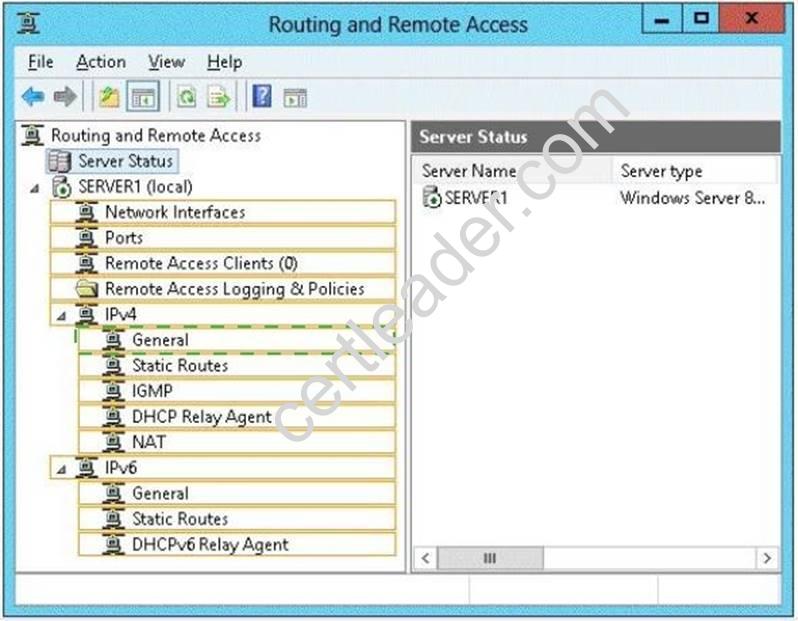
NEW QUESTION 6
Your network contains an Active Directory domain named contoso.com. The domain contains a server named Server1 that runs Windows Server 2012 R2.
You enable and configure Routing and Remote Access (RRAS) on Server1. You create a user account named User1.
You need to ensure that User1 can establish VPN connections to Server1. What should you do?
- A. Modify the members of the Remote Management Users group.
- B. Add a RADIUS client.
- C. Modify the Dial-in setting of User1.
- D. Create a connection request policy.
Answer: C
Explanation: Access permission is also granted or denied based on the dial-in properties of each user account.
http://technet.microsoft.com/en-us/library/cc772123.aspx
NEW QUESTION 7
Your network contains an Active Directory domain named contoso.com. The domain contains more than 100 Group Policy objects (GPOs). Currently, there are no enforced GPOs.
The domain contains a top-level organizational unit (OU) for each department. A group named Group1 contains members from each department.
You have a GPO named GPO1 that is linked to the domain. You need to configure GPO1 to apply settings to Group1 only. What should you use?
- A. Dcgpofix
- B. Get-GPOReport
- C. Gpfixup
- D. Gpresult
- E. Gpedi
- F. msc
- G. Import-GPO
- H. Restore-GPO
- I. Set-GPInheritance
- J. Set-GPLink
- K. Set-GPPermission
- L. Gpupdate
- M. Add-ADGroupMember
Answer: J
Explanation: Set-GPPermission grants a level of permissions to a security principal (user, security group, or computer) for one GPO or all the GPOs in a domain. You use the TargetName and TargetType parameters to specify a user, security group, or computer for which to set the permission level.
-Replace <SwitchParameter>
Specifies that the existing permission level for the group or user is removed before the new permission level is set. If a security principal is already granted a permission level that is higher than the specified permission level and you do not use the Replace parameter, no change is made.
Reference: http: //technet. microsoft. com/en-us/library/ee461038. aspx
NEW QUESTION 8
Your network contains an Active Directory domain named contoso.com. All domain controllers run either Windows Server 2008 or Windows Server 2008 R2.
You deploy a new domain controller named DC1 that runs Windows Server 2012 R2. You log on to DC1 by using an account that is a member of the Domain Admins group. You discover that you cannot create Password Settings objects (PSOs) by using Active
Directory Administrative Center.
You need to ensure that you can create PSOs from Active Directory Administrative Center. What should you do?
- A. Modify the membership of the Group Policy Creator Owners group.
- B. Transfer the PDC emulator operations master role to DC1.
- C. Upgrade all of the domain controllers that run Window Server 2008.
- D. Raise the functional level of the domain.
Answer: D
Explanation: Fine-grained password policies allow you to specify multiple password policies within a single domain so that you can apply different restrictions for password and account lockout policies to different sets of users in a domain. To use a fine-grained password policy, your domain functional level must be at least Windows Server 2008. To enable fine-grained password policies, you first create a Password Settings Object (PSO). You then configure the same settings that you configure for the password and account lockout policies. You can create and apply PSOs in the Windows Server 2012 environment by using the Active Directory Administrative Center (ADAC) or Windows PowerShell.
Step 1: Create a PSO
Applies To: Windows Server 2008, Windows Server 2008 R2
ce:
http: //technet. microsoft. com/en-us//library/cc754461%28v=ws. 10%29. aspx
NEW QUESTION 9
Your network contains an Active Directory domain named contoso.com. The domain contains a server named Server1 that runs Windows Server 2012 R2.
A local account named Admin1 is a member of the Administrators group on Server1.
You need to generate an audit event whenever Admin1 is denied access to a file or folder. What should you run?
- A. auditpol.exe /set /userradmin1 /failure: enable
- B. auditpol.exe /set /user: admin1 /category: "detailed tracking" /failure: enable
- C. auditpol.exe /resourcesacl /set /type: file /user: admin1 /failure
- D. auditpol.exe /resourcesacl /set /type: key /user: admin1 /failure /access: ga
Answer: C
Explanation: http: //technet. microsoft. com/en-us/library/ff625687. aspx
To set a global resource SACL to audit successful and failed attempts by a user to perform generic read and write functions on files or folders:
auditpol /resourceSACL /set /type: File /user: MYDOMAINmyuser /success /failure /access: FRFW
http: //technet.microsoft.com/en-us/library/ff625687%28v=ws.10%29.aspx Syntax
auditpol /resourceSACL
[/set /type: <resource> [/success] [/failure] /user: <user> [/access: <access flags>]] [/remove /type: <resource> /user: <user> [/type: <resource>]]
[/clear [/type: <resource>]]
[/view [/user: <user>] [/type: <resource>]]
References:
http: //technet. microsoft. com/en-us/library/ff625687%28v=ws. 10%29. aspx http: //technet. microsoft. com/en-us/library/ff625687%28v=ws. 10%29. aspx http: //technet. microsoft. com/en-us/library/ff625687. aspx
http: //technet. microsoft. com/en-us/library/ff625687%28v=ws. 10%29. aspx
NEW QUESTION 10
HOTSPOT
Your network contains a RADIUS server named Server1.
You install a new server named Server2 that runs Windows Server 2012 R2 and has Network Policy Server (NPS) installed.
You need to ensure that all accounting requests for Server2 are forwarded to Server1.
On Server2, you configure a Connection Request Policy.
What else should you configure on Server2? To answer, select the appropriate node in the answer area.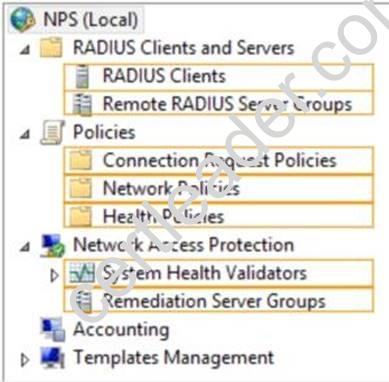
Answer:
Explanation: 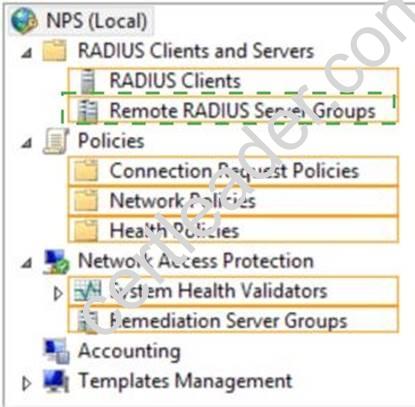
NEW QUESTION 11
Your network contains an Active Directory domain named adatum.com. The domain contains five servers. The servers are configured as shown in the following table.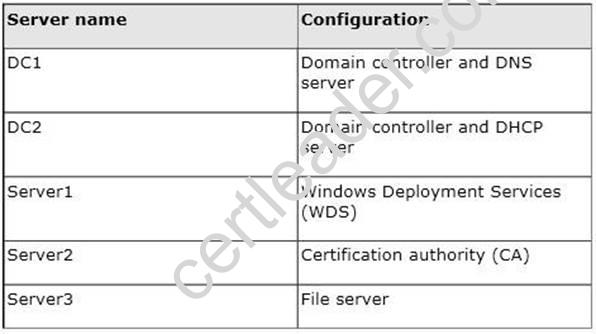
All desktop computers in adatum.com run Windows 8 and are configured to use BitLocker Drive Encryption (BitLocker) on all local disk drives.
You need to deploy the Network Unlock feature. The solution must minimize the number of features and server roles installed on the network.
To which server should you deploy the feature?
- A. Server3
- B. Server1
- C. DC2
- D. Server2
- E. DC1
Answer: B
Explanation: The BitLocker-NetworkUnlock feature must be installed on a Windows Deployment Server (which does not have to be configured--the WDSServer service just needs to be running).
NEW QUESTION 12
Your network contains an Active Directory domain named contoso.com. The domain contains a server named Server1 that runs Windows Server 2012 R2.
Server1 has the following role services installed:
✑ DirectAccess and VPN (RRAS)
✑ Network Policy Server
Remote users have client computers that run either Windows XP, Windows 7, or Windows 8.
You need to ensure that only the client computers that run Windows 7 or Windows 8 can establish VPN connections to Server1.
What should you configure on Server1?
- A. A condition of a Network Policy Server (NPS) network policy
- B. A constraint of a Network Policy Server (NPS) network policy
- C. a condition of a Network Policy Server (NPS) connection request policy
- D. A vendor-specific RADIUS attribute of a Network Policy Server (NPS) connection request policy
Answer: A
Explanation: If you want to configure the Operating System condition, click Operating System, and then click Add. In Operating System Properties, click Add, and then specify the operating system settings that are required to match the policy.
The Operating System condition specifies the operating system (operating system version or service pack number), role (client or server), and architecture (x86, x64, or ia64) required for the computer configuration to match the policy.
NEW QUESTION 13
Your network contains an Active Directory domain named contoso.com. The domain contains a Web server named www.contoso.com. The Web server is available on the Internet.
You implement DirectAccess by using the default configuration.
You need to ensure that users never attempt to connect to www.contoso.com by using DirectAccess. The solution must not prevent the users from using DirectAccess to access other resources in contoso.com.
Which settings should you configure in a Group Policy object (GPO)?
- A. DirectAccess Client Experience Settings
- B. DNS Client
- C. Name Resolution Policy
- D. Network Connections
Answer: C
Explanation: For DirectAccess, the NRPT must be configured with the namespaces of your intranet with a leading dot (for example, internal.contoso.com or . corp.contoso.com). For a DirectAccess client, any name request that matches one of these namespaces will be sent to the specified intranet Domain Name System (DNS) servers.
Include all intranet DNS namespaces that you want DirectAccess client computers to access.
There are no command line methods for configuring NRPT rules. You must use Group Policy settings. To configure the NRPT through Group Policy, use the Group Policy add-in at Computer Configuration PoliciesWindows SettingsName Resolution Policy in the Group Policy object for DirectAccess clients. You can create a new NRPT rule and edit or delete existing rules. For more information, see Configure the NRPT with Group Policy.
NEW QUESTION 14
Your network contains an Active Directory domain named contoso.com. The domain contains a server named Server1 that runs Windows Server 2008 R2.
You plan to test Windows Server 2012 R2 by using native-boot virtual hard disks (VHDs). You attach a new VHD to Server1.
You need to install Windows Server 2012 R2 in the VHD. What should you do?
- A. Run imagex.exe and specify the /append parameter.
- B. Run dism.exe and specify the /apply-image parameter.
- C. Run imagex.exe and specify the /export parameter.
- D. Run dism.exe and specify the /append-image parameter.
Answer: B
Explanation: On the destination computer, you will create a structure for the partitions where you apply your images. The partition structure on the destination computer must match the partition structure of the reference computer. If you apply an image to a volume with an existing Windows installation, files from the previous installation may not be deleted. Format the volume by using a tool such as DiskPart before applying the new image.
NEW QUESTION 15
Your network contains four Network Policy Server (NPS) servers named Server1, Server2, Servers, and Server4.
Server1 is configured as a RADIUS proxy that forwards connection requests to a remote RADIUS server group named Group1.
You need to ensure that Server2 and Server3 receive connection requests. Server4 must only receive connection requests if both Server2 and Server3 are unavailable.
How should you configure Group1?
- A. Change the Weight of Server4 to 10.
- B. Change the Weight of Server2 and Server3 to 10.
- C. Change the Priority of Server2 and Server3 to 10.
- D. Change the Priority of Server4 to 10.
Answer: D
Explanation: During the NPS proxy configuration process, you can create remote RADIUS server groups and then add RADIUS servers to each group. To configure load balancing, you must have
more than one RADIUS server per remote RADIUS server group. While adding group members, or after creating a RADIUS server as a group member, you can access the Add RADIUS server dialog box to configure the following items on the Load Balancing tab:
Priority. Priority specifies the order of importance of the RADIUS server to the NPS proxy server. Priority level must be assigned a value that is an integer, such as 1, 2, or 3. The lower the number, the higher priority the NPS proxy gives to the RADIUS server. For example, if the RADIUS server is assigned the highest priority of 1, the NPS proxy sends connection requests to the RADIUS server first; if servers with priority 1 are not available, NPS then sends connection requests to RADIUS servers with priority 2, and so on. You can assign the same priority to multiple RADIUS servers, and then use the Weight setting to load balance between them.
Weight. NPS uses this Weight setting to determine how many connection requests to send to each group member when the group members have the same priority level. Weight setting must be assigned a value between 1 and 100, and the value represents a percentage of 100 percent. For example, if the remote RADIUS server group contains two members that both have a priority level of 1 and a weight rating of 50, the NPS proxy forwards 50 percent of the connection requests to each RADIUS server.
Advanced settings. These failover settingsprovide a way for NPS to determine whether the remote RADIUS server is unavailable. If NPS determines that a RADIUS server is unavailable, it can start sending connection requests to other group members. With these settings you can configure the number of seconds that the NPS proxy waits for a response from the RADIUS server before it considers the request dropped; the maximum number of dropped requests before the NPS proxy identifies the RADIUS server as unavailable; and the number of seconds that can elapse between requests before the NPS proxy identifies the RADIUS server as unavailable.
The default priority is 1 and can be changed from 1 to 65535. So changing server 2 and 3 to priority 10 is not the way to go.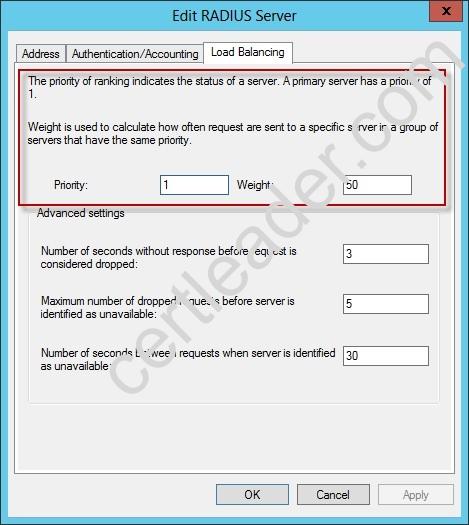
Reference: http: //technet. microsoft. com/en-us/library/dd197433(WS. 10). aspx
NEW QUESTION 16
HOTSPOT
Your network contains one Active Directory domain named contoso.com. The domain contains two domain controllers named DC01 and DC02 that run Windows Server 2012 R2.
On DC02, you open C:WindowsPolicyDefinitions as shown in the DC02 PolicyDefinitions exhibit. (Click the Exhibit button.)
From a client computer, you open the SYSVOL share as shown in the SYSVOL exhibit. (Click the Exhibit button.)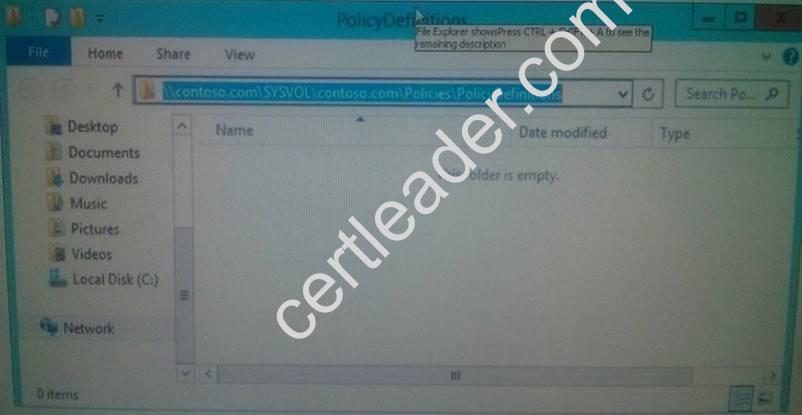
From DC01, you open a Group Policy object (GPO) named GPO1 as shown in the GPO1 exhibit. (Click the Exhibit button.)
For each of the following statements, select Yes if the statement is true. Otherwise, select No.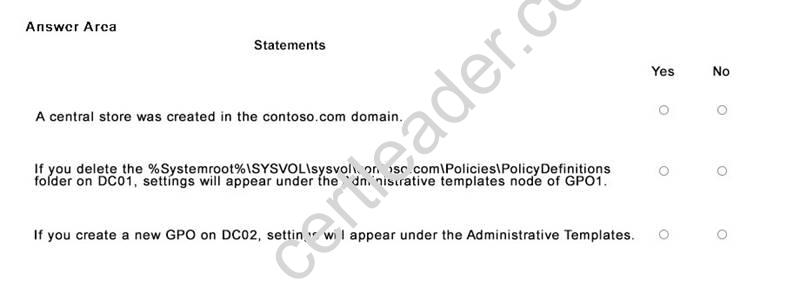
Answer:
Explanation: 
NEW QUESTION 17
HOTSPOT
Your network contains an Active Director domain named contoso.com. The domain contains a file server named Server1. All servers run Windows Server 2012 R2.
You have two user accounts named User1 and User2. User1 and User2 are the members of a group named Group1. User1 has the Department value set to Accounting, user2 has the Department value set to Marketing. Both users have the Employee Type value set to Contract Employee.
You create the auditing entry as shown in the exhibit. (Click the Exhibit button.)
To answer, complete each statement according to the information presented in the exhibit. Each correct selection is worth one point.

Answer:
Explanation: 
NEW QUESTION 18
Your network contains a single Active Directory domain named contoso.com. All domain controllers run Windows Server 2012 R2.
The domain contains 400 desktop computers that run Windows 8 and 10 desktop computers that run Windows XP Service Pack 3 (SP3). All new desktop computers that are added to the domain run Windows 8.
All of the desktop computers are located in an organizational unit (OU) named OU1. You create a Group Policy object (GPO) named GPO1. GPO1 contains startup script
settings. You link GPO1 to OU1.
You need to ensure that GPO1 is applied only to computers that run Windows XP SP3. What should you do?
- A. Create and link a WML filter to GPO1
- B. Run the Set-GPInheritance cmdlet and specify the -target parameter.
- C. Run the Set-GPLink cmdlet and specify the -target parameter.
- D. Modify the Security settings of OU1.
Answer: A
Explanation: WMI Filtering is used to get information of the system and apply the GPO on it with the condition is met.
Security filtering: apply a GPO to a specific group (members of the group)
NEW QUESTION 19
Your network contains an Active Directory domain named contoso.com. All domain controllers run Windows Server 2012 R2.
An organizational unit (OU) named OU1 contains 200 client computers that run Windows 8 Enterprise. A Group Policy object (GPO) named GPO1 is linked to OU1.
You make a change to GPO1.
You need to force all of the computers in OU1 to refresh their Group Policy settings immediately. The solution must minimize administrative effort.
Which tool should you use?
- A. Server Manager
- B. Active Directory Users and Computers
- C. The Gpupdate command
- D. Group Policy Management Console (GPMC)
Answer: D
Explanation: Starting with Windows Server® 2012 and Windows® 8, you can now remotely refresh Group Policy settings for all computers in an OU from one central location through the Group Policy Management Console (GPMC). Or you can use the Invoke-GPUpdatecmdlet to refresh Group Policy for a set of computers, not limited to the OU structure, for example, if the computers are located in the default computers container.


References:
http: //technet. microsoft. com/en-us//library/jj134201. aspx
http: //blogs. technet. com/b/grouppolicy/archive/2012/11/27/group-policy-in-windows- server-2012-using-remote-gpupdate. aspx
NEW QUESTION 20
Your network contains an Active Directory domain named contoso.com.
You create a user account named User1. The properties of User1 are shown in the exhibit. (Click the Exhibit button.)
You plan to use the User1 account as a service account. The service will forward authentication requests to other servers.
You need to ensure that you can view the Delegation tab from the properties of the User1 account.
What should you do first?
- A. Configure the Name Mappings of User1.
- B. Modify the user principal name (UPN) of User1.
- C. Configure a Service Principal Name (SPN) for User1.
- D. Modify the Security settings of User1.
Answer: C
Explanation: If you cannot see the Delegation tab, do one or both of the following:
Register a Service Principal Name (SPN) for the user account with the Setspn utility in the support tools on your CD. Delegation is only intended to be used by service accounts, which should have registered SPNs, as opposed to a regular user account which typically does not have SPNs.
Raise the functional level of your domain to Windows Server 2003. For more information, see Related Topics.
References:
http://blogs.msdn.com/b/mattlind/archive/2010/01/14/delegation-tab-in-aduc-not-available-until-a-spn-is-set. aspx
http: //blogs.msdn.com/b/mattlind/archive/2010/01/14/delegation-tab-in-aduc-not-available-until-a-spn-is-set. aspx
http: //technet. microsoft. com/en-us/library/cc739474(v=ws. 10). aspx
http://blogs.msdn.com/b/mattlind/archive/2010/01/14/delegation-tab-in-aduc-not-available-until-a-spn-is-set. aspx
P.S. Easily pass 70-411 Exam with 294 Q&As 2passeasy Dumps & pdf Version, Welcome to Download the Newest 2passeasy 70-411 Dumps: https://www.2passeasy.com/dumps/70-411/ (294 New Questions)