Microsoft 70-411 Study Guides 2021
Cause all that matters here is passing exam with 70 411 exam dumps pdf. Cause all that you need is a high score of 70 411 dumps. The only one thing you need to do is downloading microsoft 70 411 free now. We will not let you down with our money-back guarantee.
Online 70-411 free questions and answers of New Version:
NEW QUESTION 1
HOTSPOT
Your network contains an Active Directory domain named contoso.com. The domain contains a member server named Server1. Server1 runs Windows Server 2012 R2.
You enable the EventLog-Application event trace session.
You need to set the maximum size of the log file used by the trace session to 10 MB. From which tab should you perform the configuration? To answer, select the appropriate
tab in the answer area.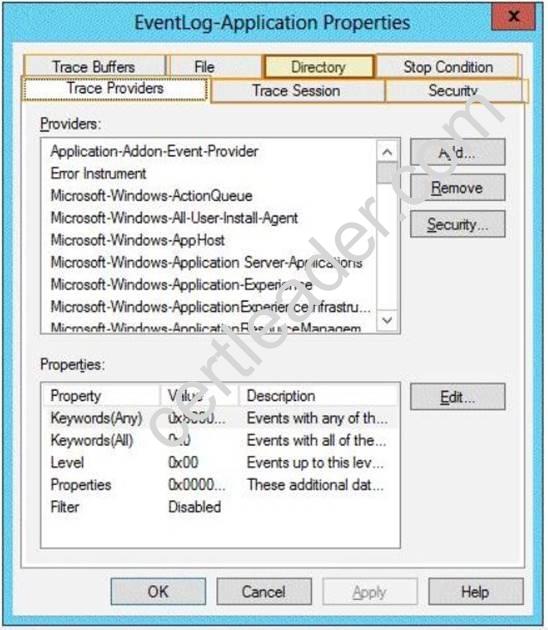
Answer:
Explanation: Note: By default, logging stops only if you set an expiration date as part of the logging schedule. Using the options on the Stop Condition tab, you can configure the log file to stop automatically after a specified period of time, such as seven days, or when the log file is full (if you’ve set a maximum size limit).
NEW QUESTION 2
Your network contains an Active Directory domain named contoso.com. All servers run Windows Server 2012 R2. The functional level of both the domain and the forest is Windows Server 2008 R2.
The domain contains a domain-based Distributed File System (DFS) namespace that is configured as shown in the exhibit. (Click the Exhibit button.)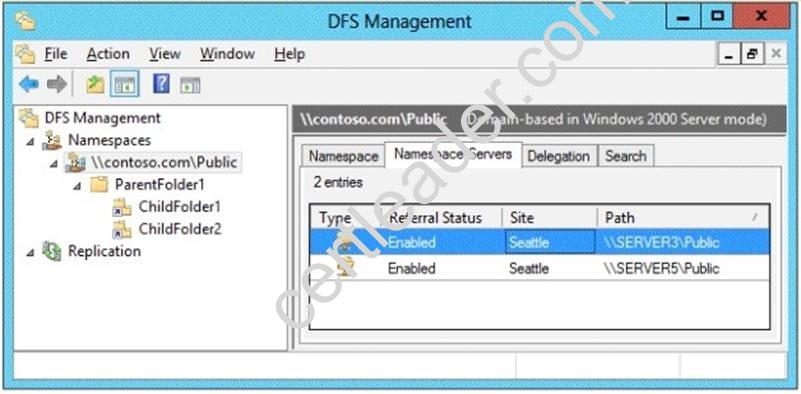
You need to enable access-based enumeration on the DFS namespace. What should you do first?
- A. Raise the domain functional level.
- B. Raise the forest functional level.
- C. Install the File Server Resource Manager role service on Server3 and Server5.
- D. Delete and recreate the namespace.
Answer: D
Explanation: Access-based enumeration is only supported on a Domain-based Namespace in Windows Server 2008 Mode. This type of Namespace requires a minimum Windows Server 2003 forest functional level and a minimum Windows Server 2008 domain functional level.
The exhibit indicates that the current namespace is a Domain-based Namespace in Windows Server 2000 Mode. To migrate a domain-based namespace from Windows 2000 Server mode to Windows Server 2008 mode, you must export the namespace to a file, delete the namespace, recreate it in Windows Server 2008 mode, and then import the namespace settings.
Reference:
http://msdn.microsoft.com/en-us/library/cc770287.aspx http://msdn.microsoft.com/en-us/library/cc753875.aspx
NEW QUESTION 3
Your network contains a single Active Directory domain named contoso.com. The domain contains a member server named Server1 that runs Windows Server 2012 R2.
Server1 has the Windows Server updates Services server role installed and is configured to download updates from the Microsoft Update servers.
You need to ensure that Server1 downloads express installation files from the Microsoft Update servers.
What should you do from the Update Services console?
- A. From the Update Files and Languages options, configure the Update Files settings.
- B. From the Automatic Approvals options, configure the Update Rules settings.
- C. From the Products and Classifications options, configure the Products settings.
- D. From the Products and Classifications options, configure the Classifications settings.
Answer: A
Explanation: To specify whether express installation files are downloaded during synchronization In the left pane of the WSUS Administration console, click Options.
In Update Files and Languages, click the Update Files tab.
If you want to download express installation files, select the Download express installation files check box. If you do not want to download express installation files, clear the check box.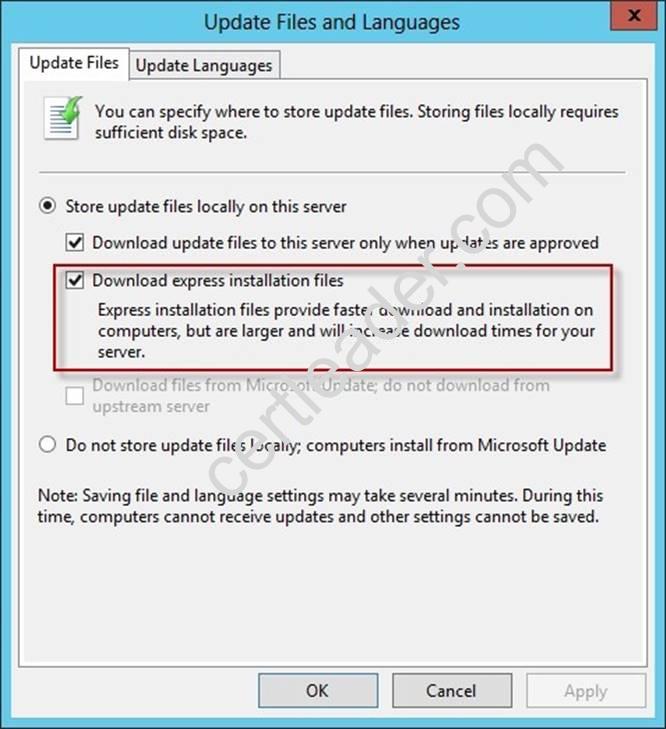
Reference:
http: //technet. microsoft. com/en-us/library/cc708431. aspx
http: //technet. microsoft.com/en-us/library/cc708431. aspx
NEW QUESTION 4
Your network contains an Active Directory domain named contoso.com. The domain contains more than 100 Group Policy objects (GPOs). Currently, there are no enforced GPOs.
A network administrator accidentally deletes the Default Domain Policy GPO. You do not have a backup of any of the GPOs.
You need to recreate the Default Domain Policy GPO. What should you use?
- A. Dcgpofix
- B. Get-GPOReport
- C. Gpfixup
- D. Gpresult
- E. Gpedi
- F. msc
- G. Import-GPO
- H. Restore-GPO
- I. Set-GPInheritance
- J. Set-GPLink
- K. Set-GPPermission
- L. Gpupdate
- M. Add-ADGroupMember
Answer: A
Explanation: Dcgpofix
Restores the default Group Policy objects to their original state (that is, the default state after initial installation).
Reference: http: //technet. microsoft. com/en-us/library/hh875588(v=ws. 10). aspx
NEW QUESTION 5
Your network contains an Active Directory domain named adatum.com.
You need to audit changes to the files in the SYSVOL shares on all of the domain controllers. The solution must minimize the amount of SYSVOL replication traffic caused by the audit.
Which two settings should you configure? (Each correct answer presents part of the solution. Choose two.)
- A. Audit PolicyAudit system events
- B. Advanced Audit Policy ConfigurationDS Access
- C. Advanced Audit Policy ConfigurationGlobal Object Access Auditing
- D. Audit PolicyAudit object access
- E. Audit PolicyAudit directory service access
- F. Advanced Audit Policy ConfigurationObject Access
Answer: DF
NEW QUESTION 6
Your network contains two servers named Server1 and Server2. Both servers run Windows Server 2012 R2.
On Server1, you create a Data Collector Set (DCS) named Data1. You need to export Data1 to Server2.
What should you do first?
- A. Right-click Data1 and click Data Manager.
- B. Right-click Data1 and click Export list.
- C. Right-click Data1 and click Properties.
- D. Right-click Data1 and click Save template.
Answer: D
NEW QUESTION 7
HOTSPOT
You have a server named Server4 that runs Windows Server 2012 R2. Server4 has the Windows Deployment Services server role installed.
Server4 is configured as shown in the exhibit. (Click the Exhibit button.)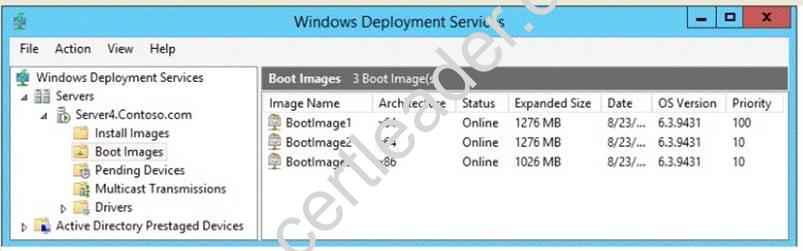
To answer, complete each statement according to the information presented in the exhibit. Each correct selection is worth one point.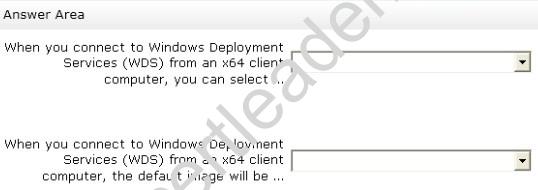
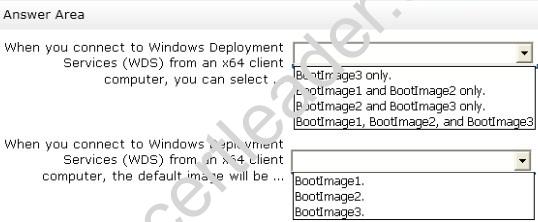
Answer:
Explanation: 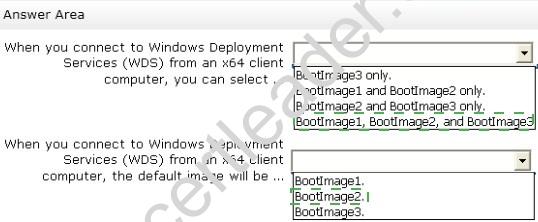
NEW QUESTION 8
Your network contains an Active Directory domain named contoso.com. The domain contains a read-only domain controller (RODC) named RODC1.
You create a global group named RODC_Admins.
You need to provide the members of RODC_Admins with the ability to manage the hardware and the software on R0DC1. The solution must not provide RODC_Admins with the ability to manage Active Directory objects.
What should you do?
- A. From Active Directory Site and Services, configure the Security settings of the RODC1 server object.
- B. From Windows PowerShell, run the Set-ADAccountControlcmdlet.
- C. From a command prompt, run the dsmgmt local roles command.
- D. From Active Directory Users and Computers, configure the Member Of settings of the RODC1 account.
Answer: C
Explanation: RODC: using the dsmgmt.exe utility to manage local administrators
One of the benefits of RODC is that you can add local administrators who do not have full access to the domain administration. This gives them the ability to manage the server but not add or change active directory objects unless those roles are delegated. Adding this type of user is done using the dsmdmt.exe utility at the command prompt.
NEW QUESTION 9
HOTSPOT
You have a server named LON-SVR1 that runs Windows Server 2012 R2. LON-SVR1 has the Remote Access server role installed. LON-SVRl is located in the perimeter network.
The IPv4 routing table on LON-SVR1 is configured as shown in the following exhibit. (Click the Exhibit button.)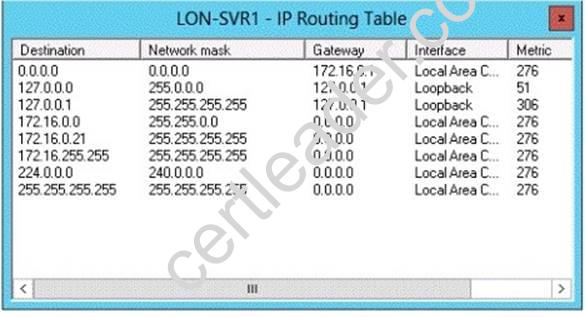
Your company purchases an additional router named Router1. Router1 has an interface that connects to the perimeter network and an interface that connects to the Internet. The IP address of the interface that connects to the perimeter network is 172.16.0.2.
You need to ensure that LON-SVR1 will route traffic to the Internet by using Router1 if the current default gateway is unavailable.
How should you configure the static route on LON-SVR1? To answer, select the appropriate static route in the answer area.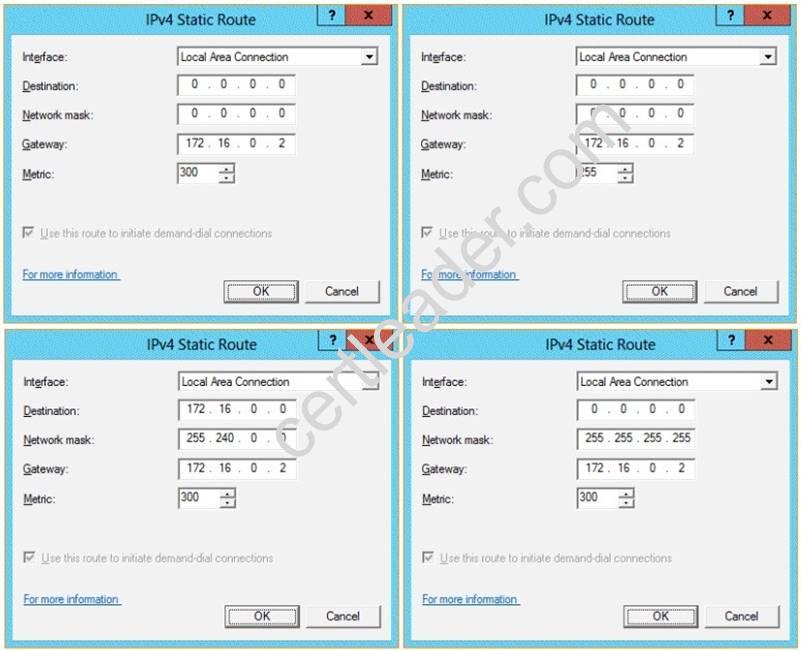
Answer:
Explanation: Metric: Specifies an integer cost metric (ranging from 1 to 9999) for the route, which is used when choosing among multiple routes in the routing table that most closely match the destination address of a packet being forwarded. The route with the lowest metric is chosen. The metric can reflect the number of hops, the speed of the path, path reliability, path throughput, or administrative properties.
A metric is a value that is assigned to an IP route for a particular network interface that identifies the cost that is associated with using that route.
The metric that is assigned to specific default gateways can be configured independently for each gateway. This setup enables a further level of control over the metric that is used for the local routes.
NEW QUESTION 10
Your network contains an Active Directory domain named contoso.com. The domain contains five servers. The servers are configured as shown in the following table.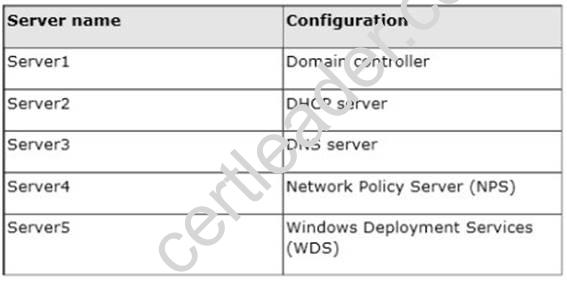
All desktop computers in contoso.com run Windows 8 and are configured to use BitLocker Drive Encryption (BitLocker) on all local disk drives.
You need to deploy the Network Unlock feature. The solution must minimize the number of features and server roles installed on the network.
To which server should you deploy the feature?
- A. Server1
- B. Server2
- C. Server3
- D. Server4
- E. Server5
Answer: E
Explanation: The BitLocker Network Unlock feature will install the WDS role if it is not already installed. If you want to install it separately before you install BitLocker Network Unlock you can use Server Manager or Windows PowerShell. To install the role using Server Manager, select the Windows Deployment Services role in Server Manager.
NEW QUESTION 11
Your network contains an Active Directory domain named contoso.com. The domain contains a file server named Server1 that runs Windows Server 2012 R2. Server1 has a share named Share1.
When users without permission to Share1 attempt to access the share, they receive the Access Denied message as shown in the exhibit. (Click the Exhibit button.)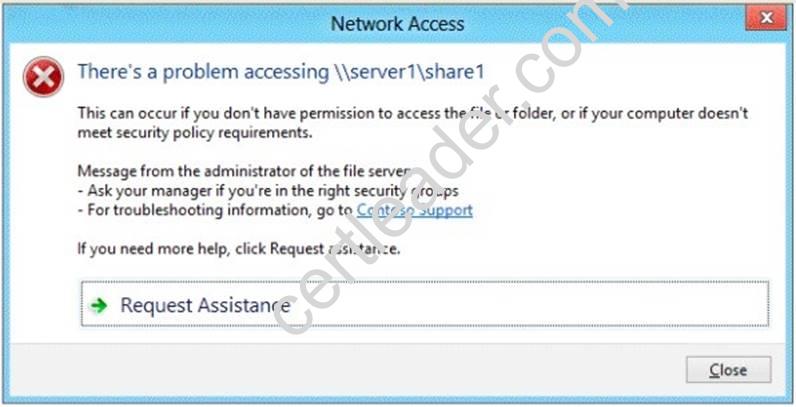
You deploy a new file server named Server2 that runs Windows Server 2012 R2.
You need to configure Server2 to display the same custom Access Denied message as Server1.
What should you install on Server2?
- A. The Remote Assistance feature
- B. The Storage Services server role
- C. The File Server Resource Manager role service
- D. The Enhanced Storage feature
Answer: C
Explanation: Access-Denied Assistance is a new role service of the File Server role in Windows Server 2012.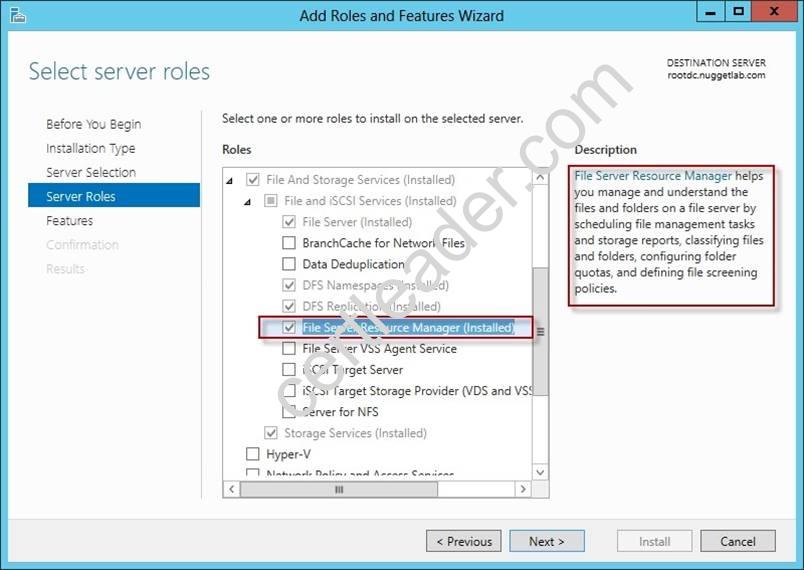
We need to install the prerequisites for Access-Denied Assistance.
Because Access-Denied Assistance relies up on e-mail notifications, we also need to configure each relevant file server with a Simple Mail Transfer Protocol (SMTP) server address. Let’s do that quickly with Windows PowerShell:
Set-FSRMSetting -SMTPServer mailserver. nuggetlab.com -AdminEmailAddress admingroup@nuggetlab.com -FromEmailAddress admingroup@nuggetlab.com
You can enable Access-Denied Assistance either on a per-server basis or centrally via Group Policy. To my mind, the latter approach is infinitely preferable from an administration standpoint.
Create a new GPO and make sure to target the GPO at your file servers’ Active Directory computer accounts as well as those of your AD client computers. In the Group Policy Object Editor, we are looking for the following path to configure Access-Denied Assistance:
Computer ConfigurationPoliciesAdministrative TemplatesSystemAccess-Denied Assistance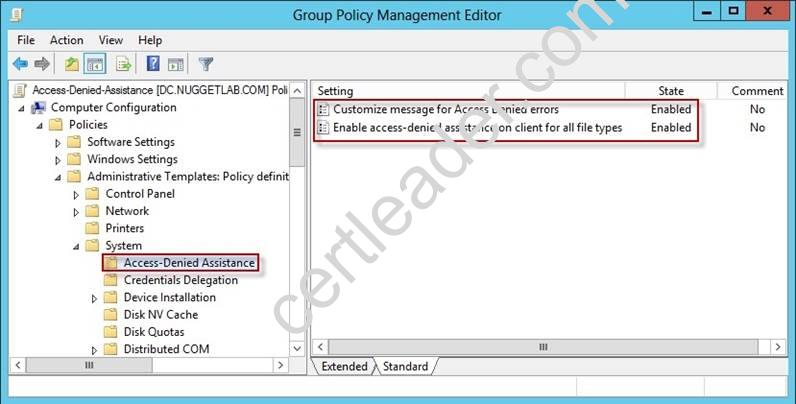
The Customize message for Access Denied errors policy, shown in the screenshot below, enables us to create the actual message box shown to users when they access a shared file to which their user account has no access.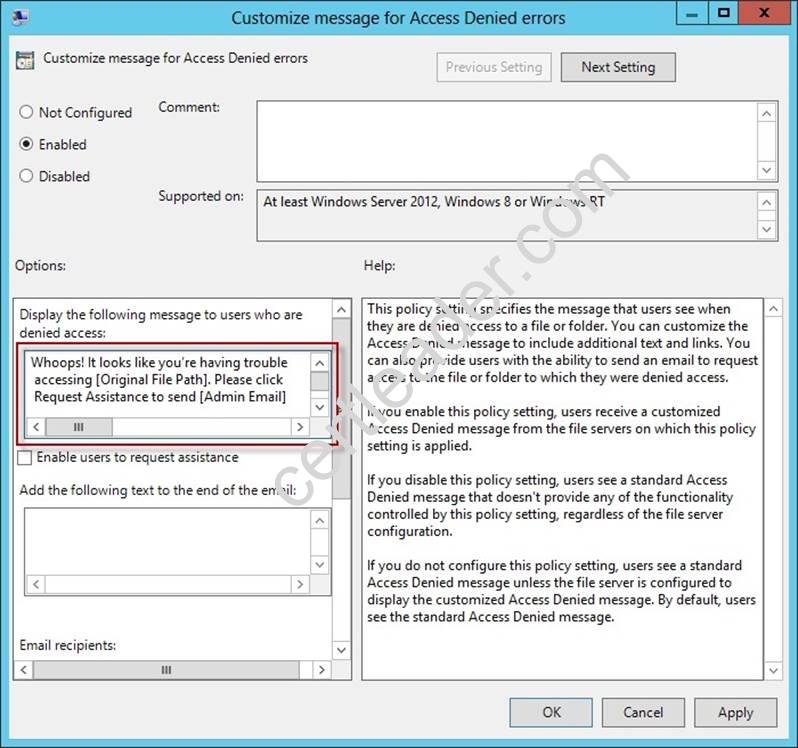
What’s cool about this policy is that we can “personalize” the e-mail notifications to give us administrators (and, optionally, file owners) the details they need to resolve the permissions issue quickly and easily.
For instance, we can insert pre-defined macros to swap in the full path to the target file, the administrator e-mail address, and so forth. See this example:
Whoops! It looks like you’re having trouble accessing [Original File Path]. Please click Request Assistance to send [Admin Email] a help request e-mail message. Thanks!
You should find that your users prefer these human-readable, informative error messages to the cryptic, non-descript error dialogs they are accustomed to dealing with.
The Enable access-denied assistance on client for all file types policy should be enabled to force client computers to participate in Access-Denied Assistance. Again, you must make sure to target your GPO scope accordingly to “hit” your domain workstations as well as your Windows Server 2012 file servers.
Testing the configuration
This should come as no surprise to you, but Access-Denied Assistance works only with Windows Server 2012 and Windows 8 computers. More specifically, you must enable the Desktop Experience feature on your servers to see Access-Denied Assistance messages on server computers.
When a Windows 8 client computer attempts to open a file to which the user has no access, the custom Access-Denied Assistance message should appear: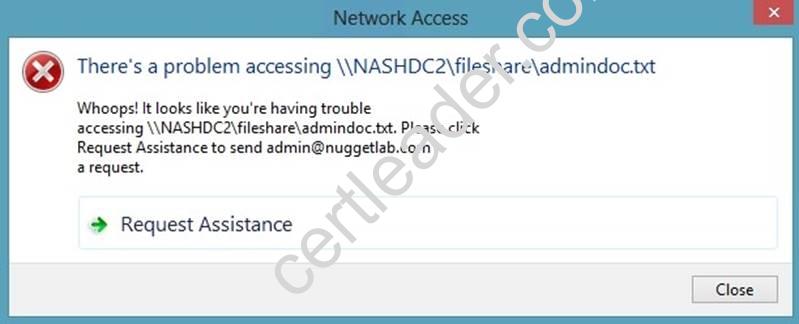
If the user clicks Request Assistance in the Network Access dialog box, they see a secondary message: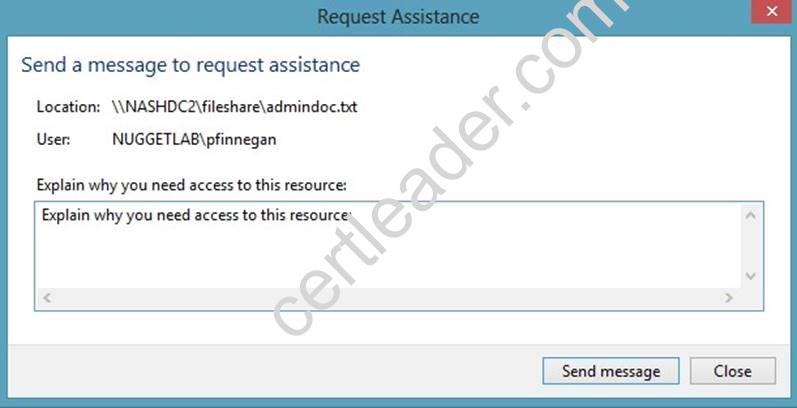
At the end of this process, the administrator(s) will receive an e-mail message that contains the key information they need in order to resolve the access problem:
The user’s Active Directory identity The full path to the problematic file
A user-generated explanation of the problem
So that’s it, friends! Access-Denied Assistance presents Windows systems administrators with an easy-to-manage method for more efficiently resolving user access problems on shared file system resources. Of course, the key caveat is that your file servers must run Windows Server 2012 and your client devices must run Windows 8, but other than that, this is a great technology that should save admins extra work and end-users extra headaches.
Reference: http: //4sysops. com/archives/access-denied-assistance-in-windows-server- 2012/
NEW QUESTION 12
You have a server named Server1 that runs Windows Server 2012 R2. Server1 has the File Server Resource Manager role service installed.
Each time a user receives an access-denied message after attempting to access a folder on Server1, an email notification is sent to a distribution list named DL1.
You create a folder named Folder1 on Server1, and then you configure custom NTFS permissions for Folder1.
You need to ensure that when a user receives an access-denied message while attempting to access Folder1, an email notification is sent to a distribution list named DL2. The solution must not prevent DL1 from receiving notifications about other access-denied messages.
What should you do?
- A. From Server Manager, run the New Share Wizard to create a share for Folder1 by selecting the SMB Share - Advanced option.
- B. From the File Server Resource Manager console, modify the Access-Denied Assistance settings.
- C. From the File Server Resource Manager console, modify the Email Notifications settings.
- D. From Server Manager, run the New Share Wizard to create a share for Folder1 by selecting the SMB Share -Applications option.
Answer: A
Explanation: When using the email model each of the file shares, you can determine whether access requests to each file share will be received by the administrator, a distribution list that represents the file share owners, or both.
The owner distribution list is configured by using the SMB Share – Advanced file share profile in the New Share Wizard in Server Manager.
NEW QUESTION 13
HOTSPOT
Your network contains an Active Directory domain named contoso.com. The domain contains a server named Server1 that has the Network Policy Server server role installed. The domain contains a server named Server2 that is configured for RADIUS accounting.
Server1 is configured as a VPN server and is configured to forward authentication requests
to Server2.
You need to ensure that only Server2 contains event information about authentication requests from connections to Server1.
Which two nodes should you configure from the Network Policy Server console? To answer, select the appropriate two nodes in the answer area.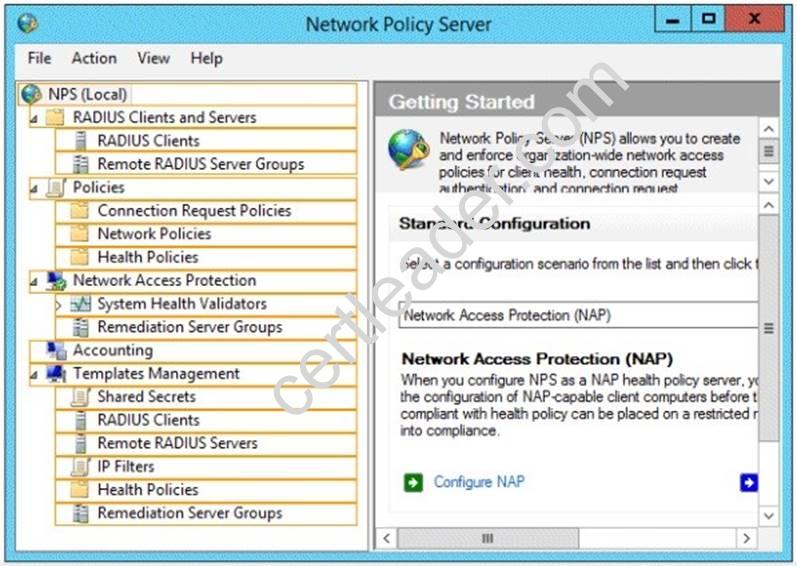
Answer:
Explanation: 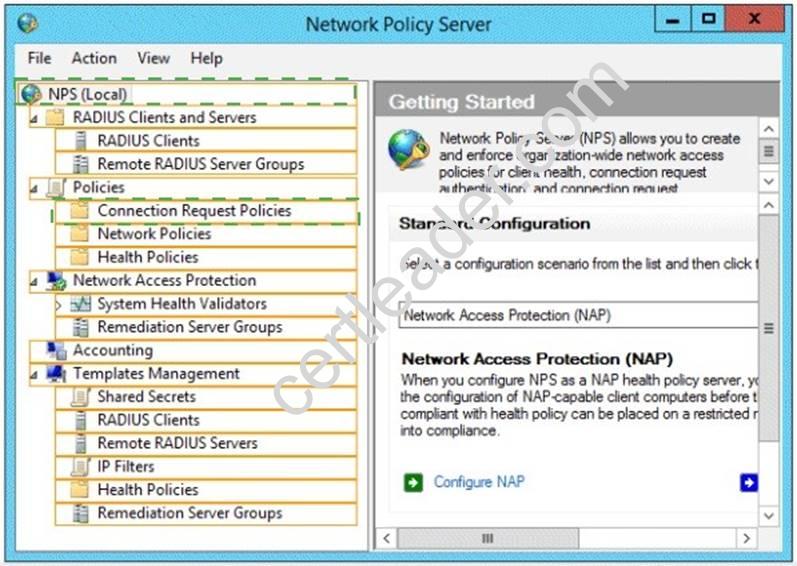
NEW QUESTION 14
Your network contains an Active Directory domain named contoso.com. The domain contains domain controllers that run Windows Server 2008, Windows Server 2008 R2 Windows Server 2012, and Windows Server 2012 R2.
A domain controller named DC1 runs Windows Server 2012 R2. DC1 is backed up daily. During routine maintenance, you delete a group named Group1.
You need to recover Group1 and identify the names of the users who were members of Group1 prior to its deletion. You want to achieve this goal by using the minimum amount of administrative effort.
What should you do first?
- A. Perform an authoritative restore of Group1.
- B. Mount the most recent Active Directory backup.
- C. Use the Recycle Bin to restore Group1.
- D. Reactivate the tombstone of Group1.
Answer: A
Explanation: The Active Directory Recycle Bin does not have the ability to track simple changes to objects. If the object itself is not deleted, no element is moved to the Recycle Bin for possible recovery in the future. In other words, there is no rollback capacity for changes to object properties, or, in other words, to the values of these properties.
There is another approach you should be aware of. Tombstone reanimation (which has nothing to do with zombies) provides the only way to recover deleted objects without taking a DC offline, and it's the only way to recover a deleted object's identity information, such as its objectGUID and objectSid attributes. It neatly solves the problem of recreating a deleted user or group and having to fix up all the old access control list (ACL) references, which contain the objectSid of the deleted object.
Restores domain controllers to a specific point in time, and marks objects in Active Directory as being authoritative with respect to their replication partners.
NEW QUESTION 15
Your network contains a server named Server1 that has the Network Policy and Access Services server role installed.
All of the network access servers forward connection requests to Server1.
You create a new network policy on Server1.
You need to ensure that the new policy applies only to connection requests from the 192.168.0.0/24 subnet.
What should you do?
- A. Set the Client IP4 Address condition to 192.168.0.0/24.
- B. Set the Client IP4 Address condition to 192.168.0.
- C. Set the Called Station ID constraint to 192.168.0.0/24.
- D. Set the Called Station ID constraint to 192.168.0.
Answer: B
Explanation: RADIUS client properties
Following are the RADIUS client conditions that you can configure in network policy.
✑ Calling Station ID: Specifies the network access server telephone number that was dialed by the dial-up access client.
✑ Client Friendly Name: Specifies the name of the RADIUS client that forwarded the connection request to the NPS server.
✑ Client IPv4 Address: Specifies the Internet Protocol (IP) version 4 address of the RADIUS client that forwarded the connection request to the NPS server.
✑ Client IPv6 Address: Specifies the Internet Protocol (IP) version 6 address of the RADIUS client that forwarded the connection request to the NPS server.
✑ Client Vendor: Specifies the name of the vendor or manufacturer of the RADIUS client that sends connection requests to the NPS server.
✑ MS RAS Vendor: Specifies the vendor identification number of the network access server that is requesting authentication.
NEW QUESTION 16
HOTSPOT
Your network contains a RADIUS server named Admin1.
You install a new server named Server2 that runs Windows Server 2012 R2 and has Network Policy Server (NPS) installed.
You need to ensure that all accounting requests for Server2 are forwarded to Admin1. On Server2, you create a new remote RADIUS server group named Group1 that contains
Admin1.
What should you configure next on Server2?
To answer, select the appropriate node in the answer area.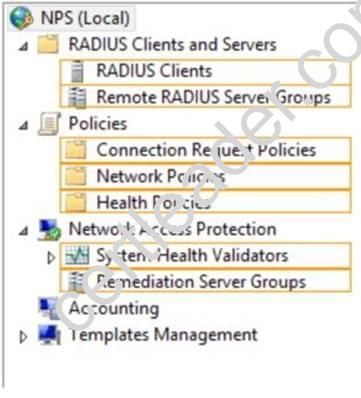
Answer:
Explanation: Connection request policies are sets of conditions and settings that allow network administrators to designate which Remote Authentication Dial-In User Service (RADIUS) servers perform the authentication and authorization of connection requests that the server running Network Policy Server (NPS) receives from RADIUS clients. Connection request policies can be configured to designate which RADIUS servers are used for RADIUS accounting.
NEW QUESTION 17
Your network contains 25 Web servers that run Windows Server 2012 R2.
You need to configure auditing policies that meet the following requirements:
✑ Generate an event each time a new process is created.
✑ Generate an event each time a user attempts to access a file share.
Which two auditing policies should you configure? To answer, select the appropriate two auditing policies in the answer area.
- A. Audit access management (Not Defined)
- B. Audit directory service access (Not Defined)
- C. Audit logon events (Not Defined)
- D. Audit Object (Not Defined)
- E. Audit policy change(Not Defined)
- F. Audit privilege use (Not Defined)
- G. Audit process tracking (Not Defined)
- H. Audit system events(Not Defined)
Answer: DG
Explanation: * Audit Object Access
Determines whether to audit the event of a user accessing an object (for example, file, folder, registry key, printer, and so forth) which has its own system access control list (SACL) specified.
* Audit Process Tracking
Determines whether to audit detailed tracking information for events such as program activation, process exit, handle duplication, and indirect object access.
Reference: Audit object access
https://technet.microsoft.com/en-us/library/cc976403.aspx
Reference: Audit Process Tracking
https://technet.microsoft.com/en-us/library/cc976411.aspx
NEW QUESTION 18
Your network contains multiple Active Directory sites.
You have a Distributed File System (DFS) namespace that has a folder target in each site.
You discover that some client computers connect to DFS targets in other sites.
You need to ensure that the client computers only connect to a DFS target in their respective site.
What should you modify?
- A. The properties of the Active Directory sites
- B. The properties of the Active Directory site links
- C. The delegation settings of the namespace
- D. The referral settings of the namespace
Answer: D
Explanation: http://www.windowsnetworking.com/articles_tutorials/Configuring-DFS-Namespaces.html
NEW QUESTION 19
Your network contains an Active Directory domain named contoso.com. The domain contains a domain controller named DC1. DC1 is a DNS server for contoso.com. The properties of the contoso.com zone are configured as shown in the exhibit. (Click the Exhibit button.)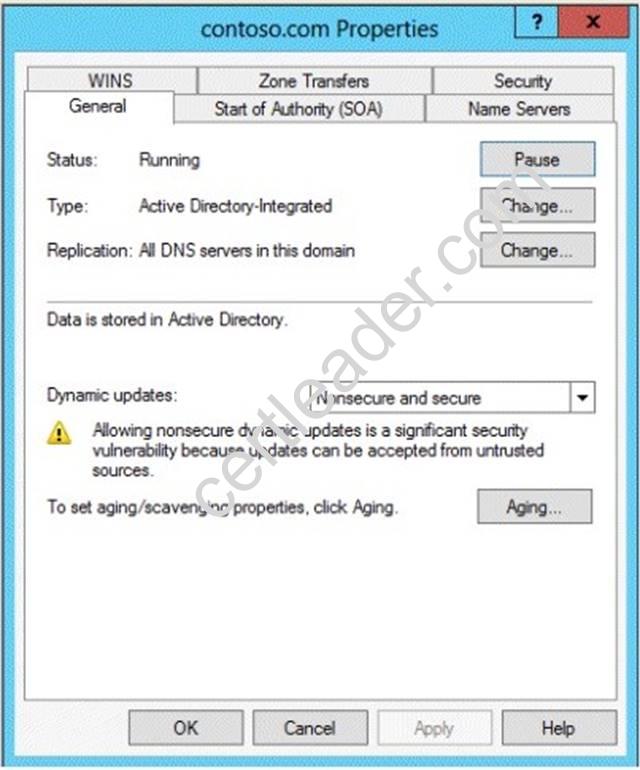
The domain contains a server named Server1 that is part of a workgroup named Workgroup. Server1 is configured to use DC1 as a DNS server.
You need to ensure that Server1 dynamically registers a host (A) record in the contoso.com zone.
What should you configure?
- A. The workgroup name of Server1
- B. The Security settings of the contoso.com zone
- C. The Dynamic updates setting of the contoso.com zone
- D. The primary DNS suffix of Server1
Answer: D
Explanation: When any computer or a standalone server is added to a domain as a member, the network identifies that computer with its Fully Qualified Domain Name or FQDN. A Fully Qualified Domain Name consist of a hostname and the DNs suffix separated by a “. ” called period. An example for this can be server01. msftdomain.com where “server01 is the hostname of the computer and “msftdomain.com” is the DNS suffix which follows the hostname. A complete FQDN of a client computer or a member server uniquely identifies that computer in the entire domain.
Primary DNS suffix must manually be added in Windows 8 computer to change its hostname to Fully Qualified Domain Name so that it becomes eligible to send queries and receive responses from the DNS server. Following are the steps which can be implemented to add primary DNS suffix to a Windows 8 computer hostname:
✑ Log on to Windows 8 computer with administrator account.
✑ From the options available on the screen click Control Panel.
✑ On the opened window click More Settings from the left pane.
✑ On the next window click System and Security category and on the appeared window click System.
✑ On View basic information about your computer window click Change settings under Computer name, domain, and workgroup settings section.
✑ On System Properties box make sure that Computer Name tab is selected and click Change button.
✑ On Computer Name/Domain Changes box click More button.
✑ On DNS Suffix and NetBIOS Computer Name box type in the DNS domain name as the DNS suffix to the Windows 8 computer under Primary DNS suffix of this computer field.
✑ Click Ok button on all the boxes and restart the computer to allow changes to take effect.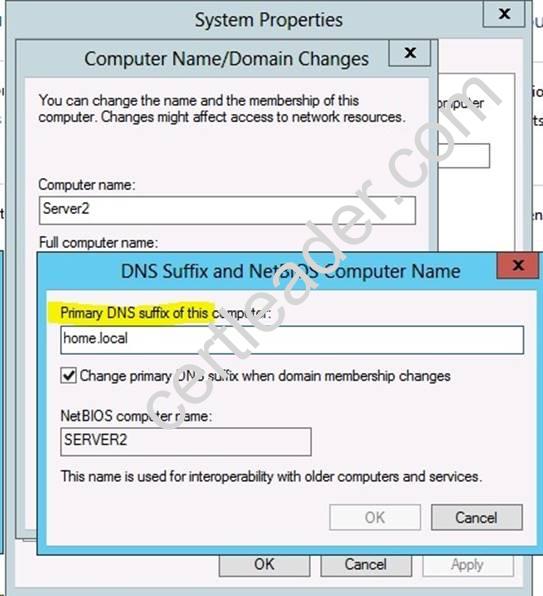
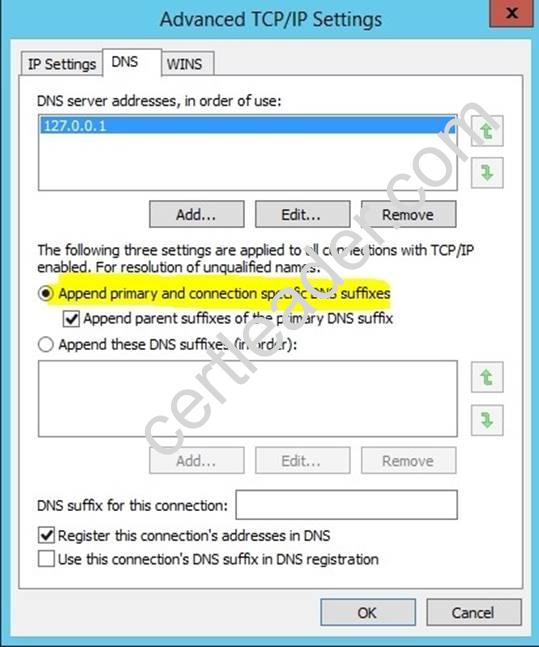
For years, Windows DNS has supported dynamic updates, whereas a DNS client host registers and dynamically updates the resource records with a DNS server. If a host’s IP address changes, the resource record (particularly the A record) for the host is automatically updated, while the host utilizes the DHCP server to dynamically update its Pointer (PTR) resource record. Therefore, when a user or service needs to contact a client PC, it can look up the IP address of the host. With larger organizations, this becomes an essential feature, especially for clients that frequently move or change locations and use DHCP to automatically obtain an IP address. For dynamic DNS updates to succeed, the zone must be configured to accept dynamic updates: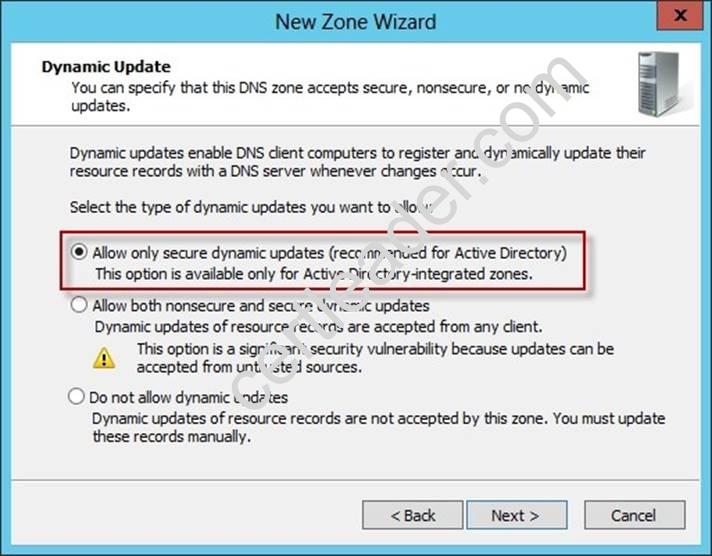
References:
http: //technet. microsoft. com/en-us/library/cc778792%28v=ws. 10%29. aspx
http: //technet. microsoft. com/en-us/library/cc778792%28v=ws. 10%29. aspx
http: //www. advicehow. com/adding-primary-dns-suffix-in-microsoft-windows-8/
http: //technet. microsoft. com/en-us/library/cc959611. aspx
NEW QUESTION 20
Your network contains an Active Directory domain named contoso.com. All domain controllers run Windows Server 2012 R2. The domain contains 500 client computers that run Windows 8.1 Enterprise and Microsoft Office 2013.
You implement a Group Policy central store.
You need to modify the default Microsoft Office 2013 Save As location for all client computers. The solution must minimize administrative effort.
What should you configure in a Group Policy object (GPO)?
- A. The Group Policy preferences
- B. An application control policy
- C. The Administrative Templates
- D. The Software Installation settings
Answer: A
Explanation: Group Policy preferences provide the means to simplify deployment and standardize configurations. They add to Group Policy a centralized system for deploying preferences (that is, settings that users can change later). You can also use Group Policy preferences to configure applications that are not Group Policy-aware. By using Group Policy preferences, you can change or delete almost any registry setting, file or folder, shortcut, and more. You are not limited by the contents of Administrative Template files.
Reference: http://technet.microsoft.com/en-us/library/dn581922.aspx
100% Valid and Newest Version 70-411 Questions & Answers shared by 2passeasy, Get Full Dumps HERE: https://www.2passeasy.com/dumps/70-411/ (New 294 Q&As)