Microsoft AZ-102 Exam Questions 2021
Cause all that matters here is passing exam with AZ-102 Exam Dumps. Cause all that you need is a high score of AZ-102 Dumps Questions. The only one thing you need to do is downloading AZ-102 Study Guides free now. We will not let you down with our money-back guarantee.
Microsoft AZ-102 Free Dumps Questions Online, Read and Test Now.
NEW QUESTION 1
You need to recommend a solution to automate the configuration for the finance department users. The solution must meet the technical requirements.
What should you include in the recommended?
- A. Azure AP B2C
- B. Azure AD Identity Protection
- C. an Azure logic app and the Microsoft Identity Management (MIM) client
- D. dynamic groups and conditional access policies
Answer: D
Explanation: Scenario: Ensure Azure Multi-Factor Authentication (MFA) for the users in the finance department only.
The recommendation is to use conditional access policies that can then be targeted to groups of users, specific applications, or other conditions.
References:
https://docs.microsoft.com/en-us/azure/active-directory/authentication/howto-mfa-userstates
NEW QUESTION 2
Note: This question is part of a series of questions that present the same scenario. Each question in the series contains a unique solution that might meet the stated goals. Some question sets might have more than one correct solution, while others might not have a correct solution.
After you answer a question in this section, you will NOT be able to return to it. As a result, these questions will not appear in the review screen.
You have an Azure Active Directory (Azure AD) tenant named Adatum and an Azure Subscription named Subscription1. Adatum contains a group named Developers. Subscription1 contains a resource group named Dev.
You need to provide the Developers group with the ability to create Azure logic apps in the Dev resource group.
Solution: On Subscription1, you assign the DevTest Labs User role to the Developers group. Does this meet the goal?
- A. Yes
- B. No
Answer: B
Explanation: DevTest Labs User role only lets you connect, start, restart, and shutdown virtual machines in your Azure DevTest Labs.
You would need the Logic App Contributor role. References:
https://docs.microsoft.com/en-us/azure/role-based-access-control/built-in-roles https://docs.microsoft.com/en-us/azure/logic-apps/logic-apps-securing-a-logic-app
NEW QUESTION 3
HOT SPOT
You have an Azure subscription named Subscription1.
You plan to deploy an Ubuntu Server virtual machine named VM1 to Subscription1.
You need to perform a custom deployment of the virtual machine. A specific trusted root certification authority (CA) must be added during the deployment.
What should you do? To answer, select the appropriate options in the answer area. NOTE: Each correct selection is worth one point.
Answer:
Explanation: Box 1: Unattend.xml
In preparation to deploy shielded VMs, you may need to create an operating system specialization answer file. On Windows, this is commonly known as the "unattend.xml" file. The New-
ShieldingDataAnswerFile Windows PowerShell function helps you do this. Starting with Windows Server version 1709, you can run certain Linux guest OSes in shielded VMs. If you are using the System Center Virtual Machine Manager Linux agent to specialize those VMs, the New- ShieldingDataAnswerFile cmdlet can create compatible answer files for it.
Box 2: The Azure Portal
You can use the Azure portal to deploy a Linux virtual machine (VM) in Azure that runs Ubuntu. References: https://docs.microsoft.com/en-us/azure/virtual-machines/linux/quick-create-portal
NEW QUESTION 4
You have an Azure Active Directory (Azure AD) domain that contains 5,000 user accounts. You create a new user account named AdminUser1.
You need to assign the User administrator administrative role to AdminUser1. What should you do from the user account properties?
- A. From the Directory role blade, modify the directory role.
- B. From the Groups blade, invite the user account to a new group.
- C. From the Licenses blade, assign a new licens
Answer: A
Explanation: Assign a role to a user
Sign in to the Azure portal with an account that's a global admin or privileged role admin for the directory.
Select Azure Active Directory, select Users, and then select a specific user from the list.
For the selected user, select Directory role, select Add role, and then pick the appropriate admin roles from the Directory roles list, such as Conditional access administrator.
Press Select to save.
References: https://docs.microsoft.com/en-us/azure/active-directory/fundamentals/activedirectory-users-assign-role-azure-portal
NEW QUESTION 5
You have an Azure subscription named Subscription1. Subscription1 contains a virtual machine named VM1.
You have a computer named Computer1 that runs Windows 10. Computer1 is connected to the Internet.
You add a network interface named Interface1 to VM1 as shown in the exhibit (Click the Exhibit button.)
From Computer1, you attempt to connect to VM1 by using Remote Desktop, but the connection fails. You need to establish a Remote Desktop connection to VM1.
What should you do first?
- A. Start VM1.
- B. Attach a network interface.
- C. Delete the DenyAllOutBound outbound port rule.
- D. Delete the DenyAllInBound inbound port rul
Answer: A
Explanation: Incorrect Answers:
B: The network interface has already been added to VM. C: The Outbound rules are fine.
D: The inbound rules are fine. Port 3389 is used for Remote Desktop.
Note: Rules are processed in priority order, with lower numbers processed before higher numbers, because lower numbers have higher priority. Once traffic matches a rule, processing stops. As a result, any rules that exist with lower priorities (higher numbers) that have the same attributes as rules with higher priorities are not processed.
References: https://docs.microsoft.com/en-us/azure/virtual-network/security-overview
NEW QUESTION 6
SIMULATION
Click to expand each objective. To connect to the Azure portal, type https://portal.azure.com in the browser address bar.


When you are finished performing all the tasks, click the ‘Next’ button.
Note that you cannot return to the lab once you click the ‘Next’ button. Scoring occur in the background while you complete the rest of the exam.
Overview
The following section of the exam is a lab. In this section, you will perform a set of tasks in a live environment. While most functionality will be available to you as it would be in a live environment, some functionality (e.g., copy and paste, ability to navigate to external websites) will not be possible by design. Scoring is based on the outcome of performing the tasks stated in the lab. In other words, it doesn’t matter how you accomplish the task, if you successfully perform it, you will earn credit for that task.
Labs are not timed separately, and this exam may have more than one lab that you must complete. You can use as much time as you would like to complete each lab. But, you should manage your time appropriately to ensure that you are able to complete the lab(s) and all other sections of the exam in the time provided.
Please note that once you submit your work by clicking the Next button within a lab, you will NOT be able to return to the lab.
To start the lab
You may start the lab by clicking the Next button.
You need to allow RDP connections over TCP port 3389 to VM1 from the internet. The solution must prevent connections from the Internet over all other TCP ports.
What should you do from the Azure portal?
Answer:
Explanation: Step 1: Create a new network security group Step 2: Select your new network security group.
Step 3: Select Inbound security rules, . Under Add inbound security rule, enter the following Destination: Select Network security group, and then select the security group you created previously.
Destination port ranges: 3389 Protocol: Select TCP
References: https://docs.microsoft.com/en-us/azure/virtual-network/tutorial-filter-network-traffic
NEW QUESTION 7
HOT SPOT
You plan to create a new Azure Active Directory (Azure AD) role.
You need to ensure that the new role can view all the resources in the Azure subscription and issue support requests to Microsoft. The solution must use the principle of least privilege.
How should you complete the JSON definition? To answer, select the appropriate options in the answer area.
NOTE: Each correct selection is worth one point.
Answer:
Explanation: Box 1: "*/read",
*/read lets you view everything, but not make any changes. Box 2: " Microsoft.Support/*"
The action Microsoft.Support/* enables creating and management of support tickets. References:
https://docs.microsoft.com/en-us/azure/role-based-access-control/tutorial-custom-role-powershell https://docs.microsoft.com/en-us/azure/role-based-access-control/built-in-roles
NEW QUESTION 8
You have a resource group named RG1. RG1 contains an Azure Storage account named storageaccount1 and a virtual machine named VM1 that runs Windows Server 2021. Storageaccount1 contains the disk files for VM1. You apply a ReadOnly lock to RG1. What can you do from the Azure portal?
- A. Generate an automation script for RG1.
- B. View the keys of storageaccount1.
- C. Upload a blob to storageaccount1.
- D. Start VM1.
Answer: B
Explanation: ReadOnly means authorized users can read a resource, but they can't delete or update the resource. Applying this lock is similar to restricting all authorized users to the permissions granted by the Reader role.
References: https://docs.microsoft.com/en-us/azure/azure-resource-manager/resource-group-lockresources
NEW QUESTION 9
You have an Azure subscription.
You plan to use Azure Resource Manager templates to deploy 50 Azure virtual machines that will be part of the same availability set.
You need to ensure that as many virtual machines as possible are available if the fabric fails or during servicing.
How should you configure the template? To answer, select the appropriate options in the answer area.
NOTE: Each correct selection is worth one point.
Select two alternatives below.
- A. platformFaultDomainCount: 0
- B. platformFaultDomainCount: 1
- C. platformFaultDomainCount: 2
- D. platformFaultDomainCount: 3
- E. platformFaultDomainCount: 4
- F. platformUpdateDomainCount: 10
- G. platformUpdateDomainCount: 20
- H. platformUpdateDomainCount: 25
- I. platformUpdateDomainCount: 30
- J. platformUpdateDomainCount: 40
- K. platformUpdateDomainCount: 50
Answer: CG
Explanation: Use two fault domains.
2 or 3 is max, depending on which region you are in. Use 20 for platformUpdateDomainCount
Increasing the update domain (platformUpdateDomainCount) helps with capacity and availability planning when the platform reboots nodes. A higher number for the pool (20 is max) means that fewer of their nodes in any given availability set would be rebooted at once.
References:
https://www.itprotoday.com/microsoft-azure/check-if-azure-region-supports-2-or-3-fault-domainsmanaged- disks
https://github.com/Azure/acs-engine/issues/1030
NEW QUESTION 10
You have two subscriptions named Subscription1 and Subscription2. Each subscription is associated to a different Azure AD tenant.
Subscription1 contains a virtual network named VNet1.VNet1 contains an Azure virtual machine named VM1 and has an IP address space of 10.0.0.0/16.
Subscription2 contains a virtual network named VNet2. VNet2 contains an Azure virtual machine named VM2 and has an IP address space of 10.10.0.0/24.
You need to connect VNet1 to VNet2. What should you do first?
- A. Move VNet1 to Subscription2.
- B. Modify the IP address space of VNet2.
- C. Provision virtual network gateways.
- D. Move VM1 to Subscription2.
Answer: C
Explanation: The virtual networks can be in the same or different regions, and from the same or different subscriptions. When connecting VNets from different subscriptions, the subscriptions do not need to
be associated with the same Active Directory tenant.
Configuring a VNet-to-VNet connection is a good way to easily connect VNets. Connecting a virtual network to another virtual network using the VNet-to-VNet connection type (VNet2VNet) is similar to creating a Site-to-Site IPsec connection to an on-premises location. Both connectivity types use a VPN gateway to provide a secure tunnel using IPsec/IKE, and both function the same way when communicating.
The local network gateway for each VNet treats the other VNet as a local site. This lets you specify additional address space for the local network gateway in order to route traffic.
References: https://docs.microsoft.com/en-us/azure/vpn-gateway/vpn-gateway-howto-vnet-vnetresource- manager-portal
NEW QUESTION 11
DRAG DROP
You have an Azure subscription that contains a storage account.
You have an on-premises server named Server1 that runs Window Server 2021. Server1 has 2 TB of data.
You need to transfer the data to the storage account by using the Azure Import/Export service.
In which order should you perform the actions? To answer, move all actions from the list of actions to the answer area and arrange them in the correct order.
NOTE: More than one order of answer choices is correct. You will receive credit for any of the correct orders you select.
Answer:
Explanation: 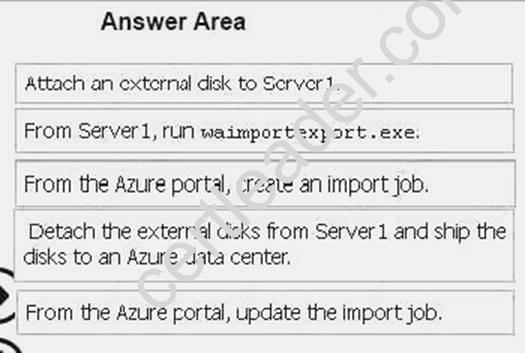
NEW QUESTION 12
HOT SPOT
You purchase a new Azure subscription named Subscription1.
You create a virtual machine named VM1 in Subscription1. VM1 is not protected by Azure Backup. You need to protect VM1 by using Azure Backup. Backups must be created at 01:00 and stored for 30 days.
What should you do? To answer, select the appropriate options in the answer area. NOTE: Each correct selection is worth one point.
Answer:
Explanation: Box 1: A Recovery Services vault
A Recovery Services vault is an entity that stores all the backups and recovery points you create over time.
Box 2: A backup policy
What happens when I change my backup policy?
When a new policy is applied, schedule and retention of the new policy is followed. References:
https://docs.microsoft.com/en-us/azure/backup/backup-configure-vault https://docs.microsoft.com/en-us/azure/backup/backup-azure-backup-faq
NEW QUESTION 13
HOT SPOT
You need to provision the resources in Azure to support the virtual machine that will be migrated from the New York office.
What should you include in the solution? To answer, select the appropriate options in the answer
area.
NOTE: Each correct selection is worth one point.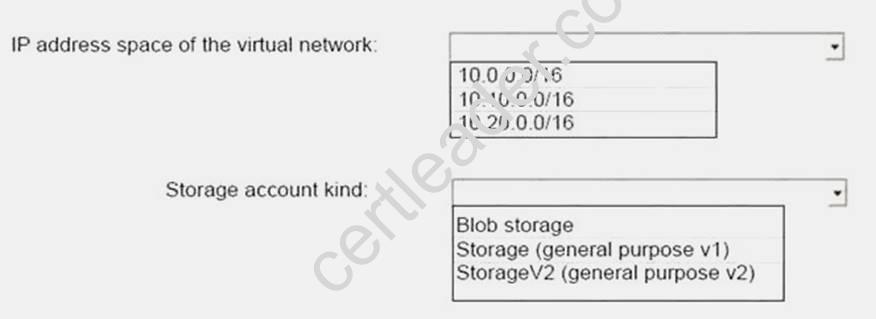
Answer:
Explanation: 
Box 1: 10.20.0.0/16
Scenario: The New York office an IP address of 10.0.0.0/16. The Los Angeles office uses an IP address space of 10.10.0.0/16.
Box 2: Storage (general purpose v1)
Scenario: The New York office has a virtual machine named VM1 that has the vSphere console installed.
NEW QUESTION 14
You have an Azure subscription named Subscription1 that has the following providers registered: Authorization
Automation Resources Compute KeyVault Network Storage Billing Web
Subscription1 contains an Azure virtual machine named VM1 that has the following configurations: Private IP address: 10.0.0.4 (dynamic)
Network security group (NSG): NSG1 Public IP address: None
Availability set: AVSet Subnet: 10.0.0.0/24 Managed disks: No Location: East US
You need to record all the successful and failed connection attempts to VM1.
Which three actions should you perform? Each correct answer presents part of the solution.
NOTE: Each correct selection is worth one point.
- A. Register the Microsoft.Insights resource provider
- B. Add an Azure Network Watcher connection monitor
- C. Register the Microsoft.LogAnalytics provider
- D. Enable Azure Network Watcher in the East US Azure region
- E. Create an Azure Storage account
- F. Enable Azure Network Watcher flow logs
Answer: ADF
Explanation:
Step 1: (D)
We must have a network watcher enabled in the East US region Step 2: (A+F)
A: NSG flow logging requires the Microsoft.Insights provider, which must be registered.
F: Network security groups (NSG) allow or deny inbound or outbound traffic to a network interface in a VM. The NSG flow log capability allows you to log the source and destination IP address, port, protocol, and whether traffic was allowed or denied by an NSG.
References:
https://docs.microsoft.com/en-us/azure/network-watcher/network-watcher-nsg-flow-logging-portal
NEW QUESTION 15
HOT SPOT
You plan to use Azure Network Watcher to perform the following tasks:
Task1: Identify a security rule that prevents a network packet from reaching an Azure virtual machine.
Task2: Validate outbound connectivity from an Azure virtual machine to an external host.
Which feature should you use for each task? To answer, select the appropriate options in the answer area.
NOTE: Each correct selection is worth one point.
Answer:
Explanation: Task 1: IP flow verify
IP flow verify checks if a packet is allowed or denied to or from a virtual machine. The information consists of direction, protocol, local IP, remote IP, local port, and remote port. If the packet is denied by a security group, the name of the rule that denied the packet is returned. While any source or destination IP can be chosen, IP flow verify helps administrators quickly diagnose connectivity issues from or to the internet and from or to the on-premises environment.
Task 2:
With the addition of Connection Troubleshoot, Network Watcher will see an incremental increase in its capabilities and ways for you to utilize it in your day to day operations. You can now, for example, check connectivity between source (VM) and destination (VM, URI, FQDN, IP Address). References:
https://docs.microsoft.com/en-us/azure/network-watcher/network-watcher-ip-flow-verify-overview https://azure.microsoft.com/en-us/blog/network-watcher-connection-troubleshoot-now-generallyavailable/
NEW QUESTION 16
You plan to deploy an application getaway named appgw1015 to load balance IP traffic to the Azure virtual machines connected to subnet0.
You need to configure a virtual network named VNET1015 to support the planned application gateway.
What should you do from the Azure portal?
Answer:
Explanation: Step 1:
Click Networking, Virtual Network, and select VNET1015. Step 2:
Click Subnets, and Click +Add on the VNET1015 - Subnets pane that appears. Step 3:
On the Subnets page, click +Gateway subnet at the top to open the Add subnet page.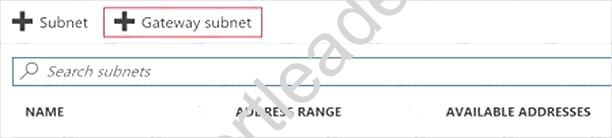
Step 4:
Locate subnet0 and add it. References:
https://docs.microsoft.com/en-us/azure/vpn-gateway/vpn-gateway-howto-site-to-site-resourcemanager- portal
NEW QUESTION 17
You need to implement a backup solution for App1 after the application is moved. What should you create first?
- A. a recovery plan
- B. an Azure Backup Server
- C. a backup policy
- D. a Recovery Services vault
Answer: D
Explanation: A Recovery Services vault is a logical container that stores the backup data for each protected resource, such as Azure VMs. When the backup job for a protected resource runs, it creates a recovery point inside the Recovery Services vault.
Scenario:
There are three application tiers, each with five virtual machines.
Move all the virtual machines for App1 to Azure.
Ensure that all the virtual machines for App1 are protected by backups.
References: https://docs.microsoft.com/en-us/azure/backup/quick-backup-vm-portal
NEW QUESTION 18
You have an Azure subscription that contains a storage account named account1.
You plan to upload the disk files of a virtual machine to account1 from your on-premises network. The on-premises network uses a public IP address space of 131.107.1.0/24.
You plan to use the disk files to provision an Azure virtual machine named VM1. VM1 will be attached to a virtual network named VNet1. VNet1 uses an IP address space of 192.168.0.0/24. You need to configure account1 to meet the following requirements:
Ensure that you can upload the disk files to account1. Ensure that you can attach the disks to VM1. Prevent all other access to account1.
Which two actions should you perform? Each correct selection presents part of the solution. NOTE: Each correct selection is worth one point.
- A. From the Firewalls and virtual networks blade of account1, add the 131.107.1.0/24 IP address range.
- B. From the Firewalls and virtual networks blade of account1, select Selected networks.
- C. From the Firewalls and virtual networks blade of acount1, add VNet1.
- D. From the Firewalls and virtual networks blade of account1, select Allow trusted Microsoft services toaccess this storage account.
- E. From the Service endpoints blade of VNet1, add a service endpoin
Answer: BE
Explanation: B: By default, storage accounts accept connections from clients on any network. To limit access to selected networks, you must first change the default action.
Azure portal
Navigate to the storage account you want to secure.
Click on the settings menu called Firewalls and virtual networks.
To deny access by default, choose to allow access from 'Selected networks'. To allow traffic from all networks, choose to allow access from 'All networks'.
Click Save to apply your changes.
E: Grant access from a Virtual Network
Storage accounts can be configured to allow access only from specific Azure Virtual Networks. By enabling a Service Endpoint for Azure Storage within the Virtual Network, traffic is ensured an optimal route to the Azure Storage service. The identities of the virtual network and the subnet are also transmitted with each request.
References: https://docs.microsoft.com/en-us/azure/storage/common/storage-network-security
Recommend!! Get the Full AZ-102 dumps in VCE and PDF From Certleader, Welcome to Download: https://www.certleader.com/AZ-102-dumps.html (New 195 Q&As Version)