Highest Quality AZ-102 Exam Questions 2021
Our pass rate is high to 98.9% and the similarity percentage between our AZ-102 Braindumps and real exam is 90% based on our seven-year educating experience. Do you want achievements in the Microsoft AZ-102 exam in just one try? I am currently studying for the AZ-102 Braindumps. Latest AZ-102 Dumps, Try Microsoft AZ-102 Brain Dumps First.
Online AZ-102 free questions and answers of New Version:
NEW QUESTION 1
You have an Azure subscription that contains two resource groups named RG1 and RG2. RG2 does not contain any resources. RG1 contains the resources in the following table.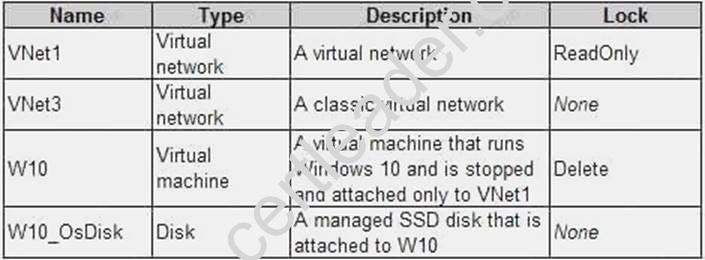
Which resource can you move to RG2?
- A. W10_OsDisk
- B. VNet1
- C. VNet3
- D. W10
Answer: B
Explanation: When moving a virtual network, you must also move its dependent resources. For example, you must move gateways with the virtual network. VM W10, which is in Vnet1, is not a dependent resource.
Incorrect Answers:
A: Managed disks don't support move.
C: Virtual networks (classic) can't be moved.
D: Virtual machines with the managed disks cannot be moved.
References: https://docs.microsoft.com/en-us/azure/azure-resource-manager/resource-groupmove- resources#virtual-machines-limitations
NEW QUESTION 2
Your company registers a domain name of contoso.com.
You create an Azure DNS named contoso.com and then you add an A record to the zone for a host named www that has an IP address of 131.107.1.10.
You discover that Internet hosts are unable to resolve www.contoso.com to the 131.107.1.10 IP address.
You need to resolve the name resolution issue.
Solution: You modify the SOA record in the contoso.com zone Does this meet the goal?
- A. Yes
- B. No
Answer: B
Explanation: Modify the NS record, not the SOA record.
Note: The SOA record stores information about the name of the server that supplied the data for the zone; the administrator of the zone; the current version of the data file; the number of seconds a secondary name server should wait before checking for updates; the number of seconds a secondary name server should wait before retrying a failed zone transfer; the maximum number of seconds that a secondary name server can use data before it must either be refreshed or expire; and a default number of seconds for the time-to-live file on resource records.
References: https://searchnetworking.techtarget.com/definition/start-of-authority-record
NEW QUESTION 3
HOT SPOT
You have an on-premises data center and an Azure subscription. The data center contains two VPN devices. The subscription contains an Azure virtual network named VNet1. VNet1 contains a gateway subnet.
You need to create a site-to-site VPN. The solution must ensure that is a single instance of an Azure VPN gateway fails, or a single on-premises VPN device fails, the failure will not cause an interruption that is longer than two minutes.
What is the minimum number of public IP addresses, virtual network gateways, and local network gateways required in Azure? To answer, select the appropriate options in the answer area. NOTE: Each correct selection is worth one point.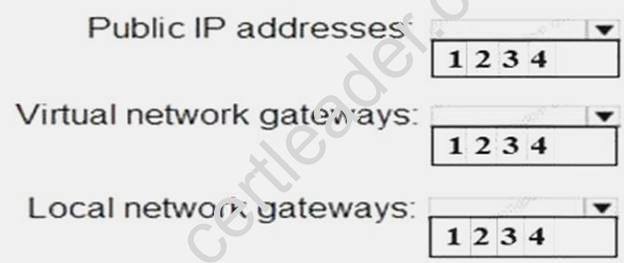
Answer:
Explanation: Box 1: 4
Two public IP addresses in the on-premises data center, and two public IP addresses in the VNET. The most reliable option is to combine the active-active gateways on both your network and Azure, as shown in the diagram below.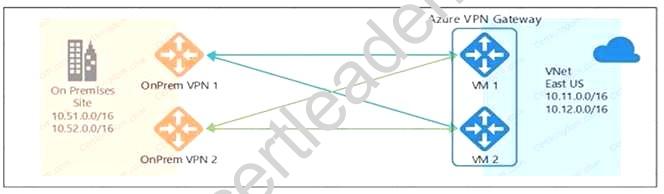
Box 2: 2
Every Azure VPN gateway consists of two instances in an active-standby configuration. For any planned maintenance or unplanned disruption that happens to the active instance, the standby instance would take over (failover) automatically, and resume the S2S VPN or VNet-to-VNet connections.
Box 3: 2
Dual-redundancy: active-active VPN gateways for both Azure and on-premises networks References:
https://docs.microsoft.com/en-us/azure/vpn-gateway/vpn-gateway-highlyavailable
NEW QUESTION 4
You set the multi-factor authentication status for a user named admin1@contoso.com to Enabled.
Admin1 accesses the Azure portal by using a web browser.
Which additional security verifications can Admin1 use when accessing the Azure portal?
- A. a phone call, a text message that contains a verification code, and a notification or a verification code sent from the Microsoft Authenticator app.
- B. an app password, a text message that contains a verification code, and a notification sent from the Microsoft Authenticator ap
- C. C a phone call, an email message that contains a verification code, and a text message that contains an app password.
- D. an app password, a text message that contains a verification code, and a verification code sent from the Microsoft Authenticator app.
Answer: A
Explanation: The user portal is an IIS web site that allows users to enroll in Azure Multi-Factor Authentication (MFA) and maintain their accounts. A user may change their phone number, change their PIN, or choose to bypass
two-step verification during their next sign-on.
Mobile App verification method is an option. If the user selects the Mobile App verification method, the page prompts the user to install the Microsoft Authenticator app on their device and generate an activation code. After installing the app, the user clicks the Generate Activation Code button.
References:
https://docs.microsoft.com/en-us/azure/active-directory/authentication/howto-mfaserver-deploy-userportal
NEW QUESTION 5
DRAG DROP
You have an on-premises file server named Server1 that runs Windows Server 2021. You have an Azure subscription that contains an Azure file share.
You deploy an Azure File Sync Storage Sync Service, and you create a sync group. You need to synchronize files from Server1 to Azure.
Which three actions should you perform in sequence? To answer, move the appropriate actions from the list of actions to the answer area and arrange them in the correct order.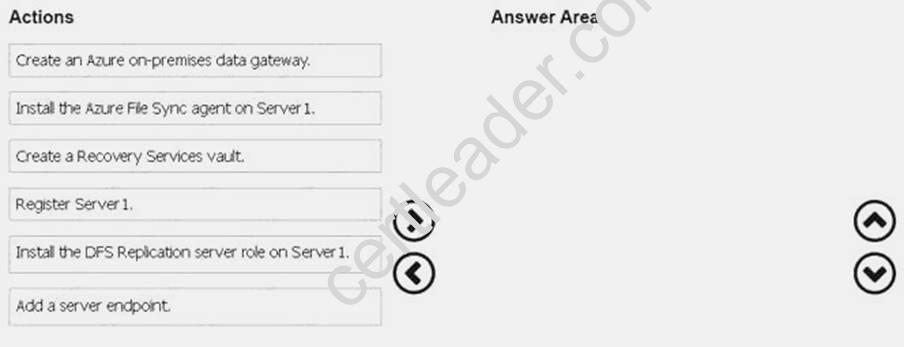
Answer:
Explanation: Step 1: Install the Azure File Sync agent on Server1
The Azure File Sync agent is a downloadable package that enables Windows Server to be synced with an Azure file share
Step 2: Register Server1.
Register Windows Server with Storage Sync Service
Registering your Windows Server with a Storage Sync Service establishes a trust relationship between your server (or cluster) and the Storage Sync Service.
Step 3: Add a server endpoint
Create a sync group and a cloud endpoint.
A sync group defines the sync topology for a set of files. Endpoints within a sync group are kept in sync with each other. A sync group must contain one cloud endpoint, which represents an Azure file share and one or more server endpoints. A server endpoint represents a path on registered server. References: https://docs.microsoft.com/en-us/azure/storage/files/storage-sync-files-deploymentguide
NEW QUESTION 6
HOT SPOT
You need to recommend a solution for App1. The solution must meet the technical requirements. What should you include in the recommendation? To answer, select the appropriate options in the answer area.
NOTE: Each correct selection is worth one point.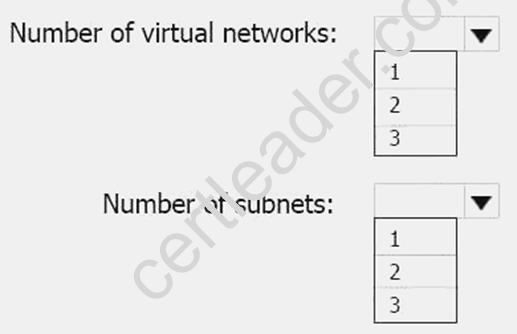
Answer:
Explanation: This reference architecture shows how to deploy VMs and a virtual network configured for an N-tier application, using SQL Server on Windows for the data tier.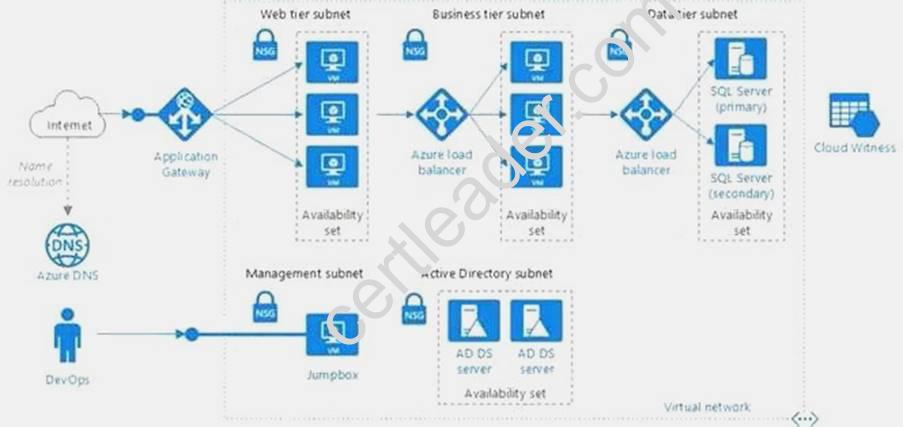
Scenario: You have a public-facing application named App1. App1 is comprised of the following three tiers:
A SQL database A web front end
A processing middle tier
Each tier is comprised of five virtual machines. Users access the web front end by using HTTPS only. Technical requirements include:
Move all the virtual machines for App1 to Azure. Minimize the number of open ports between the App1 tiers.
References: https://docs.microsoft.com/en-us/azure/architecture/reference-architectures/n-tier/n-tier-sql-server
NEW QUESTION 7
HOT SPOT
You need to configure the Device settings to meet the technical requirements and the user requirements.
Which two settings should you modify? To answer, select the appropriate settings in the answer area.
Answer:
Explanation:
Box 1: Selected
Only selected users should be able to join devices Box 2: Yes
Require Multi-Factor Auth to join devices. From scenario:
Ensure that only users who are part of a group named Pilot can join devices to Azure AD
Ensure that when users join devices to Azure Active Directory (Azure AD), the users use a mobile phone to verify their identity.
NEW QUESTION 8
Note: This questions is part of a series of questions that present the same scenario. Each questions in the series contains a unique solution that might meet the stated goals. Some questions sets might have more than one correct solution, while others might not have a correct solution. After you answer a questions in this section, you will NOT be able to return to it. As a result, these questions will not appear in the review screen.
You have an Azure subscription that contains 10 virtual networks. The virtual networks are hosted in separate resource groups.
Another administrator plans to create several network security groups (NSGs) in the subscription. You need to ensure that when an NSG is created, it automatically blocks TCP port 8080 between the virtual networks.
Solution: You configure a custom policy definition, and then you assign the policy to the subscription. Does this meet the goal?
- A. Yes
- B. No
Answer: A
Explanation: Resource policy definition used by Azure Policy enables you to establish conventions for resources in your organization by describing when the policy is enforced and what effect to take. By defining conventions, you can control costs and more easily manage your resources.
References: https://docs.microsoft.com/en-us/azure/azure-policy/policy-definition
NEW QUESTION 9
You have an Active Directory forest named contoso.com.
You install and configure Azure AD Connect to use password hash synchronization as the single signon (SSO) method. Staging mode is enabled.
You review the synchronization results and discover that the Synchronization Service Manager does not display any sync jobs.
You need to ensure that the synchronization completes successfully. What should you do?
- A. From Synchronization Service Manager, run a full import.
- B. Run Azure AD Connect and set the SSO method to Pass-through Authentication.
- C. From Azure PowerShell, run Start-AdSyncSyncCycle -PolicyType Initial.
- D. Run Azure AD Connect and disable staging mode.
Answer: D
Explanation: Staging mode must be disabled. If the Azure AD Connect server is in staging mode, password hash synchronization is temporarily disabled.
References: https://docs.microsoft.com/en-us/azure/active-directory/connect/active-directoryaadconnectsync-troubleshoot-password-hash-synchronization#no-passwords-are-synchronizedtroubleshoot-by-using-the-troubleshooting-task
NEW QUESTION 10
HOT SPOT
You have an Azure subscription named Subscroption1. In Subscription1, you create an alert rule named Alert1.
The Alert1 action group is configured as shown in the following exhibit.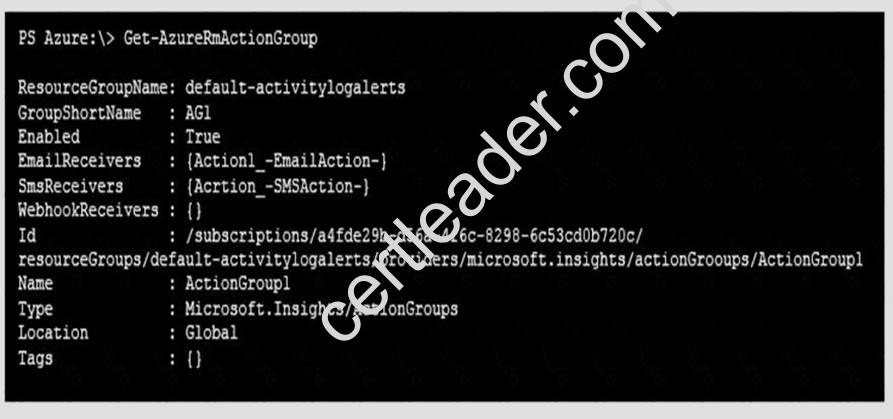
Alert1 alert criteria is triggered every minute.
Use the drop-down menus to select the answer choice that completes each statement based on the information presented in the graphic.
NOTE: Each correct selection is worth one point.
Answer:
Explanation: Box 1: 60
One alert per minute will trigger one email per minute. Box 2: 12
No more than 1 SMS every 5 minutes can be send, which equals 12 per hour.
Note: Rate limiting is a suspension of notifications that occurs when too many are sent to a particular phone number, email address or device. Rate limiting ensures that alerts are manageable and actionable.
The rate limit thresholds are:
SMS: No more than 1 SMS every 5 minutes. Voice: No more than 1 Voice call every 5 minutes. Email: No more than 100 emails in an hour. Other actions are not rate limited.
References:
https://github.com/MicrosoftDocs/azure-docs/blob/master/articles/monitoring-anddiagnostics/ monitoring-overview-alerts.md
NEW QUESTION 11
You need to resolve the Active Directory issue. What should you do?
- A. From Active Directory Users and Computers, select the user accounts, and then modify the User PrincipalName value.
- B. Run idfix.exe, and then use the Edit action.
- C. From Active Directory Domains and Trusts, modify the list of UPN suffixes.
- D. From Azure AD Connect, modify the outbound synchronization rul
Answer: B
Explanation: IdFix is used to perform discovery and remediation of identity objects and their attributes in an onpremises Active Directory environment in preparation for migration to Azure Active Directory. IdFix is
intended for the Active Directory administrators responsible for directory synchronization with Azure Active Directory.
Scenario: Active Directory Issue
Several users in humongousinsurance.com have UPNs that contain special characters. You suspect that some of the characters are unsupported in Azure AD.
References: https://www.microsoft.com/en-us/download/details.aspx?id=36832
NEW QUESTION 12
HOT SPOT
You have an Azure subscription named Subscrption1 that is associated to an Azure Active Directory (Azure AD) tenant named AAD1.
Subscription1 contains the objects in the following table: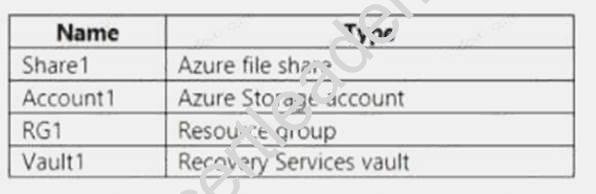
You plan to create a single backup policy for Vault1. To answer, select the appropriate options in the answer area.
NOTE: Each correct selection is worth one point.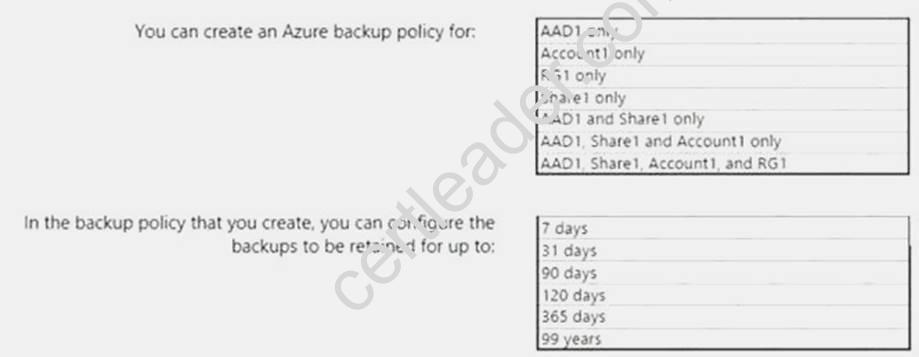
Answer:
Explanation: Box 1: RG1 only Box 2: 99 years
With the latest update to Azure Backup, customers can retain their data for up to 99 years in Azure. Note: A backup policy defines a matrix of when the data snapshots are taken, and how long those snapshots are retained.
The backup policy interface looks like this: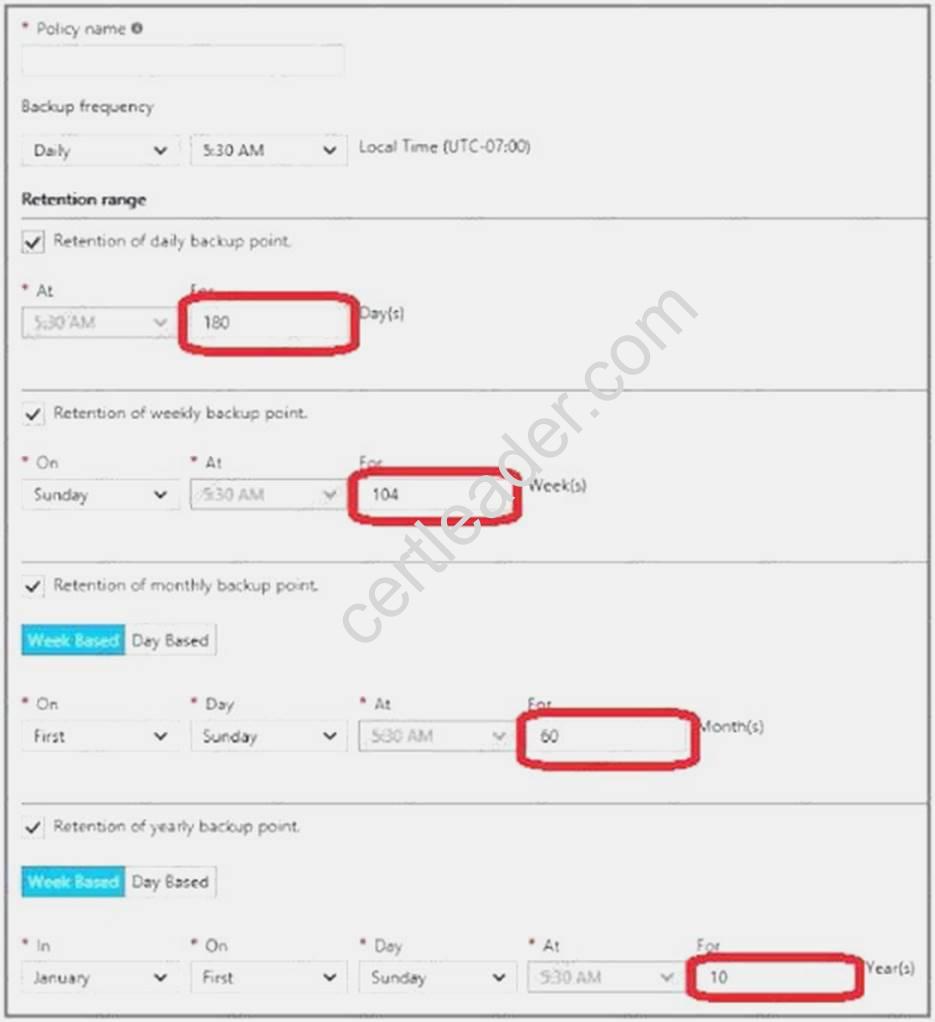
References: https://docs.microsoft.com/en-us/azure/backup/backup-azure-vms-first-lookarm# defining-a-backup-policy
https://blogs.microsoft.com/firehose/2015/02/16/february-update-to-azure-backup-includes-dataretention- up-to-99-years-offline-backup-and-more/
NEW QUESTION 13
You have an Azure subscription that contains two virtual networks named VNet1 and VNet2. Virtual machines connect to the virtual networks.
The virtual networks have the address spaces and the subnets configured as shown in the following table.
You need to add the address space of 10.33.0.0/16 to VNet1. The solution must ensure that the hosts on VNet1 and VNet2 can communicate.
Which three actions should you perform in sequence? To answer, move the appropriate actions from the list of actions to the answer area and arrange them in the correct order.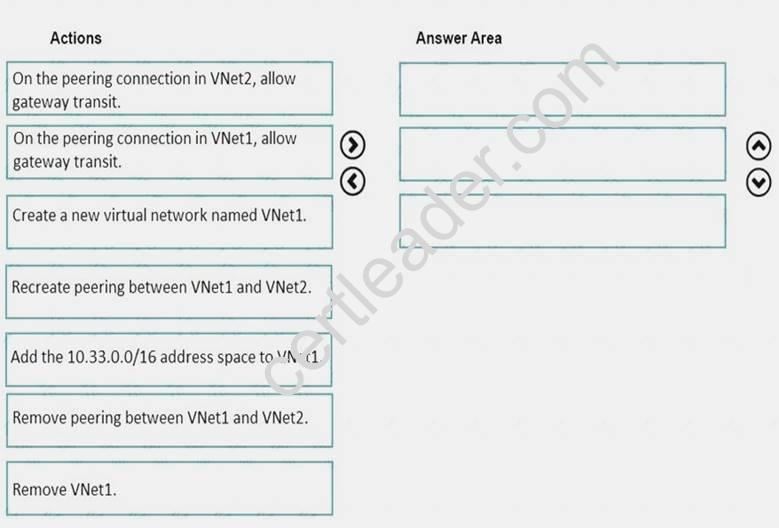
Answer:
Explanation: Step 1: Remove peering between Vnet1 and VNet2.
You can't add address ranges to, or delete address ranges from a virtual network's address space once a virtual network is peered with another virtual network. To add or remove address ranges, delete the peering, add or
remove the address ranges, then re-create the peering. Step 2: Add the 10.44.0.0/16 address space to VNet1. Step 3: Recreate peering between VNet1 and VNet2 References:
https://docs.microsoft.com/en-us/azure/virtual-network/virtual-network-manage-peering
NEW QUESTION 14
DRAG DROP
You need to prepare the New York office infrastructure for the migration of the on-premises virtual machines to Azure.
Which four actions you perform in sequence? To answer, move the appropriate actions from the list of actions to the answer area and arrange them in the correct order.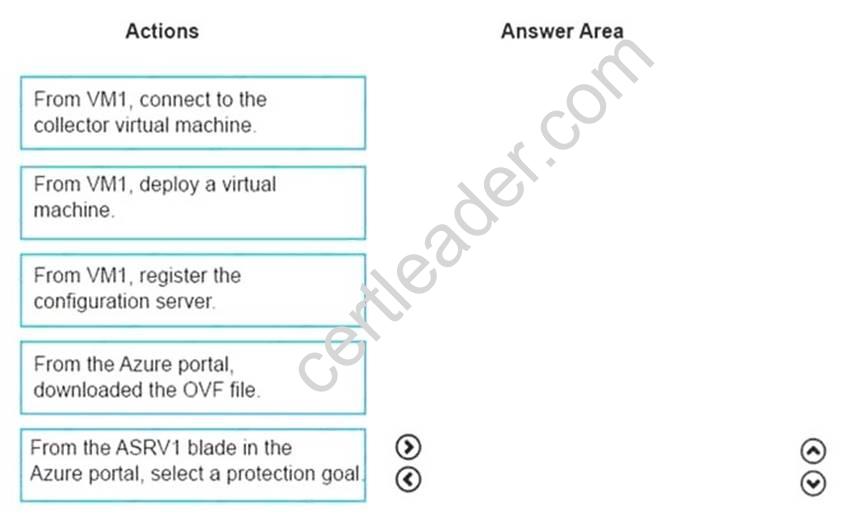
Answer:
Explanation: Box 1:
From the Azure portal, download the OVF file.
In the vCenter Server, import the Collector appliance as a virtual machine using the Deploy OVF Template wizard.
In vSphere Client console, click File > Deploy OVF Template.
In the Deploy OVF Template Wizard > Source, specify the location for the .ovf file. Box 2: From VM1, connect to the collector virtual machine
After you've created the Collector virtual machine, connect to it and run the Collector. Box 3: From the ASRV1 blade in the Azure portal, select a protection goal.
Box 4: From VM1, register the configuration server. Register the configuration server in the vault
Scenario: The Azure infrastructure and the on-premises infrastructure and the on-premises infrastructure must be prepared for the migration of the VMware virtual machines to Azure. References:
Migrate Your Virtual Machines to Microsoft Azure, Includes guidance for optional data migration, Proof of Concept guide, September 2021 https://azuremigrate.blob.core.windows.net/publicpreview/Azure%20Migrate%20-
%20Preview%20User%20Guide.pdf
NEW QUESTION 15
You have an Azure Active Directory (Azure AD) tenant named contoso.onmicrosoft.com that contains 100 user accounts.
You purchase 10 Azure AD Premium P2 licenses for the tenant.
You need to ensure that 10 users can use all the Azure AD Premium features. What should you do?
- A. From the Groups blade of each user, invite the users to a group.
- B. From the Licenses blade of Azure AD, assign a license.
- C. From the Directory role blade of each user, modify the directory role.
- D. From the Azure AD domain, add an enterprise applicatio
Answer: B
Explanation: To assign a license, under Azure Active Directory > Licenses > All Products, select one or more
products, and then select Assign on the command bar.
References: https://docs.microsoft.com/en-us/azure/active-directory/fundamentals/license-usersgroups
NEW QUESTION 16
You configure Azure AD Connect for Azure Active Directory Seamless Single Sign-On (Azure AD Seamless SSO) for an on-premises network. Users report that when they attempt to access myapps.microsoft.com, they are prompted multiple times to sign in and are forced to use an account name that ends with onmicrosoft.com.
You discover that there is a UPN mismatch between Azure AD and the on-premises Active Directory. You need to ensure that the users can use single-sign on (SSO) to access Azure resources.
What should you do first?
- A. From the on-premises network, deploy Active Directory Federation Services (AD FS).
- B. From Azure AD, add and verify a custom domain name.
- C. From the on-premises network, request a new certificate that contains the Active Directory domain name.
- D. From the server that runs Azure AD Connect, modify the filtering option
Answer: B
Explanation: Azure AD Connect lists the UPN suffixes that are defined for the domains and tries to match them
with a custom domain in Azure AD. Then it helps you with the appropriate action that needs to be taken. The Azure AD sign-in page lists the UPN suffixes that are defined for on-premises Active Directory and displays the corresponding status against each suffix. The status values can be one of the following:
State: Verified Azure AD Connect found a matching verified domain in Azure AD. All users for this domain can sign in by using their on-premises credentials.
State: Not verified Azure AD Connect found a matching custom domain in Azure AD, but it isn't verified. The UPN suffix of the users of this domain will be changed to the default .onmicrosoft.com suffix after synchronization if the domain isn't verified.
Action Required: Verify the custom domain in Azure AD.
References: https://docs.microsoft.com/en-us/azure/active-directory/hybrid/plan-connect-userQuestions& Answers PDF P-80 signin
NEW QUESTION 17
Note: This questions is part of a series of questions that present the same scenario. Each questions in the series contains a unique solution that might meet the stated goals. Some questions sets might have more than one correct solution, while others might not have a correct solution. After you answer a questions in this section, you will NOT be able to return to it. As a result, these Questions will not appear in the review screen.
You have an Azure subscription that contains 10 virtual networks. The virtual networks are hosted in separate resource groups.
Another administrator plans to create several network security groups (NSGs) in the subscription. You need to ensure that when an NSG is created, it automatically blocks TCP port 8080 between the virtual networks.
Solution: From the Resource providers blade, you unregister the Microsoft.ClassicNetwork provider. Does this meet the goal?
- A. Yes
- B. No
Answer: B
NEW QUESTION 18
You have an Azure subscription that contains an Azure file share.
You have an on-premises server named Server1 that runs Windows Server 2021. You plan to set up Azure File Sync between Server1 and the Azure file share. You need to prepare the subscription for the planned Azure File Sync.
Which two actions should you perform in the Azure subscription? To answer, drag the appropriate actions to the correct targets. Each action may be used once, more than once, or not at all. You may need to drag the split bar between panes or scroll to view content.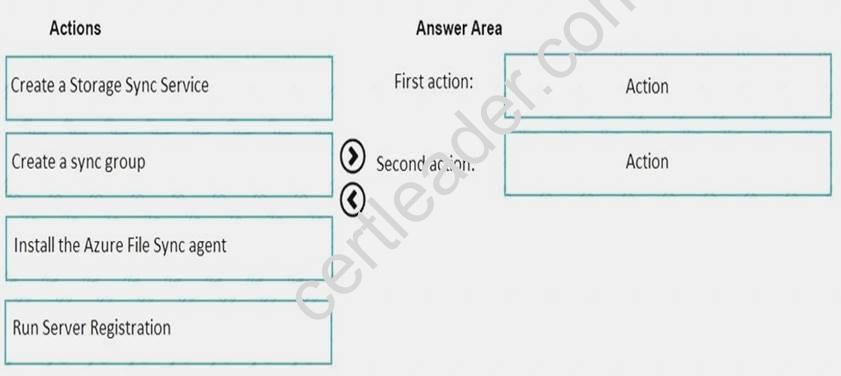
Answer:
Explanation: First action: Create a Storage Sync Service
The deployment of Azure File Sync starts with placing a Storage Sync Service resource into a resource group of your selected subscription.
Second action: Run Server Registration
Registering your Windows Server with a Storage Sync Service establishes a trust relationship between your server (or cluster) and the Storage Sync Service. A server can only be registered to one Storage Sync Service and can sync with other servers and Azure file shares associated with the same Storage Sync Service.
The Server Registration UI should open automatically after installation of the Azure File Sync agent.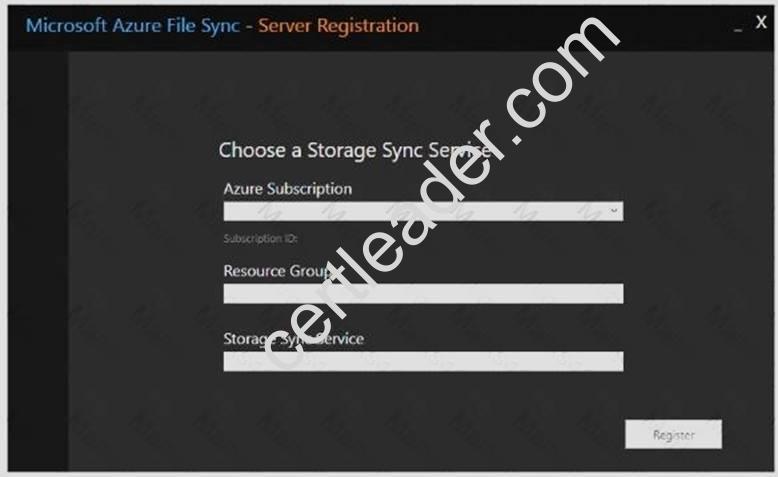
Recommend!! Get the Full AZ-102 dumps in VCE and PDF From 2passeasy, Welcome to Download: https://www.2passeasy.com/dumps/AZ-102/ (New 195 Q&As Version)