High value AZ-102 Exam Questions and Answers 2021
It is more faster and easier to pass the AZ-102 Dumps by using AZ-102 Exam Questions and Answers. Immediate access to the AZ-102 Exam Dumps and find the same core area AZ-102 Study Guides with professionally verified answers, then PASS your exam with a high score now.
Free demo questions for Microsoft AZ-102 Exam Dumps Below:
NEW QUESTION 1
You need to define a custom domain name for Azure AD to support the planned infrastructure. Which domain name should you use?
- A. ad.humongousinsurance.com
- B. humongousinsurance.onmicrosoft.com
- C. humongousinsurance.local
- D. humongousinsurance.com
Answer: D
Explanation: Every Azure AD directory comes with an initial domain name in the form of domainname.onmicrosoft.com. The initial domain name cannot be changed or deleted, but you can add your corporate domain name to Azure AD as well. For example, your organization probably has other domain names used to do business and users who sign in using your corporate domain name. Adding custom domain names to Azure AD allows you to assign user names in the directory that are familiar to your users, such as ‘alice@contoso.com.’ instead of 'alice@domain name.onmicrosoft.com'.
Scenario:
Network Infrastructure: Each office has a local data center that contains all the servers for that office. Each office has a dedicated connection to the Internet.
Humongous Insurance has a single-domain Active Directory forest named humongousinsurance.com Planned Azure AD Infrastructure: The on-premises Active Directory domain will be synchronized to Azure AD.
References: https://docs.microsoft.com/en-us/azure/active-directory/fundamentals/add-customdomain
NEW QUESTION 2
SIMULATION
Click to expand each objective. To connect to the Azure portal, type https://portal.azure.com in the browser address bar.


When you are finished performing all the tasks, click the ‘Next’ button.
Note that you cannot return to the lab once you click the ‘Next’ button. Scoring occur in the background while you complete the rest of the exam.
Overview
The following section of the exam is a lab. In this section, you will perform a set of tasks in a live environment. While most functionality will be available to you as it would be in a live environment, some functionality (e.g., copy and paste, ability to navigate to external websites) will not be possible by design. Scoring is based on the outcome of performing the tasks stated in the lab. In other words, it doesn’t matter how you accomplish the task, if you successfully perform it, you will earn credit for that task.
Labs are not timed separately, and this exam may have more than one lab that you must complete. You can use as much time as you would like to complete each lab. But, you should manage your time appropriately to ensure that you are able to complete the lab(s) and all other sections of the exam in the time provided.
Please note that once you submit your work by clicking the Next button within a lab, you will NOT be able to return to the lab.
To start the lab
You may start the lab by clicking the Next button.
You plan to create several virtual machines in different availability zones, and then to configure the virtual machines for load balanced connections from the Internet.
You need to create an IP address resource named ip1006 to support the planned load balancing solution. The solution must minimize costs.
What should you do from the Azure portal?
Answer:
Explanation: We should create a public IP address.
At the top, left corner of the portal, select + Create a resource.
Enter public ip address in the Search the Marketplace box. When Public IP address appears in the search results, select it.
Under Public IP address, select Create.
Enter, or select values for the following settings, under Create public IP address, then select Create: Name: ip1006
SKU: Basic SKU IP Version: IPv6
IP address assignment: Dynamic Subscription: Select appropriate Resource group: Select appropriate
References: https://docs.microsoft.com/en-us/azure/virtual-network/virtual-network-public-ipaddress
NEW QUESTION 3
DRAG DROP
You need to prepare the environment to ensure that the web administrators can deploy the web apps as quickly as possible.
Which three actions should you perform in sequence? To answer, move the appropriate actions from the list of actions to the answer area and arrange them in the correct order.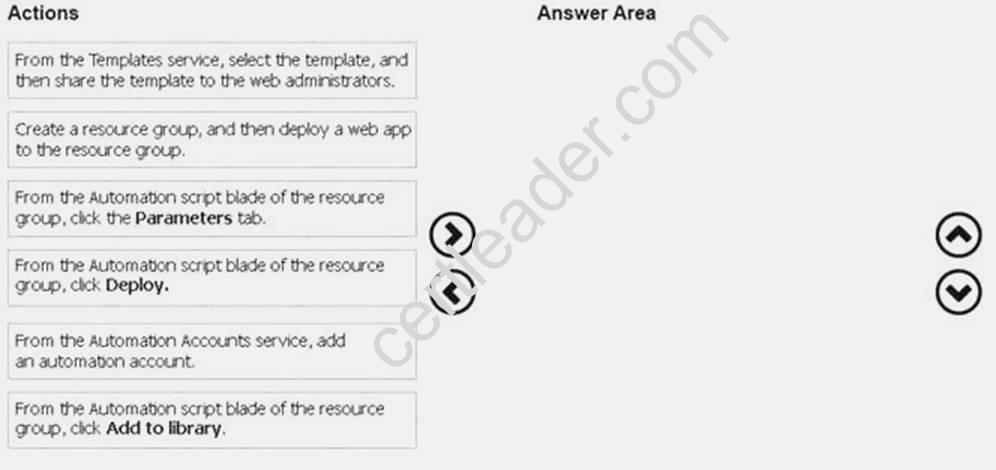
Answer:
Explanation:
Step 1:
First you create a storage account using the Azure portal.
Step 2:
Select Automation options at the bottom of the screen. The portal shows the template on the Template tab.
Deploy: Deploy the Azure storage account to Azure. Step 3:
Share the template.
Scenario: Web administrators will deploy Azure web apps for the marketing department. Each web app will be added to a separate resource group. The initial configuration of the web apps will be identical. The web administrators have permission to deploy web apps to resource groups.
References: https://docs.microsoft.com/en-us/azure/azure-resource-manager/resource-managerquickstart-create-templates-use-the-portal
NEW QUESTION 4
Your company registers a domain name of contoso.com.
You create an Azure DNS named contoso.com and then you add an A record to the zone for a host named www that has an IP address of 131.107.1.10.
You discover that Internet hosts are unable to resolve www.contoso.com to the 131.107.1.10 IP address.
You need to resolve the name resolution issue.
Solution: You modify the name servers at the domain registrar. Does this meet the goal?
- A. Yes
- B. No
Answer: A
Explanation: Before you can delegate your DNS zone to Azure DNS, you need to know the name servers for your zone. The NS record set contains the names of the Azure DNS name servers assigned to the zone. References:
https://docs.microsoft.com/en-us/azure/dns/dns-delegate-domain-azure-dns
NEW QUESTION 5
HOT SPOT
You have an Azure virtual network named VNet1 that connects to your on-premises network by using
a site-to-site VPN. VMet1 contains one subnet named Subnet1.
Subnet1 is associated to a network security group (NSG) named NSG1. Subnet1 contains a basic internal load balancer named ILB1. ILB1 has three Azure virtual machines in the backend pool. You need to collect data about the IP addresses that connects to ILB1. You must be able to run interactive queries from the Azure portal against the collected data.
What should you do? To answer, select the appropriate options in the answer area. NOTE: Each correct selection is worth one point.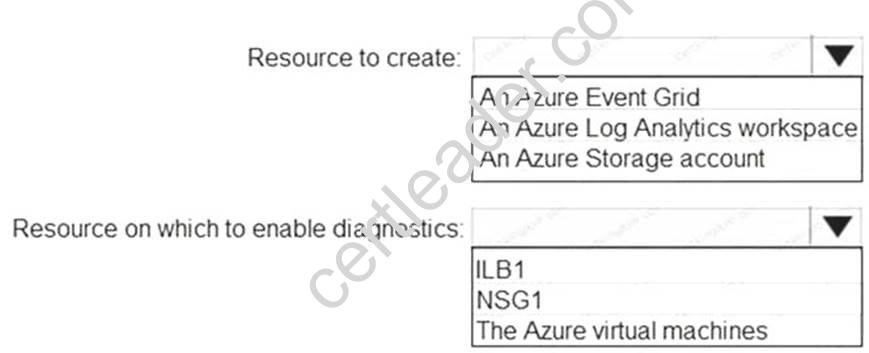
Answer:
Explanation: Box 1: An Azure Log Analytics workspace
In the Azure portal you can set up a Log Analytics workspace, which is a unique Log Analytics environment with its own data repository, data sources, and solutions
Box 2: ILB1
References:
https://docs.microsoft.com/en-us/azure/log-analytics/log-analytics-quick-create-workspace https://docs.microsoft.com/en-us/azure/load-balancer/load-balancer-standard-diagnostics
NEW QUESTION 6
You are the global administrator for an Azure Active Directory (Azure AD) tenant named adatum.com.
You need to enable two-step verification for Azure users. What should you do?
- A. Configure a playbook in Azure AD conditional access policy.
- B. Create an Azure AD conditional access policy.
- C. Create and configure the Identify Hub.
- D. Install and configure Azure AD Connec
Answer: B
Explanation: References:
https://docs.microsoft.com/en-us/azure/active-directory/authentication/howto-mfa-mfasettings
NEW QUESTION 7
HOT SPOT
You create an Azure web app named WebApp1. WebApp1 has the autoscale settings shown in the following exhibit.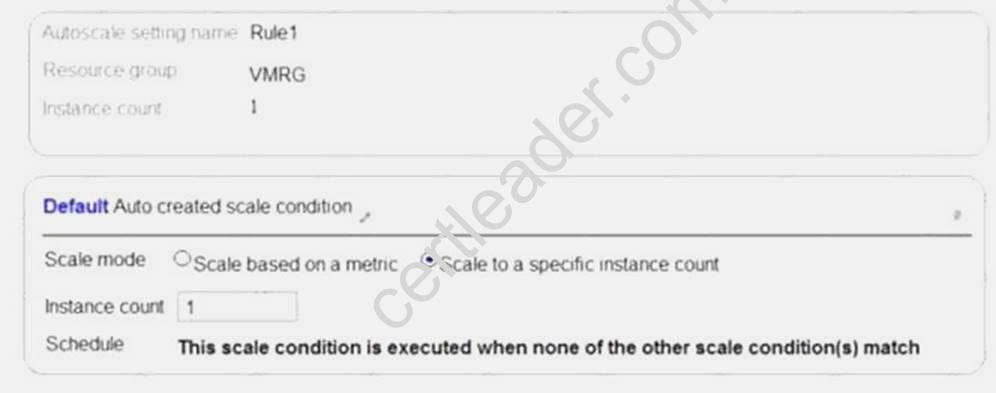
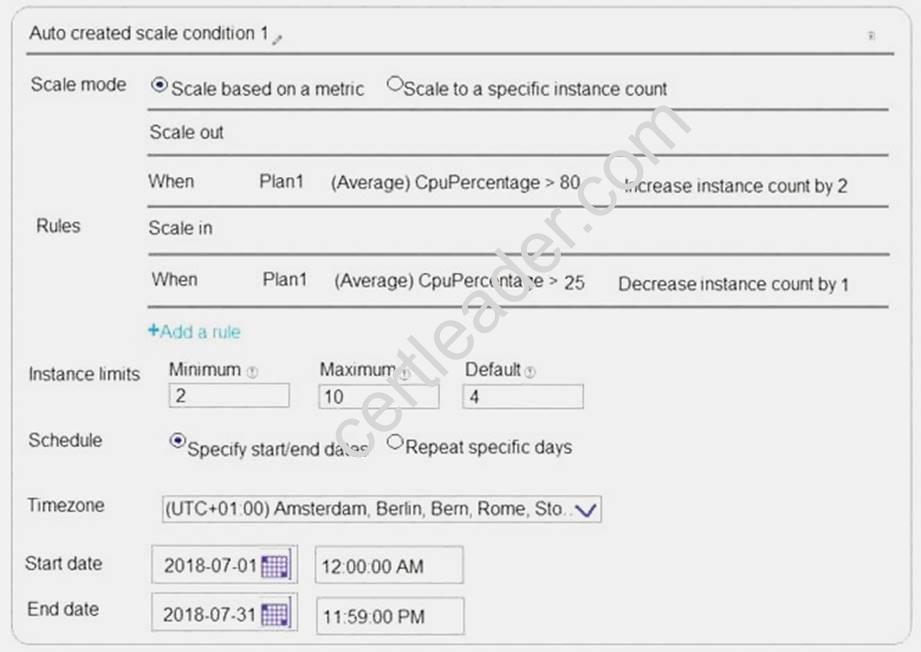
The scale out and scale in rules are configured to have a duration of 10 minutes and a cool down time of five minutes.
Use the drop-down menus to select the answer choice that completes each statement based on the information presented in the graphic.
NOTE: Each correct selection is worth one point.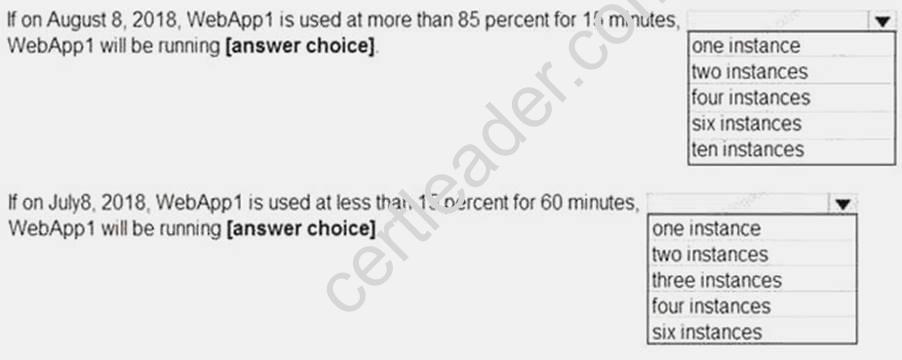
Answer:
Explanation: 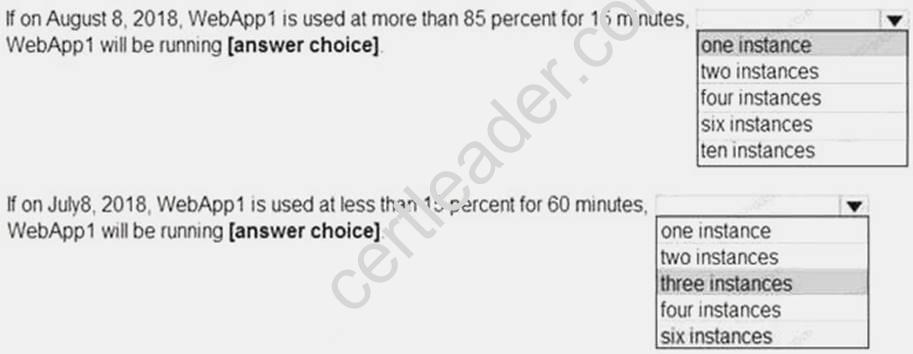
NEW QUESTION 8
HOT SPOT
You have an Azure Active Directory (Azure AD) tenant.
You need to create a conditional access policy that requires all users to use multi-factor authentication when they access the Azure portal.
Which three settings should you configure? To answer, select the appropriate settings in the answer area.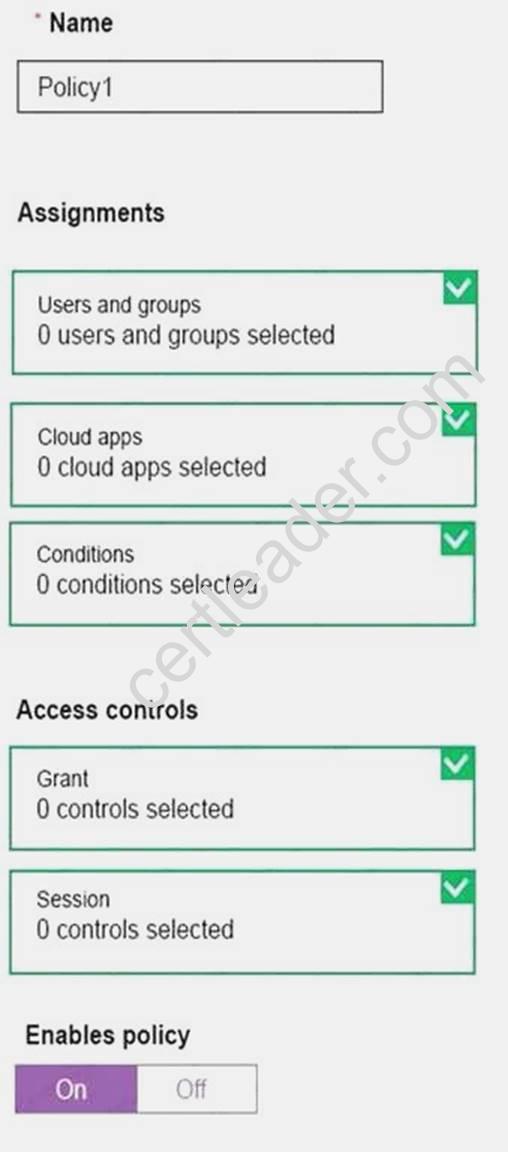
Answer:
Explanation: Box 1: Assignments, Users and Groups
When you configure the sign-in risk policy, you need to set:
The users and groups the policy applies to: Select Individuals and Groups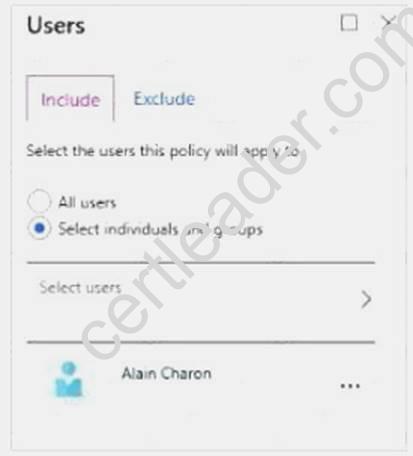
Box 2:
When you configure the sign-in risk policy, you need to set the type of access you want to be enforced.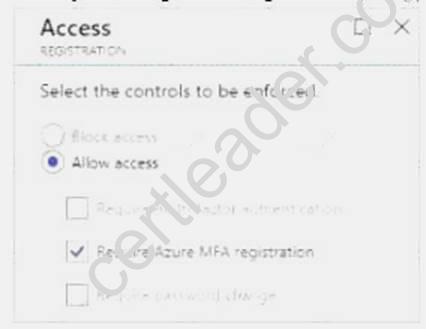
Box 3:
When you configure the sign-in risk policy, you need to set:
The type of access you want to be enforced when your sign-in risk level has been met: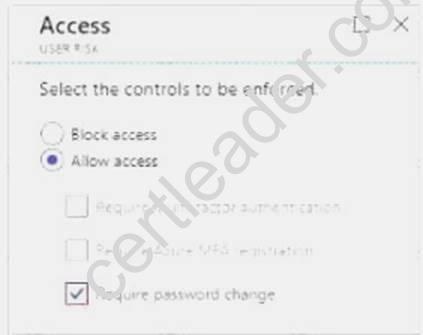
References:
https://docs.microsoft.com/en-us/azure/active-directory/identity-protection/howto-user-risk-policy
NEW QUESTION 9
DRAG DROP
You have an on-premises network that includes a Microsoft SQL Server instance named SQL1. You create an Azure Logic App named App1.
You need to ensure that App1 can query a database on SQL1.
Which three actions should you perform in sequence? To answer, move the appropriate actions from the list of actions to the answer area and arrange them in the correct order.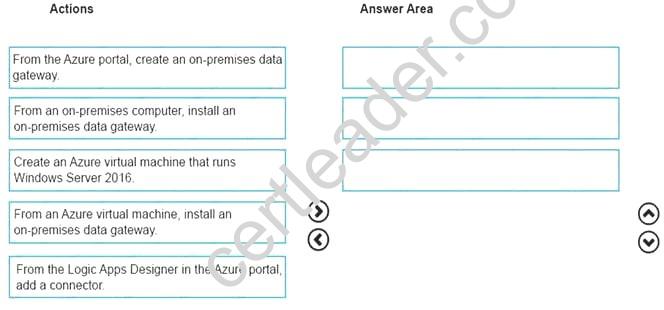
Answer:
Explanation: To access data sources on premises from your logic apps, you can create a data gateway resource in Azure so that your logic apps can use the on-premises connectors.
Box 1: From an on-premises computer, install an on-premises data gateway.
Before you can connect to on-premises data sources from Azure Logic Apps, download and install the on-premises data gateway on a local computer.
Box 2: From the Azure portal, create an on-premises data gateway Create Azure resource for gateway
After you install the gateway on a local computer, you can then create an Azure resource for your gateway. This step also associates your gateway resource with your Azure subscription.
Sign in to the Azure portal. Make sure you use the same Azure work or school email address used to install the gateway.
On the main Azure menu, select Create a resource > Integration > On-premises data gateway.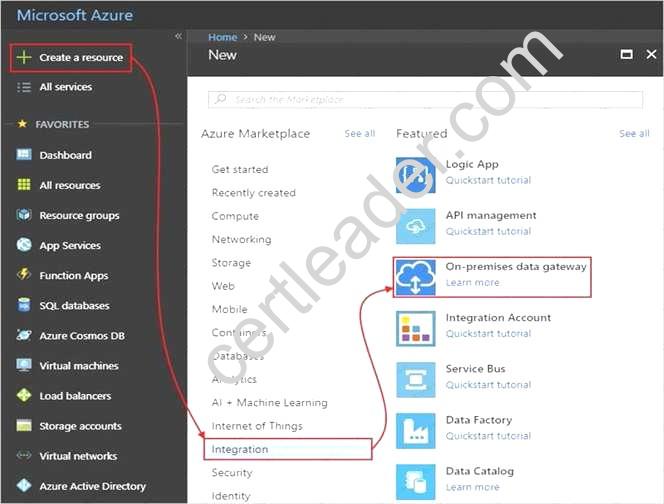
On the Create connection gateway page, provide this information for your gateway resource.
To add the gateway resource to your Azure dashboard, select Pin to dashboard. When you're done, choose Create.
Box 3: From the Logic Apps Designer in the Azure portal, add a connector
After you create your gateway resource and associate your Azure subscription with this resource, you can now create a connection between your logic app and your on-premises data source by using the gateway.
In the Azure portal, create or open your logic app in the Logic App Designer. Add a connector that supports on-premises connections, for example, SQL Server. Set up your connection.
References:
https://docs.microsoft.com/en-us/azure/logic-apps/logic-apps-gateway-connection
NEW QUESTION 10
From the MFA Server blade, you open the Block/unblock users blade as shown in the exhibit. Block/unblock users
A blocked user will not receive Multi-Factor Authentication requests. Authentication attempts for that user will be automatically denied. A user will remain blocked for 90 days from the time they are blocked. To manually unblock a user, click the “Unblock” action.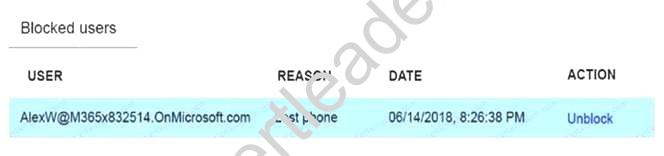
What caused AlexW to be blocked?
- A. The user entered an incorrect PIN four times within 10 minutes.
- B. The user account password expired.
- C. An administrator manually blocked the user.
- D. The user reported a fraud alert when prompted for additional authenticatio
Answer: D
NEW QUESTION 11
SIMULATION
Click to expand each objective. To connect to the Azure portal, type https://portal.azure.com in the browser address bar.
When you are finished performing all the tasks, click the ‘Next’ button.
Note that you cannot return to the lab once you click the ‘Next’ button. Scoring occur in the background while you complete the rest of the exam.
Overview
The following section of the exam is a lab. In this section, you will perform a set of tasks in a live environment. While most functionality will be available to you as it would be in a live environment, some functionality (e.g., copy and paste, ability to navigate to external websites) will not be possible by design. Scoring is based on the outcome of performing the tasks stated in the lab. In other words, it doesn’t matter how you accomplish the task, if you successfully perform it, you will earn credit for that task.
Labs are not timed separately, and this exam may have more than one lab that you must complete. You can use as much time as you would like to complete each lab. But, you should manage your time appropriately to ensure that you are able to complete the lab(s) and all other sections of the exam in the time provided.
Please note that once you submit your work by clicking the Next button within a lab, you will NOT be able to return to the lab.
To start the lab
You may start the lab by clicking the Next button.
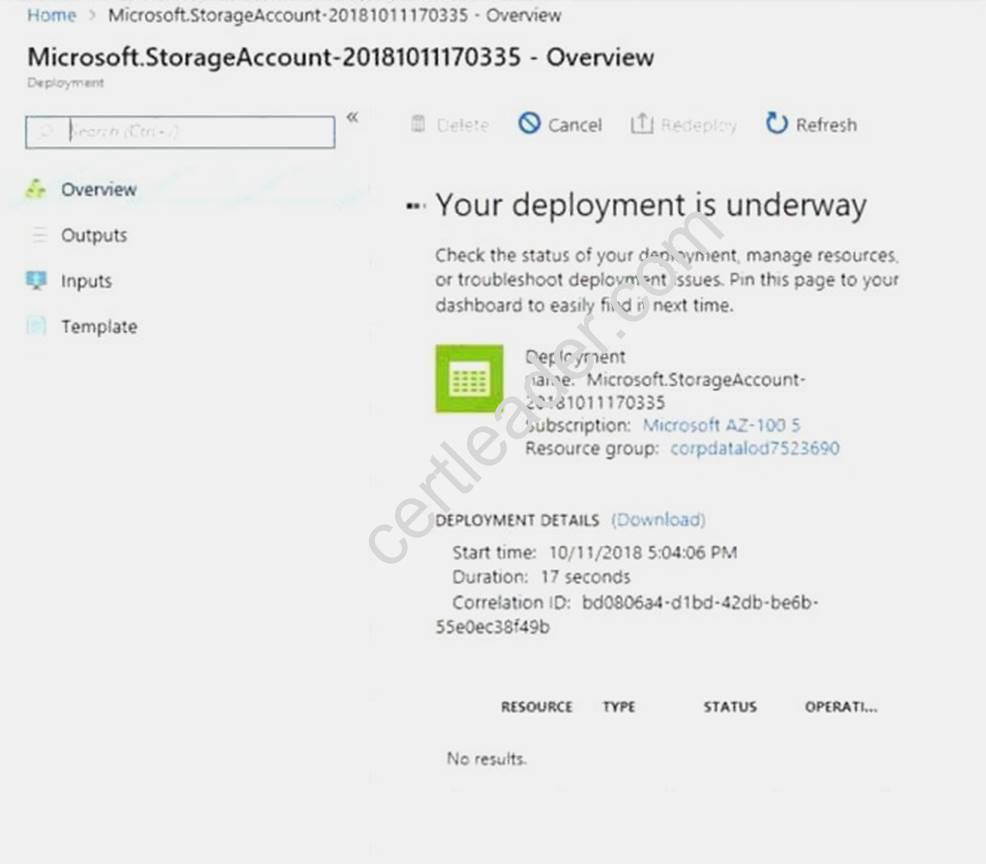
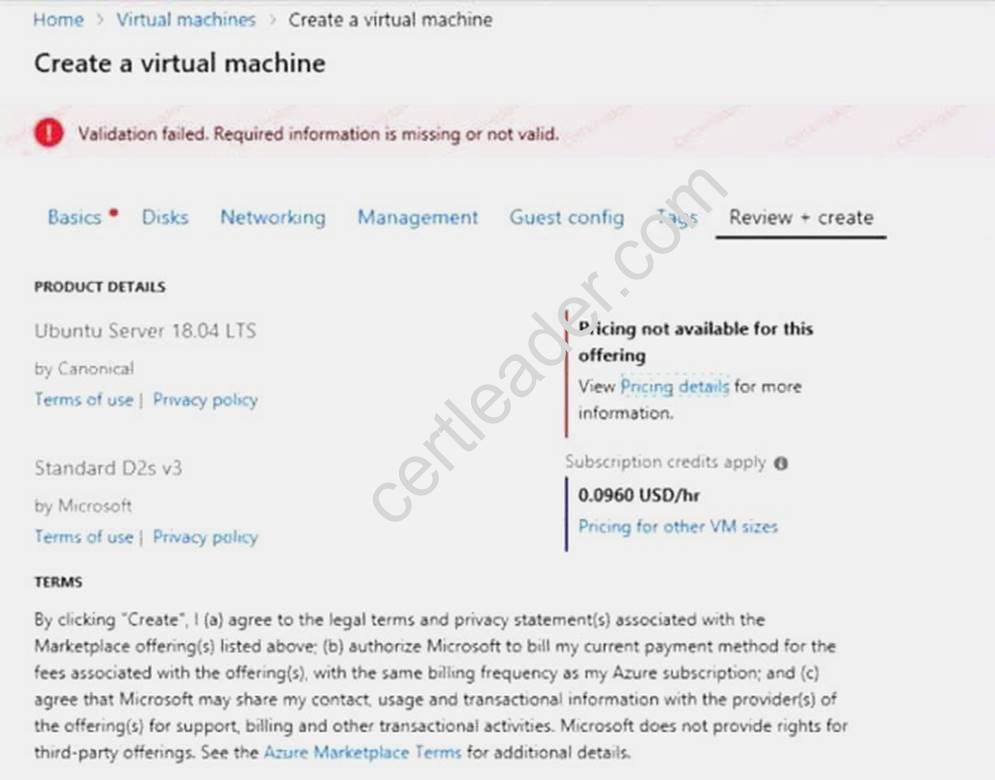
You plan to move backup files and documents from an on-premises Windows file server to Azure Storage. The backup files will be stored as blobs.
You need to create a storage account named corpdata7523690n2. The solution must meet the following requirements:
Ensure that the documents are accessible via drive mappings from Azure virtual machines that run Windows Server 2021.
Provide the highest possible redundancy for the documents. Minimize storage access costs.
What should you do from the Azure portal?
Answer:
Explanation: Step 1: In the Azure portal, click All services. In the list of resources, type Storage Accounts. As you begin typing, the list filters based on your input. Select Storage Accounts.
Step 2: On the Storage Accounts window that appears, choose Add. Step 3: Select the subscription in which to create the storage account.
Step 4: Under the Resource group field, select Create New. Create a new Resource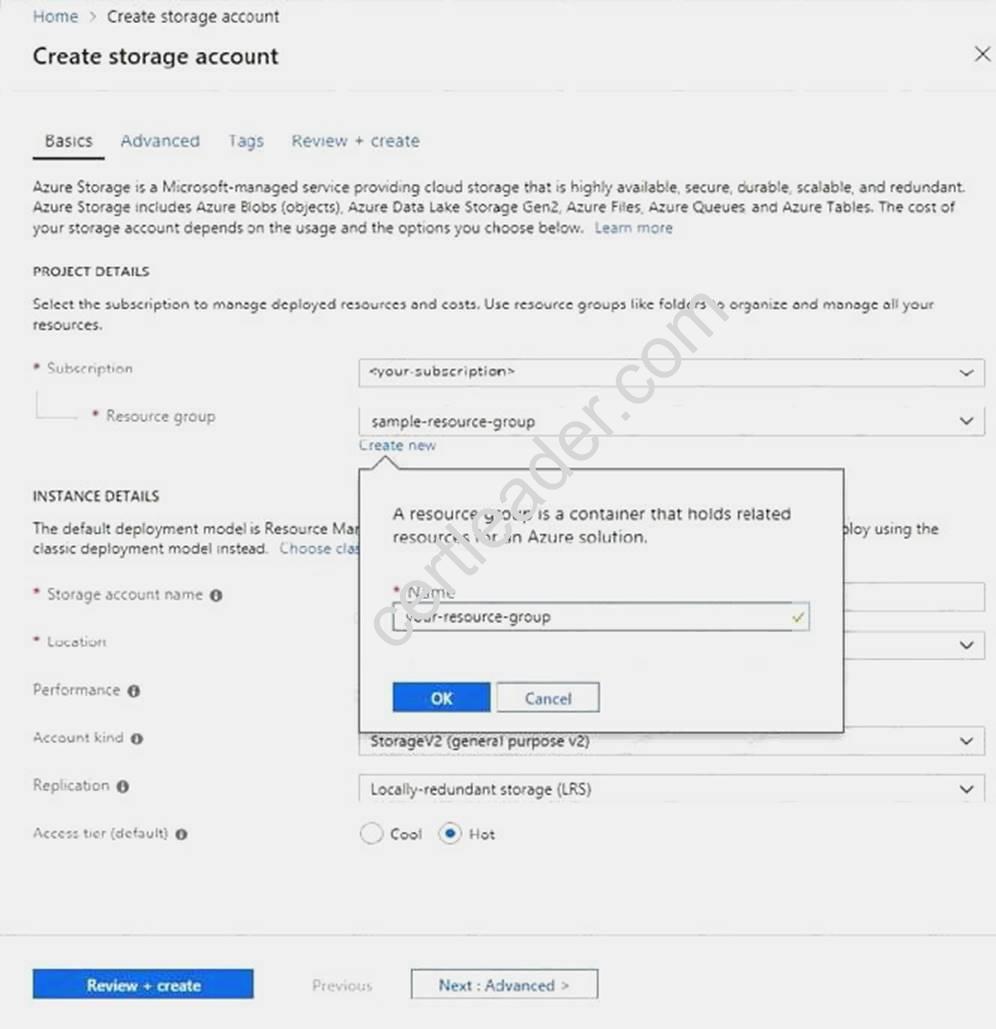
Step 5: Enter a name for your storage account: corpdata7523690n2
Step 6: For Account kind select: General-purpose v2 accounts (recommended for most scenarios) General-purpose v2 accounts is recommended for most scenarios. . General-purpose v2 accounts deliver the lowest per-gigabyte capacity prices for Azure Storage, as well as industry-competitive transaction prices.
Step 7: For replication select: Read-access geo-redundant storage (RA-GRS)
Read-access geo-redundant storage (RA-GRS) maximizes availability for your storage account. RA-GRS provides read-only access to the data in the secondary location, in addition to geo-replication across
two regions.
References:
https://docs.microsoft.com/en-us/azure/storage/common/storage-quickstart-create-account https://docs.microsoft.com/en-us/azure/storage/common/storage-account-overview
NEW QUESTION 12
You need to deploy an application gateway named appgwl015 to meet the following requirements: Load balance internal IP traffic to the Azure virtual machines connected to subnet0.
Provide a Service Level Agreement (SLA) of 99.99 percent availability for the Azure virtual machines. What should you do from the Azure portal?
Answer:
Explanation: Step 1:
Click New found on the upper left-hand corner of the Azure portal. Step 2:
Select Networking and then select Application Gateway in the Featured list. Step 3:
Enter these values for the application gateway: appgw1015 - for the name of the application gateway. SKU Size: Standard_V2
The new SKU [Standard_V2] offers autoscaling and other critical performance enhancements.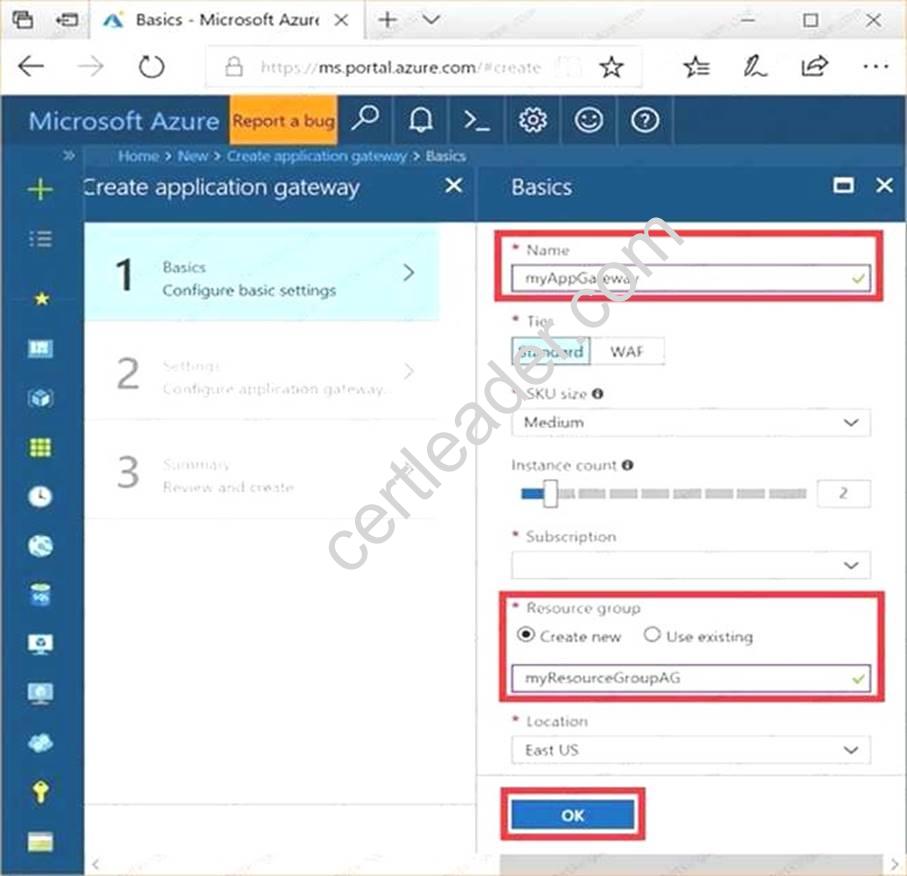
Step 4:
Accept the default values for the other settings and then click OK. Step 5:
Click Choose a virtual network, and select subnet0.
References:
https://docs.microsoft.com/en-us/azure/application-gateway/application-gateway-create-gatewayportal
NEW QUESTION 13
HOT SPOT
You have an Azure subscription named Subscription1 that contains a virtual network named VNet1. You add the users in the following table.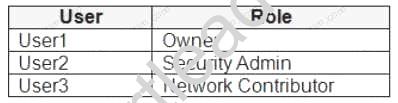
Which user can perform each configuration? To answer, select the appropriate options in the answer area.
NOTE: Each correct selection is worth one point.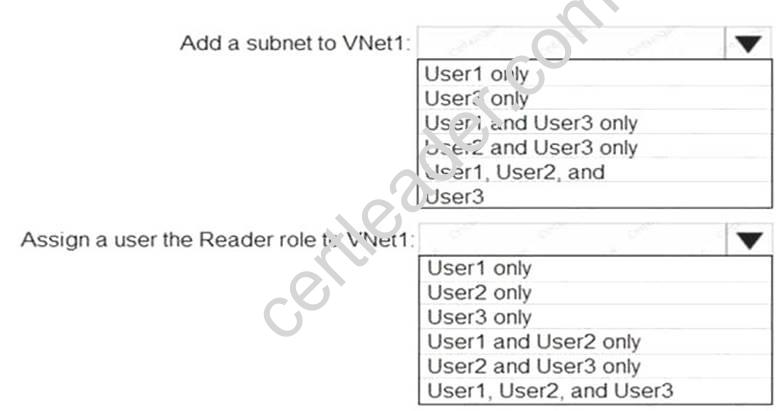
Answer:
Explanation: Box 1: User1 and User3 only.
The Owner Role lets you manage everything, including access to resources. The Network Contributor role lets you manage networks, but not access to them. Box 2: User1 and User2 only
The Security Admin role: In Security Center only: Can view security policies, view security states, edit security policies, view alerts and recommendations, dismiss alerts and recommendations.
References:
https://docs.microsoft.com/en-us/azure/role-based-access-control/built-in-roles
NEW QUESTION 14
You need to define a custom domain name for Azure AD to support the planned infrastructure. Which domain name should you use?
- A. Join the client computers in the Miami office to Azure AD.
- B. Add http://autologon.microsoftazuread-sso.com to the intranet zone of each client computer in the Miami office.
- C. Allow inbound TCP port 8080 to the domain controllers in the Miami office.
- D. Install Azure AD Connect on a server in the Miami office and enable Pass-through Authentication
- E. Install the Active Directory Federation Services (AD FS) role on a domain controller in the Miamioffic
Answer: BD
Explanation: Every Azure AD directory comes with an initial domain name in the form of domainname.onmicrosoft.com. The initial domain name cannot be changed or deleted, but you can add your corporate domain name to Azure AD as well. For example, your organization probably has other domain names used to do business and users who sign in using your corporate domain name. Adding custom domain names to Azure AD allows you to assign user names in the directory that are familiar to your users, such as ‘alice@contoso.com.’ instead of 'alice@domain name.onmicrosoft.com'.
Scenario:
Network Infrastructure: Each office has a local data center that contains all the servers for that office. Each office has a dedicated connection to the Internet.
Humongous Insurance has a single-domain Active Directory forest named humongousinsurance.com Planned Azure AD Infrastructure: The on-premises Active Directory domain will be synchronized to Azure AD.
References: https://docs.microsoft.com/en-us/azure/active-directory/fundamentals/add-customdomain
NEW QUESTION 15
Note: This questions is part of a series of questions that present the same scenario. Each questions in the series contains a unique solution that might meet the stated goals. Some questions sets might have more than one correct solution, while others might not have a correct solution. After you answer a questions in this section, you will NOT be able to return to it. As a result, these questions will not appear in the review screen.
Your company registers a domain name of contoso.com.
You create an Azure DNS zone named contoso.com, and then you add an A record to the zone for a host named www that has an IP address of 131.107.1.10.
You discover that Internet hosts are unable to resolve www.contoso.com to the 131.107.1.10 IP address.
You need to resolve the name resolution issue.
Solution: You create a PTR record for www in the contoso.com zone. Does this meet the goal?
- A. Yes
- B. No
Answer: B
Explanation: Modify the Name Server (NS) record.
References: https://docs.microsoft.com/en-us/azure/dns/dns-delegate-domain-azure-dns
NEW QUESTION 16
HOT SPOT
You have an Azure subscription.
You need to implement a custom policy that meet the following requirements:
*Ensures that each new resource group in the subscription has a tag named organization set to a value of Contoso.
*Ensures that resource group can be created from the Azure portal.
*Ensures that compliance reports in the Azure portal are accurate.
How should you complete the policy? To answer, select the appropriate options in the answers area.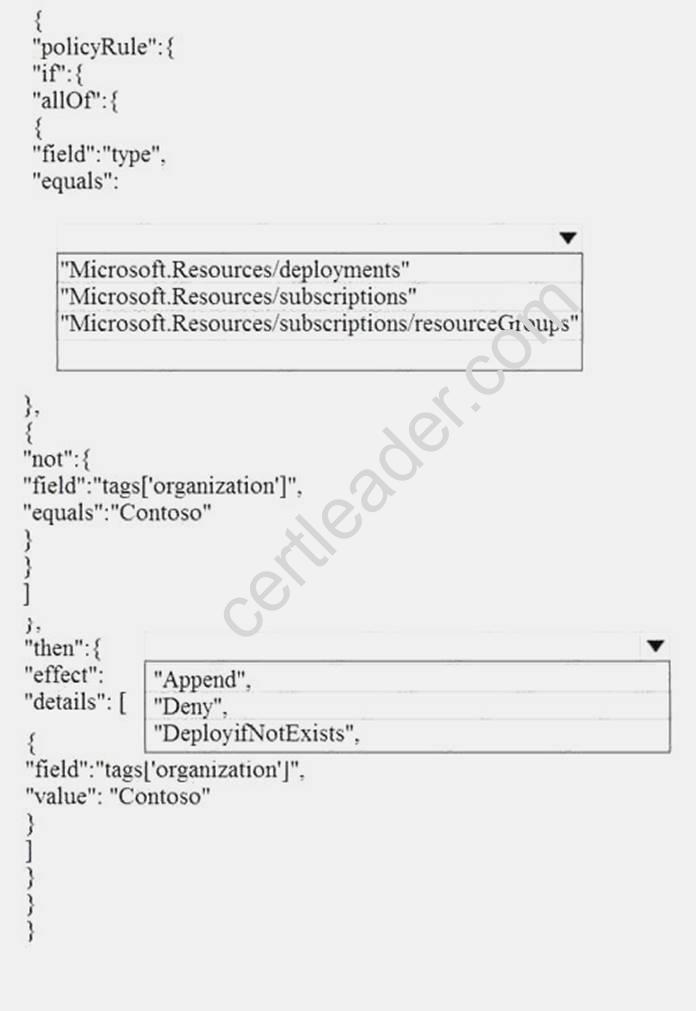
Answer:
Explanation: References: https://docs.microsoft.com/en-us/azure/governance/policy/concepts/definitionstructure
NEW QUESTION 17
You have an Azure subscription that contains three virtual networks named VNet1, VNet2, VNet3.
VNet2 contains a virtual appliance named VM2 that operates as a router.
You are configuring the virtual networks in a hub and spoke topology that uses VNet2 as the hub network.
You plan to configure peering between VNet1 and VNet2 and between VNet2 and VNet3. You need to provide connectivity between VNet1 and VNet3 through VNet2.
Which two configurations should you perform? Each correct answer presents part of the solution. NOTE: Each correct selection is worth one point.
- A. On the peering connections, allow forwarded traffic.
- B. On the peering connections, allow gateway transit.
- C. Create route tables and assign the table to subnets.
- D. Create a route filter.
- E. On the peering connections, use remote gateway
Answer: BE
Explanation: Allow gateway transit: Check this box if you have a virtual network gateway attached to this virtual network and want to allow traffic from the peered virtual network to flow through the gateway. The peered virtual network must have the Use remote gateways checkbox checked when setting up the peering from the other virtual network to this virtual network.
References:
https://docs.microsoft.com/en-us/azure/virtual-network/virtual-network-managepeering# requirements-and-constraints
NEW QUESTION 18
HOT SPOT
You have an Azure subscription named Subscription1.
In Subscription1, you create an Azure file share named share1.
You create a shared access signature (SAS) named SAS1 as shown in the following exhibit.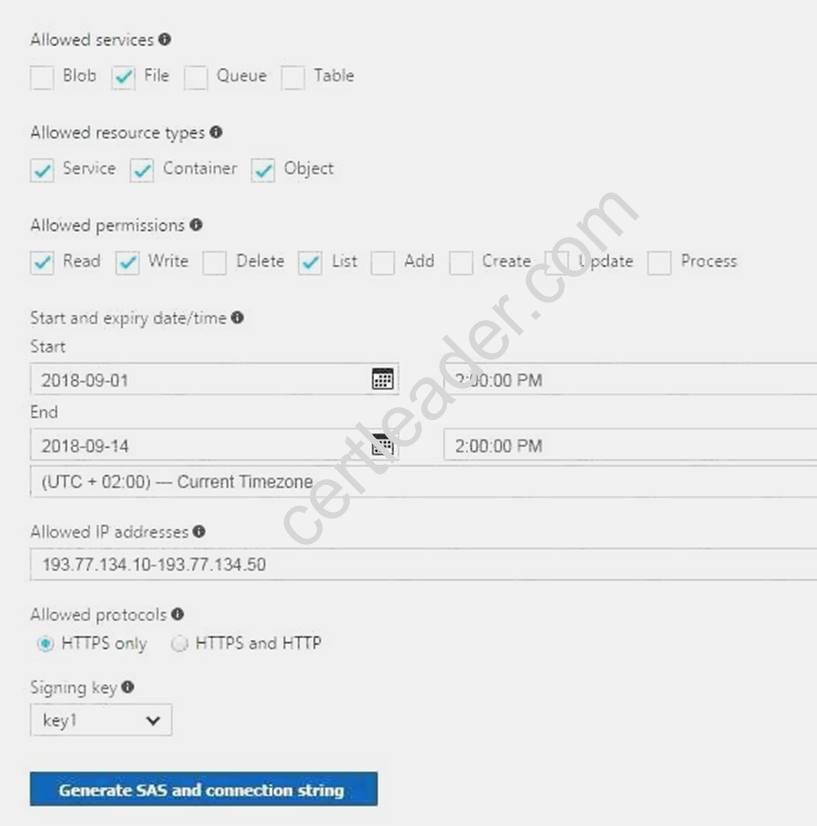
To answer, select the appropriate options in the answer area. NOTE: Each correct selection is worth one point.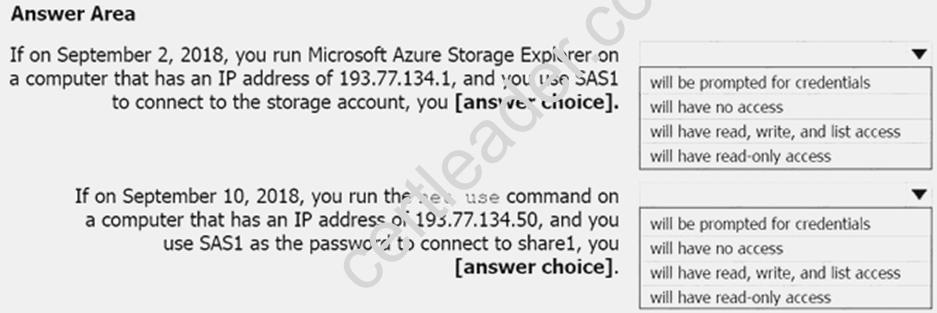
Answer:
Explanation: Box 1: Will be prompted for credentials
Azure Storage Explorer is a standalone app that enables you to easily work with Azure Storage data on Windows, macOS, and Linux. It is used for connecting to and managing your Azure storage accounts.
Box 2: Will have read, write, and list access
The net use command is used to connect to file shares. References:
https://docs.microsoft.com/en-us/azure/storage/common/storage-dotnet-shared-access-signaturepart- https://docs.microsoft.com/en-us/azure/vs-azure-tools-storage-manage-with-storageexplorer? tabs=windows
Recommend!! Get the Full AZ-102 dumps in VCE and PDF From 2passeasy, Welcome to Download: https://www.2passeasy.com/dumps/AZ-102/ (New 195 Q&As Version)