Microsoft 70-697 Dumps 2021
Exam Code: 70-697 (70 697 exam questions), Exam Name: Configuring Windows Devices, Certification Provider: Microsoft Certifitcation, Free Today! Guaranteed Training- Pass 70-697 Exam.
Check 70-697 free dumps before getting the full version:
NEW QUESTION 1
A company has an Active Directory Domain Services (AD DS) domain with Windows 10 Enterprise client computers.
You need to minimize the amount of Trusted Platform Module (TPM) authorization information that is stored in the registry.
What should you do?
- A. Create a Group Policy object (GPO) that sets the Configure the level of TPM owner authorization information available to operating system policy setting to None.
- B. Enable Platform Configuration Register indices (PCRs) 0, 2, 4, and 11 for the Configure TPM validation profile for native UEFI firmware configuration policy setting.
- C. Create a Group Policy object (GPO) that disables the Configure the level of TPM owner authorization information available to operating system policy setting.
- D. Create a Group Policy object (GPO) that enables the Turn on TPM Local Encryption policy setting.
Answer: A
Explanation: References:
https://docs.microsoft.com/en-us/previous-versions/windows/it-pro/windows-8.1-and-8/jj679889(v=ws.11)#BKMK_tpmgp_oauthos
NEW QUESTION 2
A company has an Active Directory Domain Services (AD DS) domain. All client computers run Windows 10
Enterprise and are joined to the domain. You have the following requirements:
Ensure that files in shared network folders are available offline. Minimize all data access times.
Reduce network bandwidth usage.
You need to configure Group Policy settings to meet the requirements. What should you do first?
- A. Enable the Synchronize all offline files when logging on policy setting.
- B. Enable and configure the Configure slow-link mode policy setting.
- C. Enable the Enable file synchronization on costed networks policy setting.
- D. Enable and configure the Specify administratively assigned Offline Files policy setting.
Answer: C
Explanation: References: https://docs.microsoft.com/en-us/previous-versions/windows/it-pro/windows-server-2012-R2-and-2012/hh968298(v=ws.11)
NEW QUESTION 3
You administer a corporate network. Employees use docking stations for Windows 10 devices when the employees are working in their offices.
The wireless adapters of the devices are connected to a specific network. The docking stations are connected to a separate network that uses twisted pair cabling.
You need to ensure that the devices can access all resources from each network using either network adapter.
What should you do?
- A. Configure a network bridge.
- B. Configure Internet Connection Sharing (ICS).
- C. Configure VPN Reconnect.
- D. Turn on Network Discovery.
Answer: C
NEW QUESTION 4
You have a Windows 10 Enterprise computer. The computer has 500 gigabytes (GB) of free disk space.
You receive a request to extract several files from a 200-GB virtual hard drive (VHD) file. You copy the file to your computer.
You need to access data from the VHD file. What should you do?
- A. From PowerShell, run the Get-Volume cmdlet.
- B. From Windows Explorer, right-click the VHD file and mount the disk.
- C. From Disk Management, select Create VHD and point to the VHD file.
- D. From Disk Management, rescan the disks.
Answer: B
Explanation: References: https://www.howtogeek.com/51174/mount-and-unmount-a-vhd-file-in-windows-explorer-via-a-rightclick/
NEW QUESTION 5
You have a computer that runs Windows 10 and has BitLocker Drive Encryption (BitLocker) configured.
You need to change the BitLocker PIN for the drive. What should you run?
- A. the bitsadmin.exe command
- B. the Enable–BitLocker cmdlet
- C. the Add–BitLockerKeyProtector cmdlet
- D. the Set–PcsvDeviceUserPassword cmdlet
Answer: C
NEW QUESTION 6
DRAG DROP
You support Windows 10 Enterprise client computers. Company policy requires that Microsoft Outlook 2010 be the only mail client allowed and supported.
You collect software metering data and discover that several users are running other third-party mail clients.
You need to block the third-party mail client from running on the computers. All other applications should be allowed.
Which three actions should you perform in sequence? To answer, move the appropriate actions from the list of actions to the answer area and arrange them in the correct order.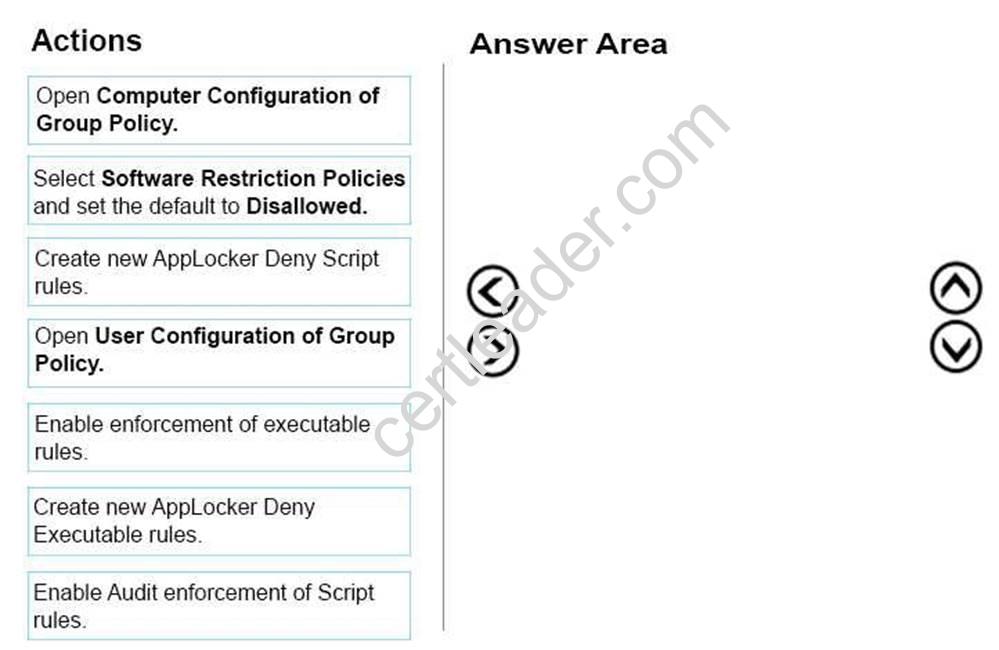
Answer:
Explanation: 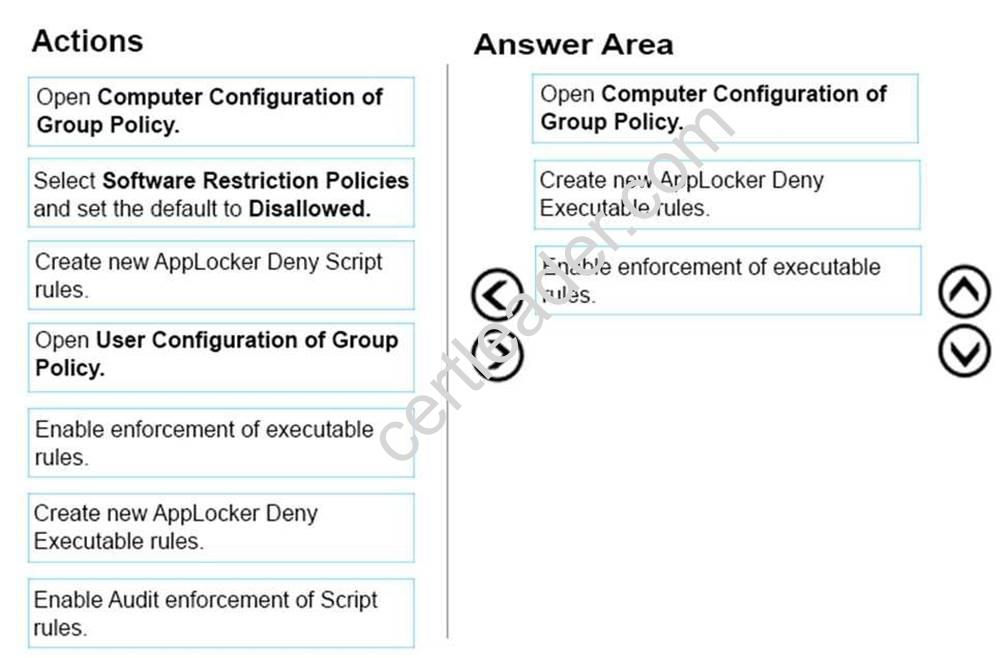
NEW QUESTION 7
A company has Windows 10 Enterprise client computers. A client computer named COMPUTER1 has a shared folder named Folder1 located in the user’s Downloads folder. Folder1 is shared only with employees in the Marketing department. All Marketing employees can connect to Folder1 from their client computers.
A Marketing employee is unable to connect to Folder1 from a legacy device that is not compatible with the Windows 10 Enterprise default sharing settings. The device is able to connect to resources on other client computers.
You need to configure COMPUTER1 to allow the device to connect to Folder1. Which setting should you enable?
- A. Enable file sharing for devices that use 40- or 56-bit encryption
- B. Turn off password protected sharing
- C. Use 128-bit encryption to help protect file sharing connections
- D. Turn off network discovery
- E. Turn on sharing so anyone with network access can read and write files in the Public folders.
Answer: A
Explanation: References: http://www.tenforums.com/tutorials/51024-file-sharing-encryption-level-change-windows-10-a.html
NEW QUESTION 8
You support Windows 10 Enterprise computers that are members of an Active Directory domain. Recently, several domain user accounts have been configured with super-mandatory user profiles.
A user reports that she has lost all of her personal data after a computer restart.
You need to configure the user’s computer to prevent possible user data loss in the future. What should you do?
- A. Remove the .man extension from the user profile name.
- B. Configure FolderRedirection by using the domain group policy.
- C. Configure the user’s documents library to include folders from network shares.
- D. Add the .dat extension to the user profile name.
Answer: B
Explanation: Folder Redirection allows administrators to redirect the path of a folder to a new location, which can be a folder on the local computer or a directory on a network file share. Users can then work with documents on a server as if the documents were based on a local drive, but are available to the user from any computer on the network. Folder Redirection can be found under Windows Settings in the console tree by editing
domain-based Group Policy via the Group Policy Management Console (GPMC).
NEW QUESTION 9
DRAG DROP
Your network contains an Active Directory domain and 100 Windows 10 Enterprise client computers. All software is deployed by using Microsoft Application Virtualization (App-V) 5.0.
Users are NOT configured as local administrators. Your company purchases a subscription to Microsoft Office 365 that includes Office 365 ProPlus.
You need to create an App-V package for Office 365 ProPlus. Which three actions should you perform in sequence?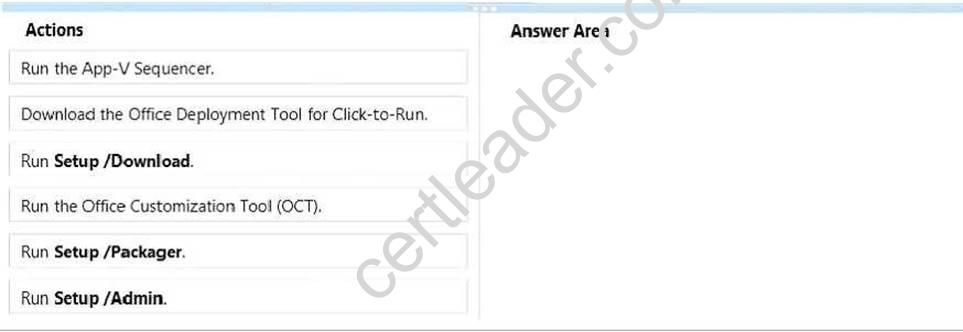
Answer:
Explanation: Step 1: First we download the Office Deployment Tool for Click-to Run.
Step 2: We use the tool to download files to create an Office 15 installation with the Run Setup/Download command.
Step 3: Finally we produce the App-V package with by running the Setup /Packager. The Office Deployment Tool allows the administrator to customize and manage Office 2013 Volume License or Office 365 Click-to-Run deployments.
The Office Deployment Tool Setup runs the following tasks:
Setup /Download – Downloads files to create an Office 15 installation Setup /Configure – Adds, removes, or configures an Office 15 installation Setup/Packager – Produces an Office 15 App-V package
NEW QUESTION 10
Your company has a standard power scheme for the sales team. You are replacing a laptop for a sales associate.
You import the power scheme onto the new laptop. You need to apply the power scheme.
What should you do?
- A. Modify the power scheme under Power and Sleep settings.
- B. Run the gpupdate /F command.
- C. Run the powercfg /S command.
- D. Modify the advanced power settings.
Answer: C
NEW QUESTION 11
А company has Windows 10 Enterprise client computers. The corporate network is configured for IPv4 and Ipv6.
You need to disable Media Sensing for IPv6 on the client computers without affecting IPv4 communications.
What should you do on each client computer?
- A. Run the Set-NetIPv4Protrocol Windows PowerShell cmdlet.
- B. Run the Disable-NetAdapterBinding Windows PowerShell cmdlet.
- C. Run the Set-NetIPv6Protocol Windows PowerShell cmdlet.
- D. Run the Disable-NetAdapter Windows PowerShell cmdlet.
Answer: C
Explanation: References: https://docs.microsoft.com/en-us/powershell/module/nettcpip/set-netipv6protocol?view=win10-ps
NEW QUESTION 12
You manage a corporate network. All servers run Windows Server 2021. All servers and client devices are joined to an Active Directory Domain Services (AD DS) domain named adatum.com.
The use of VPN servers
on the network is strictly prohibited.
Users must be able to access the corporate network in addition to Work Folders when they work at home on Windows 10 devices. You install, configure, and publish the certificate revocation list (CRL) for an internal Active Directory Certificate Services (AD CS) server.
You need to configure the environment to allow your users to register devices. Solution: You create a DNS A record of deviceregistration.adatum.com. You deploy Active Directory Federation
Services (AD FS) and point the DNS record to your AD FS server. You deploy a Web Application Proxy server for the clients to establish Internet connectivity for the device registration. Does the solution meet the goal?
- A. Yes
- B. No
Answer: B
Explanation: References: https://blog.nextxpert.com/2013/11/27/publishing-work-folders-with- web-application-proxy-2/
NEW QUESTION 13
You manage 50 computers that run Windows 10 Enterprise.
You have a Windows to Go workspace installed on a USB drive named USB1. You need to configure USB1 to meet the following requirements:
When you run Windows to Go from USB1, you can see the contents of the computer’s internal drives from File Explorer.
When you connect USB1 to a computer that runs Windows 10, you can automatically view the content of USB1 from FileExplorer.
In the table below, select the action that must be performed to achieve each requirement. NOTE: Make only one selection in each column. Each correct selection is worth one point.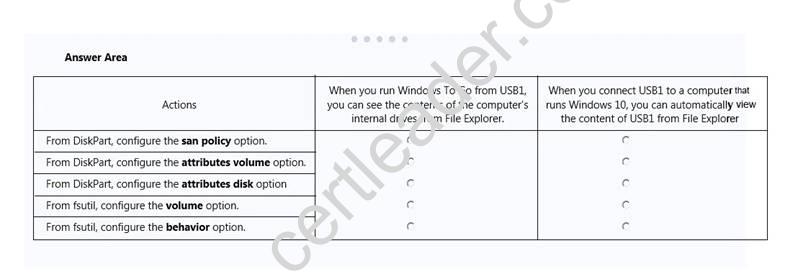
Answer:
Explanation: If you want to view the contents of the computer’s internal drives from File Explorer when you run Windows To Go from USB1, you have to launch an elevated command prompt, run disk part and then execute the List disk command. You now have to select the internal disk using the sel disk command, and then enter the online disk command.
Configuring the attributes volume option from DiskPart allows you to display, set, or clear the attributes of a
volume.
NEW QUESTION 14
DRAG DROP
You administer Windows 10 Enterprise computers. Your company has a team of technical writers that is preparing technical manuals and help files. The team manager wants to ensure that the technical writers are able to restore any documents that been modified within the last year.
You need to ensure that the technical writers can restore Microsoft Word files to any previous versions for up to one year.
Which three actions should you perform in sequence?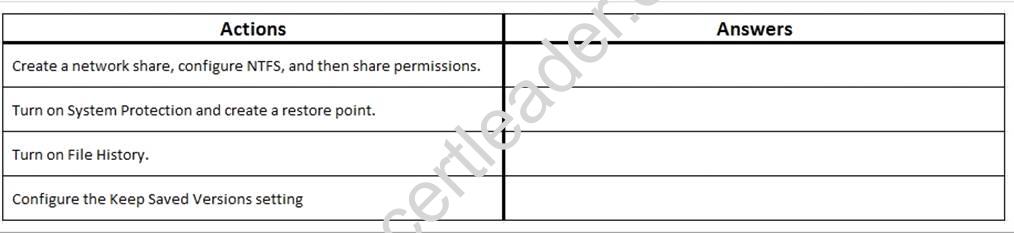
Answer:
Explanation: We need a NTFS folder.
In the Advanced settings we can configure the Keep SavedVersions settings. Finally we turn on File History.
NEW QUESTION 15
You administer Windows 10 devices for an organization. All devices are joined to the domain contoso.com. All network printers are managed in the domain. You have a group named Printer Administrators. You grant this group permissions to manage all printer settings. You add all mobile users to the Printer Administrators group.
Each office locations has Web Services for Devices (WSD) printers available. Managers report that network printers are not available when they move between office locations. Managers
must be able to use printers in each office location.
You need to troubleshoot the manager's computer for printing issues.
Which three actions should you perform? Each correct answer is part of the solution. NOTE: Each correct selection is worth one point.
- A. Ensure that the network type is set to domain.
- B. Ensure that the network type is set to public.
- C. Ensure that File and Printer Sharing is turned on.
- D. Ensure that Network Discovery is turned on.
- E. Update the Printing Preferences settings.
Answer: CDE
Explanation: References: http://support.brother.com/g/b/faqend.aspx?c=us_ot&lang=en&prod=p750weus&faqid=faqp00100003_000 https://support.microsoft.com/en-sg/help/4028622/windows-10-how-to-set-a-default- printer
NEW QUESTION 16
You have a computer that has the disk configuration shown in the following table: You need to configure a storage space that will provide data redundancy if a disk fails.
The solution must minimize impact if a disk fails.
Which resiliency type should you choose?
- A. three-way mirror
- B. two-way mirror
- C. simple
- D. parity
Answer: B
Explanation: References:
https://social.technet.microsoft.com/wiki/contents/articles/11382.storage-spaces- frequently-asked- sfaq.
aspx#What_types_of_drives_can_I_use_with_Storage_Spaces
NEW QUESTION 17
Your network contains an Active Directory domain. All client computers run Windows 10 Enterprise.
Your company uses virtual smart cards.
A user named User1 requires a virtual smart card on a new client computer named Computer1.
Which two actions should you perform? Each correct answer presents part of the solution.
NOTE: Each correct selection is worth one point.
- A. Run the tpmvscmgr.exe command.
- B. Enroll Computer1 for a certificate.
- C. Run the Enable-BitLocker cmdlet.
- D. Enroll User1 for a certificate.
Answer: AD
NEW QUESTION 18
DRAG DROP
You are the system administrator for a company. You need to deploy Windows to Go for all users. Which four actions should you perform in sequence? To answer, move the appropriate actions from the list of actions to the answer area and arrange them in the correct order.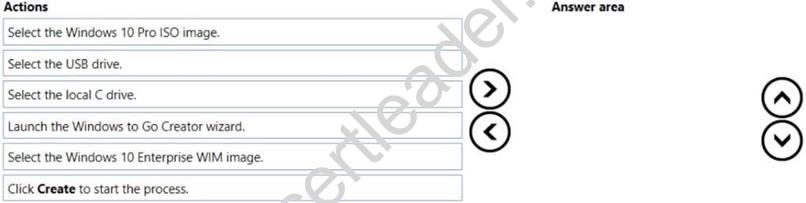
Answer:
Explanation: 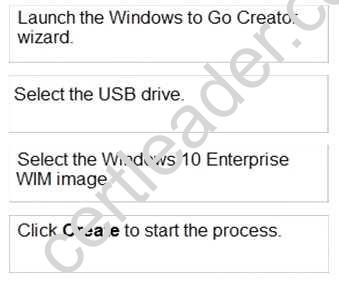
Thanks for reading the newest 70-697 exam dumps! We recommend you to try the PREMIUM prep-labs.com 70-697 dumps in VCE and PDF here: https://www.prep-labs.com/dumps/70-697/ (338 Q&As Dumps)