Microsoft 70-697 Dumps Questions 2021
Want to know 70 697 pdf download features? Want to lear more about mcsa microsoft windows 10 study guide exam 70 697 pdf experience? Study 70 697 vce. Gat a success with an absolute guarantee to pass Microsoft 70-697 (Configuring Windows Devices) test on your first attempt.
Check 70-697 free dumps before getting the full version:
NEW QUESTION 1
You are the system administrator for a company. You have a developer that uses Storage Spaces on their Windows 10 device. The developer has a storage pool that contains five drives. You add four drives to the existing pool on the developer's computer.
You need to ensure that the developer can quickly use the space of the new drives. Which command or Windows PowerShell cmdlet should you run?
- A. Optimize-StoragePool
- B. Enable-StorageHighAvailability
- C. fsutil
- D. defrag
- E. diskpart
Answer: A
Explanation: References: https://docs.microsoft.com/en-us/powershell/module/storage/optimize-storagepool?view=win10-ps
NEW QUESTION 2
You manage a client Windows 10 Enterprise computer named Computer1. You have a OneDrive synchronized folder that contains .pdf files.
You need to ensure that you can restore previous versions of the .pdf files. What should you do?
- A. Enable File History.
- B. Configure System Restore.
- C. Configure Computer1 as a trusted PC.
- D. Enable Sync your settings on Computer1.
Answer: A
NEW QUESTION 3
You provide IT support for a small business.
A member of the team needs the ability to use Remote Desktop and VPN to access a desktop computer from a laptop when traveling. This desktop computer is running Windows 10 Enterprise, while the laptop is running Windows 8.
You need to set up a secure Remote Desktop connection on the desktop computer. Which two actions should you perform? Each correct answer presents part of the solution.
NOTE: Each correct selection is worth one point.
- A. Make the user account a standard user.
- B. Allow remote connections.
- C. Require Network Level Authentication.
- D. Disable Remote Assistance connections.
Answer: BC
Explanation: References: https://docs.microsoft.com/en-us/windows-server/remote/remote-desktop-services/clients/remotedesktop-allow-access
NEW QUESTION 4
DRAG DROP
You administer Windows 10 Enterprise tablets and virtual desktop computers that are joined to an Active Directory domain.
Your company provides virtual desktop computers to all users. Employees in the sales department also use tablets, sometimes connected to the company network and sometimes disconnected from the company network.
You want sales department employees to have the same personal data, whether they are using their virtual desktop or their tablets.
You need to configure the network environment to meet the requirements.
Which three actions should you perform in sequence? To answer, move the appropriate actions from the lust of actions to the answer area and arrange them in the correct order. More than one order to answer choices may be correct. You will receive credit for any of the correct orders you select.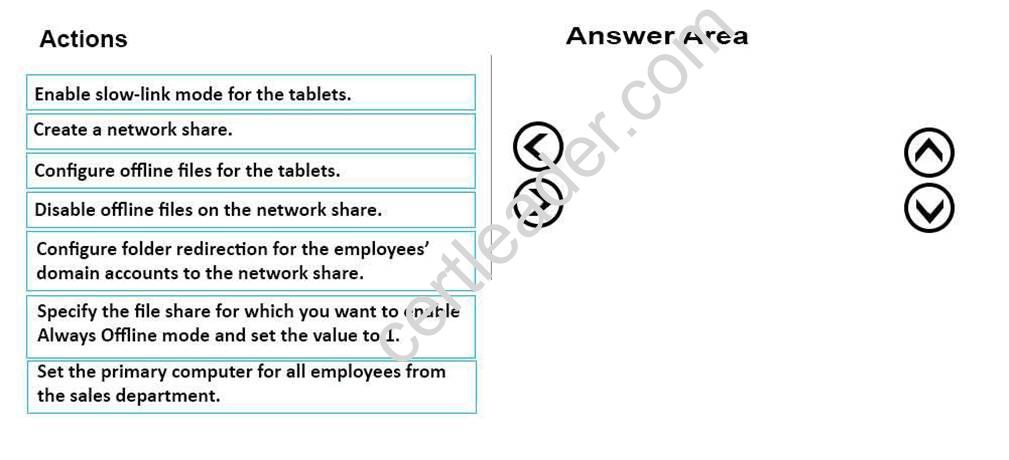
Answer:
Explanation: Create a network share.
Configure offline files for the tablets.
Configure folder redirection for the employees’ domain accounts to the network share.
References: https://technet.microsoft.com/en-us/library/cc732275(v=ws.11).aspx
NEW QUESTION 5
Your Windows 10 Enterprise work computer is a member of an Active Directory domain. You use your domain account to log on to the computer. You use your Microsoft account to log on to a home laptop.
You want to access Windows 10 Enterprise apps from your work computer by using your Microsoft account. You need to ensure that you are able to access the Windows 10 Enterprise apps on your work computer by
logging on only once.
What should you do?
- A. Add the Microsoft account as a user on your work computer.
- B. Enable Remote Assistance on your home laptop.
- C. Connect your Microsoft account to your domain account on your work computer.
- D. Install SkyDrive for Windows on both your home laptop and your work computer.
Answer: C
Explanation: You can connect your Microsoft account to your domain account on your work computer. This will enable you to sign in to your work computer with your Microsoft account and access the same resources that you would access if you were logged in with your domain account.
When you connect your Microsoft account to your domain account, you can sync your settings and preferences between them. For example, if you use a domain account in the workplace, you can connect your Microsoft account to it and see the same desktop background, app settings, browser history and favorites, and other Microsoft account settings that you see on your home PC.
Topic 2, Plan desktop and device deployment
NEW QUESTION 6
You have five computers that run Windows 10. The computers are used for testing and cannot connect to the Internet. You are the only user who uses the computers. All of the computers are members of the same domain.
One of the computers contains a folder named Folder1.
You need to ensure that you can access Folder1 from any of the computers. What should you configure?
- A. HomeGroup settings
- B. OneDrive for Business
- C. NTFS permissions
- D. Encrypting File System (EFS) settings
- E. share permissions
- F. application control policies
- G. account policies
- H. software restriction policies
Answer: A
Explanation: References: https://www.teamknowhow.com/kit-guide/computing/laptops/dell/inspiron-13-5000/how-to-set-upfile-sharing-on-windows-10
NEW QUESTION 7
You administer Windows 10 Enterprise laptop and desktop computers. Your company uses Active Directory Domain Services (AD DS) and Active Directory Certificate Services (AD CS).
Your company decides that access to the company network for all users must be controlled by two-factor authentication.
You need to configure the computers to meet this requirement. What should you do?
- A. Install smart card readers on all computer
- B. Issue smart cards to all users.
- C. Enable the Password must meet complexity requirements policy settin
- D. Instruct users to logon by typing their user principal name (UPN) and their strong password.
- E. Create an Internet Protocol security (IPsec) policy on each Windows 10 Enterprise computer to encrypt traffic to and from the domain controller
- F. Issue photo identification to all user
- G. Instruct all users to create and use a picture password.
Answer: A
Explanation: Smart cards contain a microcomputer and a small amount of memory, and they provide secure, tamper-proof storage for private keys and X.509 security certificates.
A smart card is a form of two-factor authentication that requires the user to have a smart card and know the PIN to gain access to network resources.
NEW QUESTION 8
You have a computer that runs Windows 10.
You need to block all outbound and inbound communications that occur over TCP 9997, TCP 9999, and TCP 4000.
What is the minimum number of rules that you must create?
- A. 1
- B. 2
- C. 3
- D. 6
Answer: D
Explanation: References: https://technet.microsoft.com/en-us/library/dd421709(v=ws.10).aspx
NEW QUESTION 9
You administer a group of 10 client computers that run Windows 10. The client computers are members of a local workgroup. Employees log on to the client computers by using their Microsoft accounts.
The company plans to use Windows BitLocker Drive Encryption. You need to back up the BitLocker recovery key.
Which two options can you use? (Each correct answer presents a complete solution. Choose two.)
- A. Save the recovery key to a file on the BitLocker-encrypted drive.
- B. Save the recovery key in the Credential Store.
- C. Save the recovery key to OneDrive.
- D. Print the recovery key.
Answer: CD
Explanation: C: The Bitlocker recovery key is saved in your OneDrive account in the cloud. D: The recovery key can be printed.
NEW QUESTION 10
DRAG DROP
A Windows 10 Enterprise computer has an external hard drive that contains selected folders that are encrypted by using EFS. The computer's internal hard drive fails.
You have a backup of the certificate and key.
You need to provide access to the encrypted folders on the external hard drive. Which four actions should you perform in sequence? To answer, move the appropriate four actions from the list of actions to the answer area and arrange them in the correct order.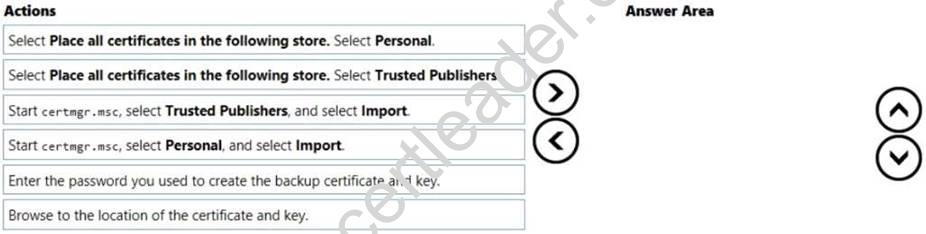
Answer:
Explanation: 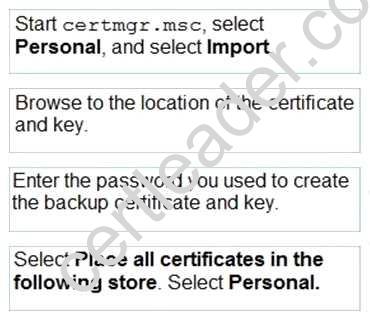
NEW QUESTION 11
You are a systems administrator for your company. The company has employees who work remotely by using a virtual private network (VPN) connection from their computers, which run Windows 10 Enterprise.
These employees use an application to access the company intranet database servers. The company recently decided to distribute the latest version of the application through using a public cloud.
Some users report that every time they try to download the application by using Internet Explorer, they receive a warning message that indicates the application could harm their computer.
You need to recommend a solution that prevents this warning message from appearing, without compromising the security protection of the computers. What should you do?
- A. Publish the application through a public file transfer protocol (FTP) site.
- B. Publish the application through an intranet web site.
- C. Instruct employees to disable the SmartScreen Filter from within the Internet Explorer settings.
- D. Digitally sign the application by using a trusted certificate, and then update the default App PackageDeployment policy on all computers.
Answer: D
NEW QUESTION 12
Note: This question is part of a series of questions that use the same or similar answer choices. An answer choice may be correct for more than one question in the series. Each question is independent of the other questions in this series. Information and details in a question apply only to that question.
You make a folder available for offline use.
Currently, the folder is synchronizing and will take approximately 15 minutes to complete.
You need to ensure that the files continue to synchronize when you close the lid of the computer.
Which Control Panel application should you use?
- A. System
- B. RemoteApp and Desktop Connections
- C. Work Folders
- D. Power Options
- E. Network and Sharing Center
- F. Credential Manager
- G. Phone and Modem
- H. Sync Center
Answer: D
NEW QUESTION 13
You have a Microsoft Intune subscription.
You create two compliance policies named Comp1 and Comp2. You create a configuration policy named ConfigPol1. The settings in each policy do not conflict with other policies.
Comp1 has low security settings. Comp2 has medium security settings. ConfigPol1 has high security settings.
You have a device named Device1. Device1 is a member of groups that have Comp1, Comp2 and ConfigPol1 applied.
You need to identify which policies with be enforced on Device1. What should you identify?
- A. Comp1 only
- B. Comp2 only
- C. Comp1, Comp2 and ConfigPol1
- D. Comp1 and Comp2 only
- E. Comp1 and ConfigPol1 only
- F. ConfigPol1 only
- G. Comp2 andConfigPol1 only
Answer: C
NEW QUESTION 14
You deploy several tablet PCs that run Windows 10 Enterprise.
You need to minimize power usage when the user presses the sleep button. What should you do?
- A. In Power Options, configure the sleep button setting to Sleep.
- B. In Power Options, configure the sleep button setting to Hibernate.
- C. Configure the active power plan to set the system cooling policy to passive.
- D. Disable the C-State control in the computer’s BIOS.
Answer: B
Explanation: We can minimize power usage on the tablet PCs by configuring them to use Hibernation mode. A computer in hibernation mode uses no power at all.
Hibernation is a power-saving state designed primarily for laptops. While sleep puts your work and settings in memory and draws a small amount of power, hibernation puts your open documents and programs on your hard disk, and then turns off your computer. Of all the power-saving states in Windows, hibernation uses the least amount of power. On a laptop, use hibernation when you know that you won't use your laptop for an extended period and won't have an opportunity to charge the battery during that time.
NEW QUESTION 15
HOTSPOT
You are an administrator of the desktop environment for an organization. All devices run Windows 10 Enterprise and are domain joined. AM users have home folders defined in Active Directory.
You must configure User Experience Virtualization (UE-V) to store application settings for users and ensure that settings follow them wherever they log on.
You need to configure the share permissions for the settings template catalog shared folder.
Which permission should you assign to each group? To answer, select the appropriate permission for the listed group in the answer area.
NOTE: Each correct selection is worth one point.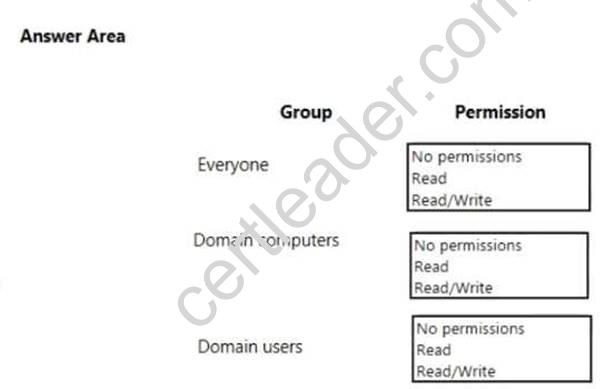
Answer:
Explanation: 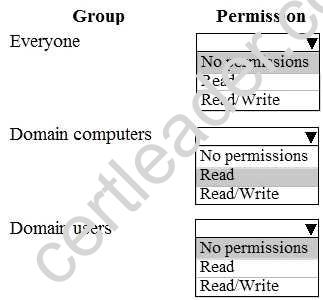
NEW QUESTION 16
You have a computer named Computer1 that runs Windows 10 Enterprise. Computer1 is configured to receive Windows updates from the Internet.
If a user is logged on to Computer1, you need to prevent Computer1 from automatically restarting without the logged on user’s consent after the installation of the Windows updates.
What should you do?
- A. Enable the Defer upgrades setting.
- B. Edit the Automatic App Update scheduled task.
- C. Configure the Choose how updates are delivered setting.
- D. Configure the Choose how updates are installed setting.
Answer: D
Explanation: In the Choose how updates are installed setting, you can use the drop-down menu to choose an option:
The Schedule a restart option will allow the user to choose when the computer is restarted. Of the answers given, this is the only way to prevent Computer1 from automatically restarting without the logged on user’s consent after the installation of the Windows updates.
NEW QUESTION 17
HOTSPOT
You have a computer named Computer1 that runs Windows 10 Enterprise. You plan to implement File History on Computer1.
You need to identify the interface that can be used to perform File History management actions.
Which interface should you identify for each action? To answer, select the appropriate options in the answer area.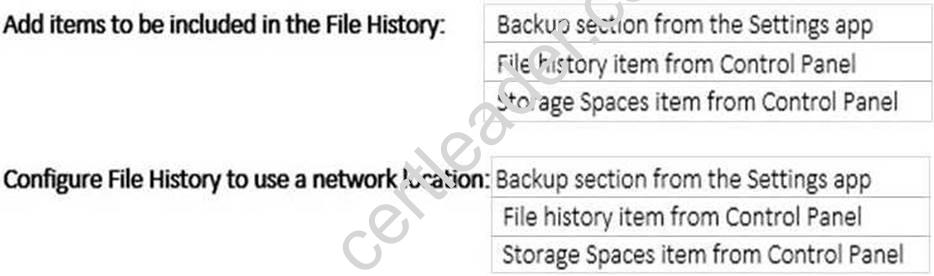
Answer:
Explanation: 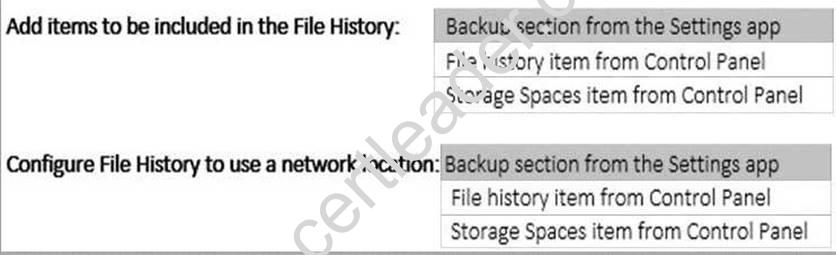
NEW QUESTION 18
Note: This question is part of a series of questions that use the same or similar answer choices. An answer choice may be correct for more than one question in the series. Each question is independent of the other questions in this series. Information and details in a question apply only to that question.
Your network contains a shared folder that is located at \server1data.
On a computer, you make the shared folder available for offline use.
You need to ensure that you have the most up-to-date version of the folder cached. Which Control Panel application should you use?
- A. Credential Manager
- B. Phone and Modem
- C. Work Folders
- D. System
- E. RemoteApp and DesktopConnections
- F. Network and Sharing Center
- G. Sync Center
- H. Power Options
Answer: C
P.S. Easily pass 70-697 Exam with 338 Q&As prep-labs.com Dumps & pdf Version, Welcome to Download the Newest prep-labs.com 70-697 Dumps: https://www.prep-labs.com/dumps/70-697/ (338 New Questions)