Red Hat EX200 Dumps Questions 2021
It is more faster and easier to pass the ex200 exam questions by using hitachi ex200. Immediate access to the redhat ex200 and find the same core area ex200 exam questions with professionally verified answers, then PASS your exam with a high score now.
Free demo questions for Red Hat EX200 Exam Dumps Below:
NEW QUESTION 1
Configure the NTP service in your system.
Answer:
Explanation: see explanation below. Explanation: system-config-date &
NEW QUESTION 2
Create a volume group, and set 16M as a extends. And divided a volume group containing 50 extends on volume group lv, make it as ext4 file system, and mounted automatically under /mnt/data.
Answer:
Explanation: # pvcreate /dev/sda7 /dev/sda8
# vgcreate -s 16M vg1 /dev/sda7 /dev/sda8
# lvcreate -l 50 -n lvm02
# mkfs.ext4 /dev/vg1/lvm02
# blkid /dev/vg1/lv1
# vim /etc/fstab
# mkdir -p /mnt/data
UUID=xxxxxxxx /mnt/data ext4 defaults 0 0
# vim /etc/fstab
# mount -a
# mount
(Verify)
NEW QUESTION 3
Create the user named eric and deny to interactive login.
Answer:
Explanation:  useradd eric passwd eric vi /etc/passwd eric:x:505:505::/home/eric:/sbin/nologin
Which shell or program should start at login time is specified in /etc/passwd file? By default, Redhat Enterprise Linux assigns the /bin/bash shell to the users. To deny the interactive login, you should write
/sbin/nologin or /bin/ false instead of login shell.
NEW QUESTION 4
Set cronjob for user natasha to do /bin/echo hiya at 14:23.
Answer:
Explanation: # crontab -e -u natasha
23 14 * * * /bin/echo hiya
wq!
NEW QUESTION 5
Your System is going to use as a Router for two networks. One Network is 192.168.0.0/24 and Another Network is 192.168.1.0/24. Both network's IP address has assigned. How will you forward the packets from
one network to another network?
Answer:
Explanation:  echo "1" >/proc/sys/net/ipv4/ip_forward vi /etc/sysctl.conf
net.ipv4.ip_forward = 1
If you want to use the Linux System as a Router to make communication between different networks, you need enable the IP forwarding. To enable on running session just set value 1 to
/proc/sys/net/ipv4/ip_forward. As well as automatically turn on the IP forwarding features on next boot set on /etc/sysctl.conf file.
NEW QUESTION 6
Change the logical volume capacity named vo from 190M to 300M. and the size of the floating range should set between 280 and 320. (This logical volume has been mounted in advance.)
Answer:
Explanation: # vgdisplay
(Check the capacity of vg, if the capacity is not enough, need to create pv , vgextend , lvextend)
# lvdisplay (Check lv)
# lvextend -L +110M /dev/vg2/lv2
# resize2fs /dev/vg2/lv2
mount -a
(Verify)
-------------------------------------------------------------------------------
(Decrease lvm)
# umount /media
# fsck -f /dev/vg2/lv2
# resize2fs -f /dev/vg2/lv2 100M
# lvreduce -L 100M /dev/vg2/lv2
# mount -a
# lvdisplay (Verify)
OR
# e2fsck -f /dev/vg1/lvm02
# resize2fs -f /dev/vg1/lvm02
# mount /dev/vg1/lvm01 /mnt
# lvreduce -L 1G -n /dev/vg1/lvm02
# lvdisplay (Verify)
NEW QUESTION 7
Create a backup
Create a backup file named /root/backup.tar.bz2, contains the content of /usr/local, tar must use bzip2 to compress.
Answer:
Explanation: cd /usr/local
tar –jcvf /root/backup.tar.bz2
mkdir /test
tar –jxvf /root/backup.tar.bz2 –C /test// Decompression to check the content is the same as the /usr/loca after If the questions require to use gzip to compress. change –j to –z.
NEW QUESTION 8
Create a 2G swap partition which take effect automatically at boot-start, and it should not affect the original swap partition.
Answer:
Explanation: # fdisk /dev/sda
p
(check Partition table)
n
(create new partition: press e to create extended partition, press p to create the main partition, and the extended partition is further divided into logical partitions) Enter
+2G
t
l
W
partx -a /dev/sda
partprobe
mkswap /dev/sda8
Copy UUID
swapon -a
vim /etc/fstab
UUID=XXXXX swap swap defaults 0 0
(swapon -s)
NEW QUESTION 9
Binding to an external validation server.
System server.domain11.example.com provides a LDAP validation service, your system should bind to this service as required:
Base DN of validation service is dc=example,dc=com
LDAP is used for providing account information and validation information Connecting and using the certification of http://server.domain11.example.com/pub/EXAMPLE-CA-CERT to encrypt
After the correct configuration, ldapuser1 can log into your system, it does not have HOME directory until you finish autofs questions, ldapuser1 password is password.
Answer:
Explanation: yum -y install sssd authconfig-gtk krb5-workstation authconfig-gtk // open the graphical interface
Modify user account database to ldap, fill up DN and LDAP SERVER as questions required, use TLS to encrypt connections making tick, write http://server.domain11.example.com/pub/EXAMPLE-CA-CERT to download ca, authentication method choose ldap password.
You can test if the ldapuser is added by the following command:
Id ldapuser1
Note: user password doesn’t not need to set
NEW QUESTION 10
Install a FTP server, and request to anonymous download from /var/ftp/pub catalog. (it needs you to configure yum direct to the already existing file server.)
Answer:
Explanation: # cd /etc/yum.repos.d
# vim local.repo
[local]
name=local.repo
baseurl=file:///mnt
enabled=1
gpgcheck=0
# yum makecache
# yum install -y vsftpd
# service vsftpd restart
# chkconfig vsftpd on
# chkconfig --list vsftpd
# vim /etc/vsftpd/vsftpd.conf
anonymous_enable=YES
NEW QUESTION 11
Search files.
Find out files owned by jack, and copy them to directory /root/findresults
Answer:
Explanation: mkdir/root/findfiles
find / -user jack -exec cp -a {} /root/findfiles/ ; ls /root/findresults
NEW QUESTION 12
SELinux must run in force mode.
Answer:
Explanation: /etc/sysconfig/selinux
SELINUX=enforcing
NEW QUESTION 13
Configure your Host Name, IP Address, Gateway and DNS.
Host name: dtop5.dn.ws.com
IP Address: 172.28.10.5/4
Gateway: 172.28.10.1
DNS: 172.28.10.1
Answer:
Explanation:  Configure Host Name vim /etc/sysconfig/network NETWORKING=yes HOSTNAME=dtop5.dn.ws.com GATEWAY=172.28.10.1
2. Configure IP Address, Gateway and DNS
Configure the network by Network Manager:
Note: Please remember to choose two options: Connect automatically Available to all users
Click "Apply", save and exit, and restart your network services:
# Service network restart
3. Validate these profiles:
a) Check gateway: # vim / etc / sysconfig / network
NETWORKING=yes
HOSTNAME=dtop5.dn.ws.com
GATEWAY=172.28.10.1
b) Check Host Name: # vim /etc/hosts
c) Check DNS: # vim /etc/resolv.conf
# Generated by NetworkManager
Search dn.ws.com
Nameserver 172.28.10.1
d) Check Gateway: # vim /etc/sysconfig/network-scripts/ifcfg-eth0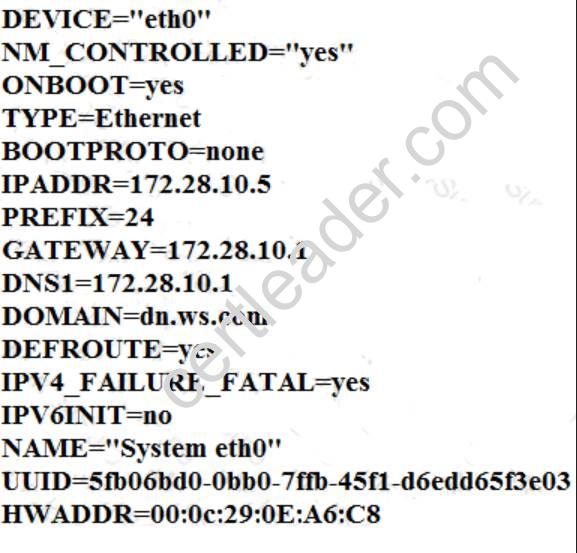
NEW QUESTION 14
Configure autofs.
Configure the autofs automatically mount to the home directory of LDAP, as required: server.domain11.example.com use NFS to share the home to your system. This file system contains a pre configured home directory of user ldapuserX.
Home directory of ldapuserX is: server.domain11.example.com /home/guests/ldapuser
Home directory of ldapuserX should automatically mount to the ldapuserX of the local /home/guests Home directory’s write permissions must be available for users ldapuser1’s password is password
Answer:
Explanation: yum install -y autofs mkdir /home/rehome /etc/auto.master
/home/rehome/etc/auto.ldap
Keep then exit
cp /etc/auto.misc /etc/auto.ldap  /etc/auto.ldap
ldapuserX -fstype=nfs,rw server.domain11.example.com:/home/guests/
Keep then exit
systemctl start autofs
systemctl enable autofs
su - ldapuserX// test
If the above solutions cannot create files or the command prompt is -bash-4.2$, it maybe exist multi-level directory, this needs to change the server.domain11.example.com:/home/guests/ to server.domain11.example.com:/home/guests/ldapuserX. What is multi-level directory? It means there is a directory of ldapuserX under the /home/guests/ldapuserX in the questions. This directory is the real directory.
NEW QUESTION 15
Copy /etc/fstab to /var/tmp name admin, the user1 could read, write and modify it, while user2 without any permission.
Answer:
Explanation: # cp /etc/fstab /var/tmp/
# chgrp admin /var/tmp/fstab
# setfacl -m u:user1:rwx /var/tmp/fstab
# setfacl -m u:user2:--- /var/tmp/fstab
# ls -l
-rw-rw-r--+ 1 root admin 685 Nov 10 15:29 /var/tmp/fstab
NEW QUESTION 16
Install the Kernel Upgrade.
Install suitable kernel update from: http://server.domain11.example.com/pub/updates. Following requirements must be met:
Updated kernel used as the default kernel of system start-up.
The original kernel is still valid and can be guided when system starts up.
Answer:
Explanation: Using the browser open the URL in the question, download kernel file to root or home directory. uname –r// check the current kernel version
rpm –ivh kernel-*.rpm
vi /boot/grub.conf// check
Some questions are: Install and upgrade the kernel as required. To ensure that grub2 is the default item for startup.
Yum repo : http://content.example.com/rhel7.0/x86-64/errata
OR
uname -r // check kernel
Yum-config-manager
--add-repo=“http://content.example.com/rhel7.0/x86-64/ errata”
Yum clean all
Yum list kernel// install directly
Yum -y install kernel// stuck with it, do not pipe! Please do not pipe!
Default enable new kernel grub2-editenv list// check
Modify grub2-set-default “kernel full name”
Grub2-mkconfig –o/boot/grub2/grub.cfg// Refresh
NEW QUESTION 17
Find all lines in the file /usr/share/dict/words that contain the string seismic. Put a copy of all these lines in their original order in the file /root/wordlist. /root/wordlist should contain no empty lines and all lines must be exact copies of the original lines in /usr/share/dict/words.
Answer:
Explanation: grep seismic /usr/share/dict/words> /root/wordlist
Thanks for reading the newest EX200 exam dumps! We recommend you to try the PREMIUM 2passeasy EX200 dumps in VCE and PDF here: https://www.2passeasy.com/dumps/EX200/ (111 Q&As Dumps)