Red Hat EX200 Study Guides 2021
We provide redhat ex200 which are the best for clearing EX200 test, and to get certified by Red Hat EX200 Red Hat Certified System Administrator (RHCSA) Exam. The hitachi ex200 covers all the knowledge points of the real EX200 exam. Crack your Red Hat EX200 Exam with latest dumps, guaranteed!
Online Red Hat EX200 free dumps demo Below:
NEW QUESTION 1
The user authentication has been provided by ldap domain in 192.168.0.254. According the following requirements to get ldapuser.
-LdapuserX must be able to login your system, X is your hostname number. But the ldapuser's home directory cannot be mounted, until you realize automatically mount by autofs server.
- All ldap user's password is "password".
Answer:
Explanation: system-config-authentication &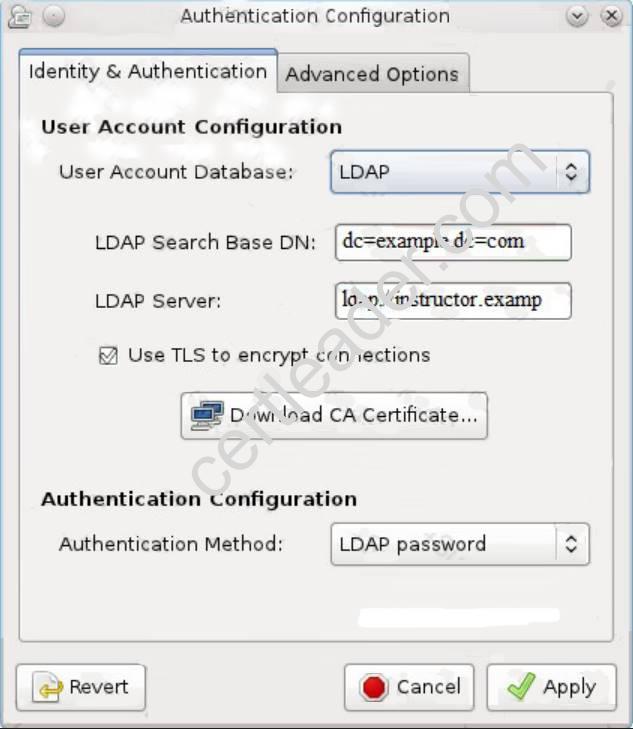
NEW QUESTION 2
Add user: user1, set uid=601
Password: redhat
The user's login shell should be non-interactive.
Answer:
Explanation: # useradd -u 601 -s /sbin/nologin user1
# passwd user1
redhat
NEW QUESTION 3
Configure autofs to automount the home directories of LDAP users as follows: host.domain11.example.com NFS-exports /home to your system.
This filesystem contains a pre-configured home directory for the user ldapuser11 ldapuser11's home directory is host.domain11.example.com /rhome/ldapuser11 ldapuser11's home directory should be automounted locally beneath /rhome as /rhome/ldapuser11
Home directories must be writable by their users ldapuser11's password is 'password'.
Answer:
Explanation:  vim /etc/auto.master /rhome /etc/auto.misc
wq!
# vim /etc/auto.misc
ldapuser11 --rw,sync host.domain11.example.com:/rhome/ldpauser11 :wq!
#service autofs restart service autofs reload chkconfig autofs on su -ldapuser11
Login ldapuser with home directory
# exit
NEW QUESTION 4
You are new System Administrator and from now you are going to handle the system and your main task is Network monitoring, Backup and Restore. But you don't know the root password. Change the root password to redhat and login in default Runlevel.
Answer:
Explanation: When you Boot the System, it starts on default Runlevel specified in /etc/inittab:
Id:?:initdefault:
When System Successfully boot, it will ask for username and password. But you don't know the root's password. To change the root password you need to boot the system into single user mode. You can pass the kernel arguments from the boot loader.
1. Restart the System.
2. You will get the boot loader GRUB screen.
3. Press a and type 1 or s for single mode ro root=LABEL=/ rhgb queit s
4. System will boot on Single User mode.
5. Use passwd command to change.
6. Press ctrl+d
NEW QUESTION 5
Create a swap space, set the size is 600 MB, and make it be mounted automatically after rebooting the system (permanent mount).
Answer:
Explanation: if=/dev/zero of=/swapfile bs=1M count=600 mkswap /swapfile
/etc/fstab:
/swapfile swap swap defaults 0 0 mount -a
NEW QUESTION 6
Add 3 users: harry, natasha, tom.
The requirements: The Additional group of the two users: harry, Natasha is the admin group. The user: tom's login shell should be non-interactive.
Answer:
Explanation: # useradd -G admin harry
# useradd -G admin natasha
# useradd -s /sbin/nologin tom
# id harry;id Natasha (Show additional group)
# cat /etc/passwd
(Show the login shell)
OR
# system-config-users
NEW QUESTION 7
Update the kernel from ftp://instructor.example.com/pub/updates. According the following requirements: The updated kernel must exist as default kernel after rebooting the system. The original kernel still exists and is available in the system.
Answer:
Explanation: rpm -ivh kernel-firm…
rpm -ivh kernel...
NEW QUESTION 8
Install the appropriate kernel update from http://server.domain11.example.com/pub/updates. The following criteria must also be met:
The updated kernel is the default kernel when the system is rebooted
The original kernel remains available and bootable on the system
Answer:
Explanation: see explanation below. ftp server.domain11.example.com Anonymous login
ftp> cd /pub/updates ftp> ls
ftp> mget kernel* ftp> bye rpm -ivh kernel* vim /etc/grub.conf
Check the updatted kernel is the first kernel and the orginal kernel remains available. set default=0 wq!
NEW QUESTION 9
Configure the FTP service in your system, allow remote access to anonymous login and download the program by this service. Service is still running after system rebooting.
Answer:
Explanation: yum install vsftpd
/etc/init.d/vsftpd start
chkconfig vsftpd on
NEW QUESTION 10
Create a Shared Directory.
Create a shared directory /home/admins, make it has the following characteristics:
/home/admins belongs to group adminuser
This directory can be read and written by members of group adminuser Any files created in /home/ admin, group automatically set as adminuser.
Answer:
Explanation: mkdir /home/admins
chgrp -R adminuser /home/admins
chmodg+w /home/admins
chmodg+s /home/admins
NEW QUESTION 11
Configure autofs to make sure after login successfully, it has the home directory autofs, which is shared as /rhome/ldapuser40 at the ip: 172.24.40.10. and it also requires that, other ldap users can use the home directory normally.
Answer:
Explanation: # chkconfig autofs on
# cd /etc/
# vim /etc/auto.master
/rhome /etc/auto.ldap
# cp auto.misc auto.ldap
# vim auto.ladp
ldapuser40 -rw,soft,intr 172.24.40.10:/rhome/ldapuser40
* -rw,soft,intr 172.16.40.10:/rhome/&
# service autofs stop
# server autofs start
# showmount -e 172.24.40.10
# su - ladpuser40
NEW QUESTION 12
Copy /etc/fstab document to /var/TMP directory. According the following requirements to configure the permission of this document. The owner of this document must be root. This document belongs to root group. User mary have read and write permissions for this document. User alice have read and execute permissions for this document. Create user named bob, set uid is 1000. Bob have read and write permissions for this document. All users has read permission for this document in the system.
Answer:
Explanation: cp /etc/fstab /var/tmp
chown root:root /var/tmp/fstab
chmod a-x /var/tmp/fstab
setfacl –m u:mary:rw /var/tmp/fstab
setfacl –m u:alice:rx /var/tmp/fstab
useradd –u 1000 bob
NEW QUESTION 13
Configure the system synchronous as 172.24.40.10.
Answer:
Explanation: Graphical Interfaces:
System-->Administration-->Date & Time
OR
# system-config-date
NEW QUESTION 14
There is a local logical volumes in your system, named with common and belong to VGSRV volume group, mount to the /common directory. The definition of size is 128 MB.
Requirement:
Extend the logical volume to 190 MB without any loss of data. The size is allowed between 160-160 MB after extending.
Answer:
Explanation: lvextend -L 190M /dev/mapper/vgsrv-common resize2fs /dev/mapper/vgsrv-common
NEW QUESTION 15
Upgrade the kernel, start the new kernel by default. kernel download from this address: ftp://server1.domain10.example.com/pub/update/new.kernel
Answer:
Explanation: Download the new kernel file and then install it.
[root@desktop8 Desktop]# ls
kernel-2.6.32-71.7.1.el6.x86_64.rpm
kernel-firmware-2.6.32-71.7.1.el6.noarch.rpm
[root@desktop8 Desktop]# rpm -ivh kernel-*
Preparing... ###########################################
[100%]
1:kernel-firmware
########################################### [ 50%]
2:kernel
########################################### [100%]
Verify the grub.conf file, whether use the new kernel as the default boot. [root@desktop8 Desktop]# cat
/boot/grub/grub.conf default=0
title Red Hat Enterprise Linux Server (2.6.32-71.7.1.el6.x86_64)
root (hd0,0)
kernel /vmlinuz-2.6.32-71.7.1.el6.x86_64 ro root=/dev/mapper/vol0-root rd_LVM_LV=vol0/root rd_NO_LUKS rd_NO_MD
rd_NO_DM LANG=en_US.UTF-8 SYSFONT=latarcyrheb-sun16 KEYBOARDTYPE=pc KEYTABLE=us crashkernel=auto rhgb quiet
initrd /initramfs-2.6.32-71.7.1.el6.x86_64.img
NEW QUESTION 16
Configure iptables, there are two domains in the network, the address of local domain is 172.24.0.0/16 other domain is 172.25.0.0/16, now refuse domain 172.25.0.0/16 to access the server.
Answer:
Explanation: below iptables -F service iptables save iptables -A INPUT -s 172.25.0.0/16 -j REJECT service iptables save service iptables restart
NEW QUESTION 17
Create a volume group, and set the size is 500M, the size of single PE is 16M. Create logical volume named lv0 in this volume group, set size is 20 PE, make it as ext3 file system, and mounted automatically under data.
Answer:
Explanation:
fdisk /dev/vda
pvcreate /dev/vda3
vgcreate –s 16M vg0 /dev/vda3
lvcreate –n lv0 –l 20 vg0
mkfs.ext3 /dev/mapper/vg0-lv0
mkdir /data
/etc/fstab:
/dev/mapper/vg0-lv0 /data ext3 defaults 0 0
mount –a
mount | grep data
Recommend!! Get the Full EX200 dumps in VCE and PDF From Certleader, Welcome to Download: https://www.certleader.com/EX200-dumps.html (New 111 Q&As Version)