Microsoft AZ-100 Exam Questions and Answers 2021
AZ-100 Exam Questions are updated and AZ-100 Braindumps are verified by experts. Once you have completely prepared with our AZ-100 Exam Questions and Answers you will be ready for the real AZ-100 exam without a problem. We have AZ-100 Exam Questions and Answers. PASSED AZ-100 Braindumps First attempt! Here What I Did.
Check AZ-100 free dumps before getting the full version:
NEW QUESTION 1
You have an Azure Active Directory (Azure AD) tenant that has the initial domain name. You have a domain name of contoso.com registered at a third-party registrar.
You need to ensure that you can create Azure AD users that have names containing a suffix of @contoso.com.
Which three actions should you perform in sequence? To answer, move the appropriate cmdlets from the list of cmdlets to the answer area and arrange them in the correct order.
Answer:
Explanation: The process is simple: Add the custom domain name to your directory Add a DNS entry for the domain name at the domain name registrar Verify the custom domain name in Azure AD
References: https://docs.microsoft.com/en-us/azure/dns/dns-web-sites-custom-domain
NEW QUESTION 2
You have an Azure subscription named Subscription1.
In Subscription1, you create an Azure file share named share1.
You create a shared access signature (SAS) named SAS1 as shown in the following exhibit.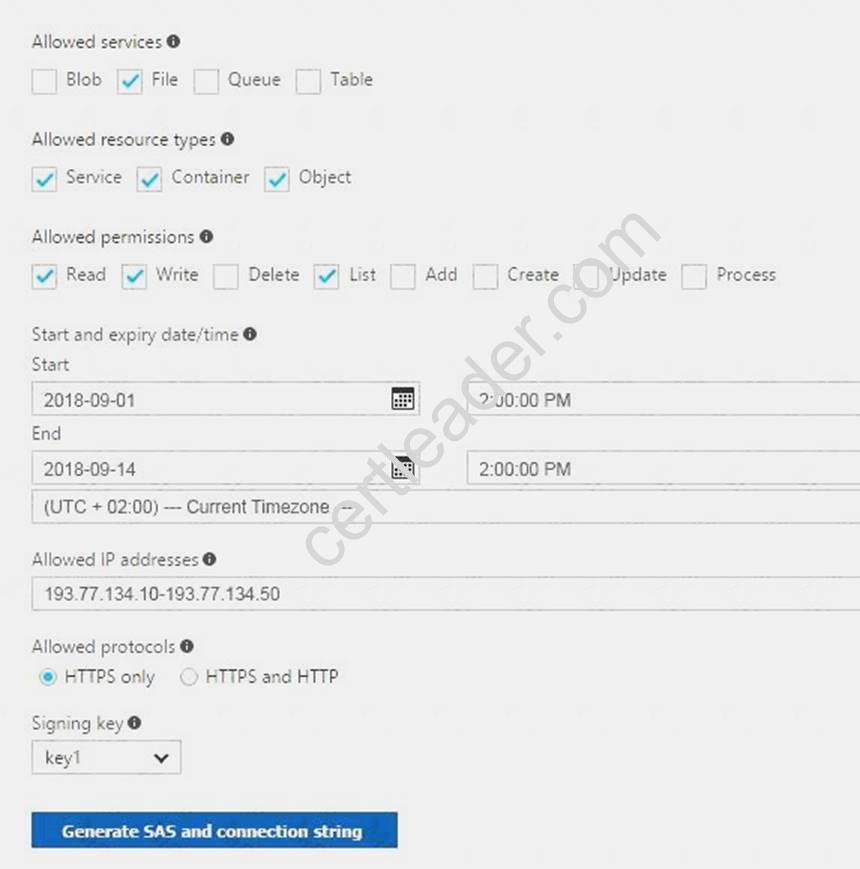
To answer, select the appropriate options in the answer area. NOTE: Each correct selection is worth one point.
Answer:
Explanation: Box 1: Will be prompted for credentials
Azure Storage Explorer is a standalone app that enables you to easily work with Azure Storage data on Windows, macOS, and Linux. It is used for connecting to and managing your Azure storage accounts.
Box 2: Will have read, write, and list access
The net use command is used to connect to file shares. References:
https://docs.microsoft.com/en-us/azure/storage/common/storage-dotnet-shared-access-signature-part-1 https://docs.microsoft.com/en-us/azure/vs-azure-tools-storage-manage-with-storage-explorer?tabs=windows
NEW QUESTION 3
You create an Azure Storage account named contosostorage.
You plan to create a file share named data.
Users need to map a drive to the data file share from home computers that run Windows 10. Which port should be open between the home computers and the data file share?
- A. 80
- B. 443
- C. 445
- D. 3389
Answer: C
Explanation: Ensure port 445 is open: The SMB protocol requires TCP port 445 to be open; connections will fail if port 445 is blocked.
References: https://docs.microsoft.com/en-us/azure/storage/files/storage-how-to-use-files-windows
NEW QUESTION 4
You have an Azure subscription that contains an Azure virtual machine named VM1. VM1 runs Windows Server 2021 and is part of an availability set.
VM1 has virtual machine-level backup enabled. VM1 is deleted.
You need to restore VM1 from the backup. VM1 must be part of the availability set.
Which three actions should you perform in sequence? To answer, move the appropriate actions from the list of actions to the answer area and arrange them in the correct order.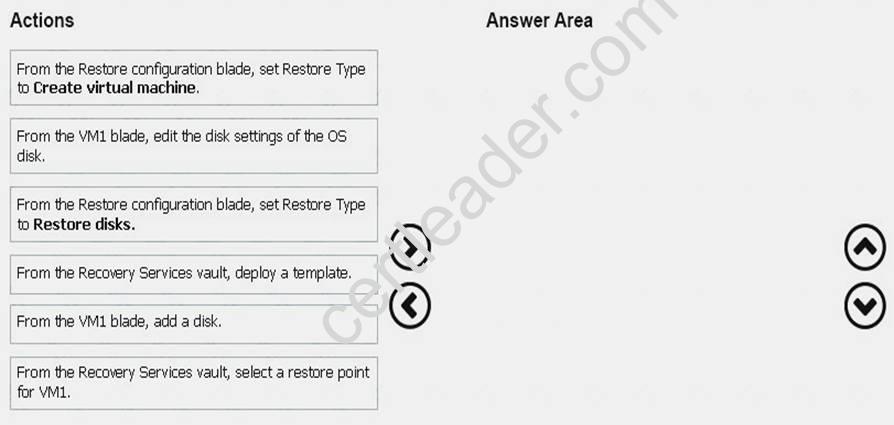
Answer:
Explanation: 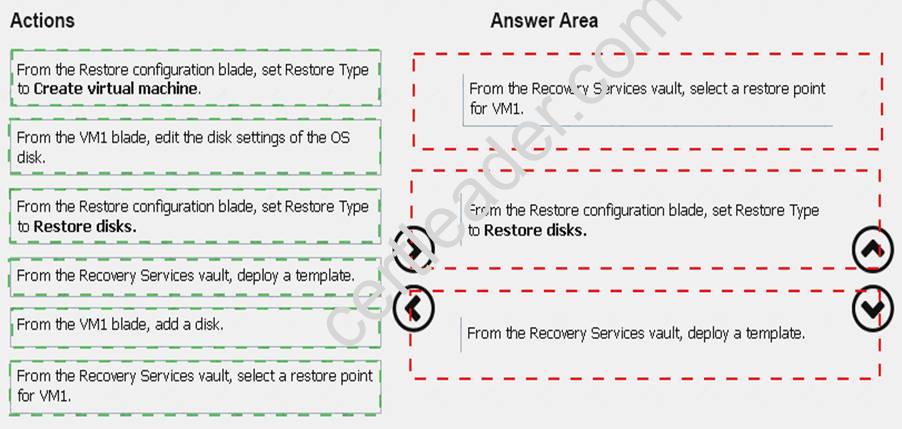
NEW QUESTION 5
You configure Azure AD Connect for Azure Active Directory Seamless Single Sign-On (Azure AD Seamless SSO) for an on-premises network. Users report that when they attempt to access myapps.microsoft.com, they are prompted multiple times to sign in and are forced to use an account name that ends with onmicrosoft.com.
You discover that there is a UPN mismatch between Azure AD and the on-premises Active Directory. You need to ensure that the users can use single-sign on (SSO) to access Azure resources.
What should you do first?
- A. From the on-premises network, deploy Active Directory Federation Services (AD FS).
- B. From Azure AD, add and verify a custom domain name.
- C. From the on-premises network, request a new certificate that contains the Active Directory domain name.
- D. From the server that runs Azure AD Connect, modify the filtering options.
Answer: B
Explanation: Azure AD Connect lists the UPN suffixes that are defined for the domains and tries to match them with a custom domain in Azure AD. Then it helps you with the appropriate action that needs to be taken. The Azure AD sign-in page lists the UPN suffixes that are defined for on-premises Active Directory and displays the corresponding status against each suffix. The status values can be one of the following:
State: Verified
Azure AD Connect found a matching verified domain in Azure AD. All users for this domain can sign in by using their on-premises credentials.
State: Not verified
Azure AD Connect found a matching custom domain in Azure AD, but it isn't verified. The UPN suffix of the users of this domain will be changed to the default .onmicrosoft.com suffix after synchronization if the domain isn't verified.
Action Required: Verify the custom domain in Azure AD.
References: https://docs.microsoft.com/en-us/azure/active-directory/hybrid/plan-connect-user-signin
NEW QUESTION 6
You have an Azure Active Directory (Azure AD) tenant named contosocloud.onmicrosoft.com. Your company has a public DNS zone for contoso.com.
You add contoso.com as a custom domain name to Azure AD. You need to ensure that Azure can verify the domain name. Which type of DNS record should you create?
- A. RRSIG
- B. PTR
- C. DNSKEY
- D. TXT
Answer: D
Explanation: Create the TXT record. App Services uses this record only at configuration time to verify that you own the custom domain. You can delete this TXT record after your custom domain is validated and configured in App Service.
References: https://docs.microsoft.com/en-us/azure/dns/dns-web-sites-custom-domain
NEW QUESTION 7
You plan to deploy five virtual machines to a virtual network subnet.
Each virtual machine will have a public IP address and a private IP address. Each virtual machine requires the same inbound and outbound security rules.
What is the minimum number of network interfaces and network security groups that you require? To answer, select the appropriate options in the answer area.
NOTE: Each correct selection is worth one point.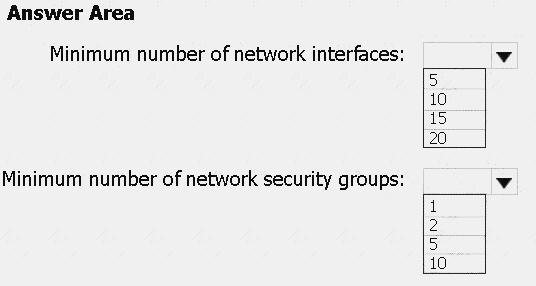
Answer:
Explanation: Box 1: 10
One public and one private network interface for each of the five VMs. Box 2: 1
You can associate zero, or one, network security group to each virtual network subnet and network interface in a virtual machine. The same network security group can be associated to as many subnets and network interfaces as you choose.
References:
https://docs.microsoft.com/en-us/azure/virtual-network/security-overview
NEW QUESTION 8
Note: This question is part of a series of questions that present the same scenario. Each question in the series contains a unique solution that might meet the stated goals. Some question sets might have more than one correct solution, while others might not have a correct solution.
After you answer a question in this section, you will NOT be able to return to it. As a result, these questions will not appear in the review screen.
You have an Azure subscription that contains 10 virtual networks. The virtual networks are hosted in separate resource groups.
Another administrator plans to create several network security groups (NSGs) in the subscription.
You need to ensure that when an NSG is created, it automatically blocks TCP port 8080 between the virtual networks.
Solution: You create a resource lock, and then you assign the lock to the subscription. Does this meet the goal?
- A. Yes
- B. No
Answer: B
Explanation: How can I freeze or lock my production/critical Azure resources from accidental deletion? There is way to do this with both ASM and ARM resources using Azure resource lock.
References:
https://blogs.msdn.microsoft.com/azureedu/2021/04/27/using-azure-resource-manager-policy-and-azure-lock-to
NEW QUESTION 9
You have an Azure DNS zone named adatum.com. You need to delegate a subdomain named research.adatum.com to a different DNS server in Azure. What should you do?
- A. Create an PTR record named research in the adatum.com zone.
- B. Create an NS record named research in the adatum.com zone.
- C. Modify the SOA record of adatum.com.
- D. Create an A record named “.research in the adatum.com zone.
Answer: D
Explanation: Configure A records for the domains and sub domains. References:
http://www.stefanjohansson.org/2012/12/how-to-configure-custom-dns-names-for-multiple-subdomain-based-az
NEW QUESTION 10
You have an Azure subscription named Subscription1. Subscription1 contains the virtual machines in the following table.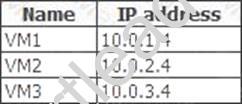
Subscription1 contains a virtual network named VNet1 that has the subnets in the following table.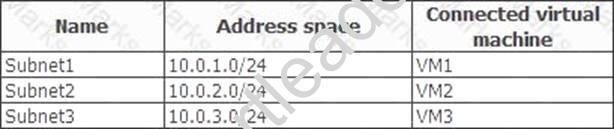
VM3 has a network adapter named NIC3. IP forwarding is enabled on NIC3. Routing is enabled on VM3. You create a route table named RT1. RT1 is associated to Subnet1 and Subnet2 and contains the routes in the following table.
You apply RT1 to Subnet1.
For each of the following statements, select Yes if the statement is true. Otherwise, select No. NOTE: Each correct selection is worth one point.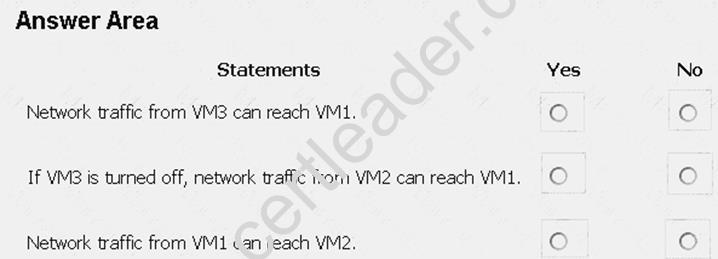
Answer:
Explanation: Box 1: Yes
Traffic from VM1 and VM2 can reach VM3 thanks to the routing table, and as IP forwarding is enabled on VM3, traffic from VM3 can reach VM1.
Box 2: No
VM3, which has IP forwarding, must be turned on, in order for traffic from VM2 to reach VM1. Box 3: Yes
The traffic from VM1 will reach VM3, which thanks to IP forwarding, will send the traffic to VM2. References: https://www.quora.com/What-is-IP-forwarding
NEW QUESTION 11
Click to expand each objective. To connect to the Azure portal, type https://portal.azure.com in the browser address bar.
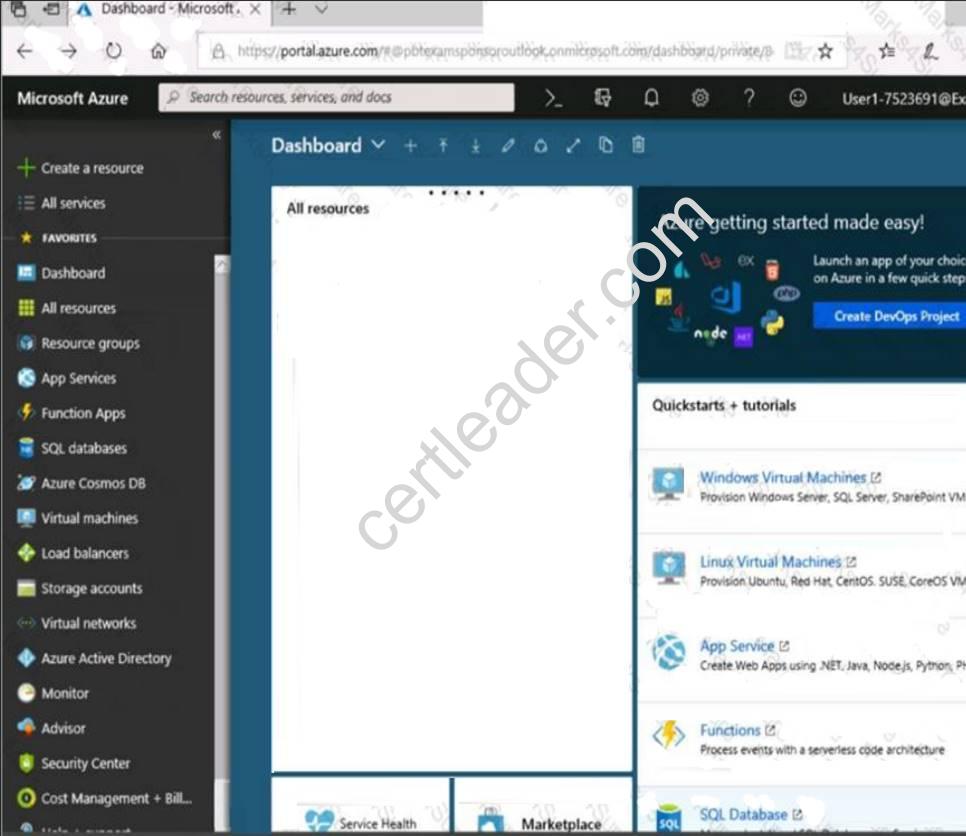
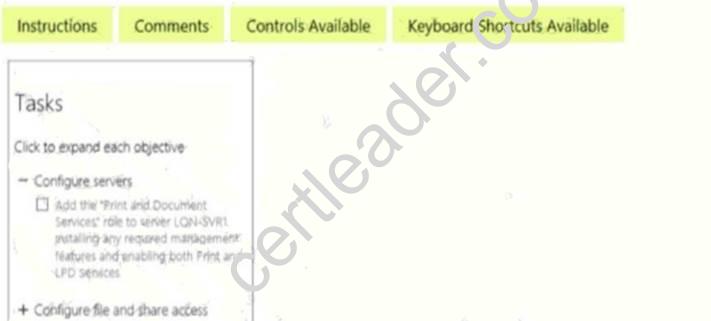
When you are finished performing all the tasks, click the ‘Next’ button.
Note that you cannot return to the lab once you click the ‘Next’ button. Scoring occur in the background while you complete the rest of the exam.
Overview
The following section of the exam is a lab. In this section, you will perform a set of tasks in a live environment. While most functionality will be available to you as it would be in a live environment, some functionality (e.g., copy and paste, ability to navigate to external websites) will not be possible by design. Scoring is based on the outcome of performing the tasks stated in the lab. In other words, it doesn’t matter how you accomplish the task, if you successfully perform it, you will earn credit for that task.
Labs are not timed separately, and this exam may have more than one lab that you must complete. You can use as much time as you would like to complete each lab. But, you should manage your time appropriately to ensure that you are able to complete the lab(s) and all other sections of the exam in the time provided.
Please note that once you submit your work by clicking the Next button within a lab, you will NOT be able to return to the lab.
To start the lab
You may start the lab by clicking the Next button.
You plan to configure VM1 to be accessible from the Internet.
You need to add a public IP address to the network interface used by VM1. What should you do from Azure portal?
Answer:
Explanation: You can add private and public IP addresses to an Azure network interface by completing the steps that follow.
Step 1: In Azure portal, click More services > type virtual machines in the filter box, and then click Virtual machines.
Step 2: In the Virtual machines pane, click the VM you want to add IP addresses to. Click Network interfaces in the virtual machine pane that appears, and then select the network interface you want to add the IP addresses to. In the example shown in the following picture, the NIC named myNIC from the VM named myVM is selected: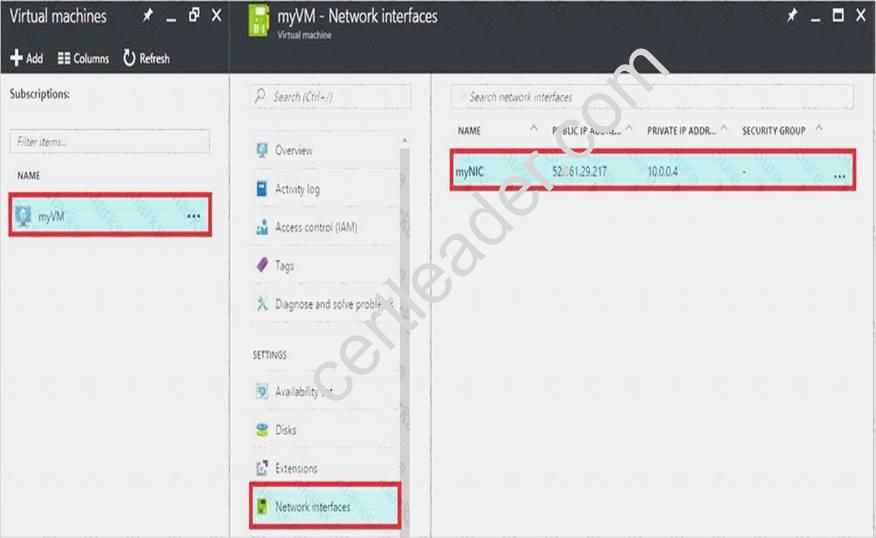
Step 3: In the pane that appears for the NIC you selected, click IP configurations. Step 4: Click Create public IP address.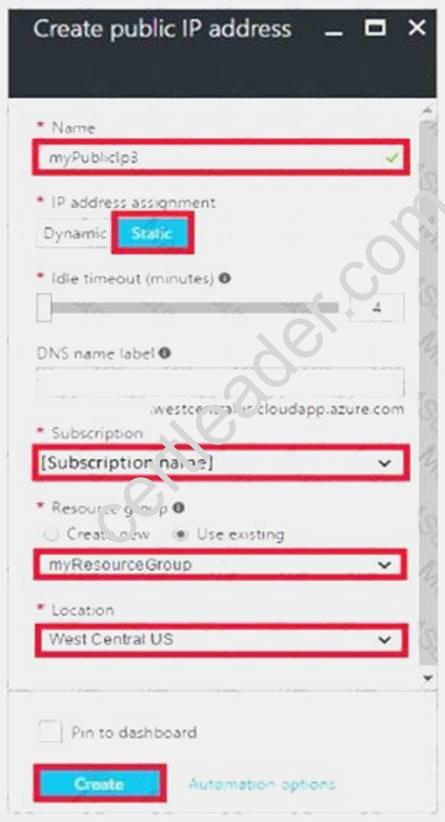
Step 5: In the Create public IP address pane that appears, enter a Name, select an IP address assignment type, a Subscription, a Resource group, and a Location, then click Create, as shown in the following picture:
References:
https://docs.microsoft.com/en-us/azure/virtual-network/virtual-network-multiple-ip-addresses-portal
NEW QUESTION 12
You have two Azure Active Directory (Azure AD) tenants named contoso.com and fabrikam.com. You have a Microsoft account that you use to sign in to both tenants.
You need to configure the default sign-in tenant for the Azure portal. What should you do?
- A. From the Azure portal, configure the portal settings.
- B. From the Azure portal, change the directory.
- C. From Azure Cloud Shell, run Set-AzureRmContext.
- D. From Azure Cloud Shell, run Set-AzureRmSubscription.
Answer: B
Explanation: Change the subscription directory in the Azure portal.
The classic portal feature Edit Directory, that allows you to associate an existing subscription to your Azure Active Directory (AAD), is now available in Azure portal. It used to be available only to Service Admins with Microsoft accounts, but now it's available to users with AAD accounts as well.
To get started: Go to Subscriptions. Select a subscription. Select Change directory.
NEW QUESTION 13
Note: This question is part of a series of questions that present the same scenario. Each question in the series contains a unique solution that might meet the stated goals. Some question sets might have more than one correct solution, while others might not have a correct solution.
After you answer a question in this section, you will NOT be able to return to it. As a result, these questions will not appear in the review screen.
You have an Azure subscription named Subscription1. Subscription1 contains a resource group named RG1. RG1 contains resources that were deployed by using templates.
You need to view the date and time when the resources were created in RG1.
Solution: From the Subscriptions blade, you select the subscription, and then click Resource providers. Does this meet the goal?
- A. Yes
- B. No
Answer: B
NEW QUESTION 14
Overview
The following section of the exam is a lab. In this section, you will perform a set of tasks in a live environment. While most functionality will be available to you as it would be in a live environment, some functionality (e.g., copy and paste, ability to navigate to external websites) will not be possible by design.
Scoring is based on the outcome of performing the tasks stated in the lab. In other words, it doesn’t matter how you accomplish the task, if you successfully perform it, you will earn credit for that task.
Labs are not timed separately, and this exam may have more than one lab that you must complete. You can use as much time as you would like to complete each lab. But, you should manage your time appropriately to ensure that you are able to complete the lab(s) and all other sections of the exam in the time provided.
Please note that once you submit your work by clicking the Next button within a lab, you will NOT be able to return to the lab.
To start the lab
You may start the lab by clicking the Next button.
You plan to prevent users from accidentally deleting blob data from Azure.
You need to ensure that administrators can recover any blob data that is deleted accidentally from the storagelod8095859 storage account for 14 days after the deletion occurred.
What should you do from the Azure portal?
Answer:
Explanation: Task A: Create a Recovery Services vault (if a vault already exists skip this task, go to Task B below) A1. From Azure Portal, On the Hub menu, click All services and in the list of resources, type Recovery
Services and click Recovery Services vaults.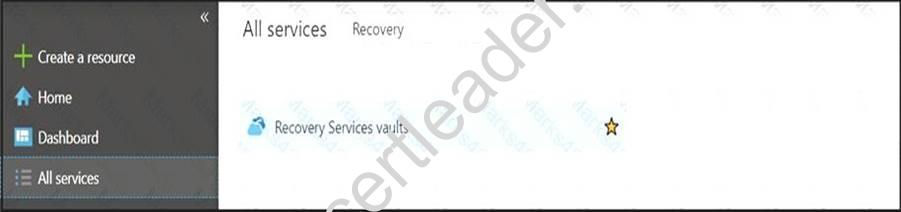
If there are recovery services vaults in the subscription, the vaults are listed. A2. On the Recovery Services vaults menu, click Add.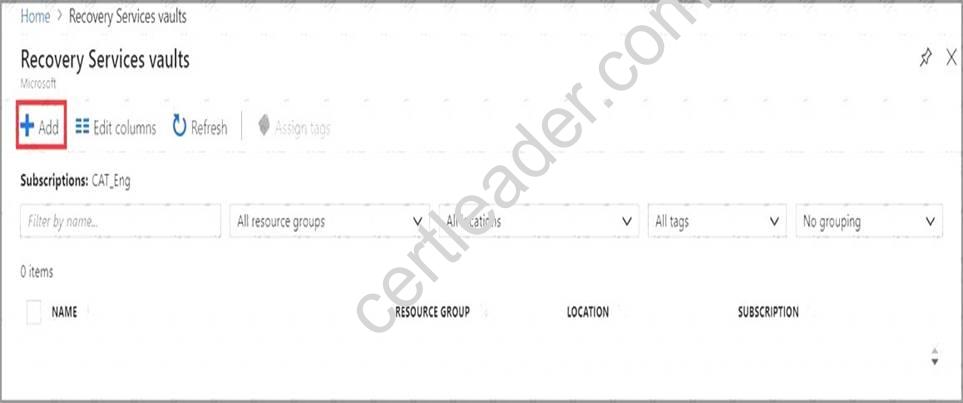
A3. The Recovery Services vault blade opens, prompting you to provide a Name, Subscription, Resource group, and Location
Task B. Create a backup goal
B1. On the Recovery Services vault blade (for the vault you just created), in the Getting Started section, click Backup, then on the Getting Started with Backup blade, select Backup goal.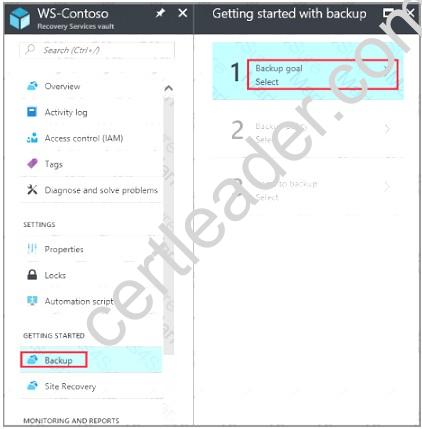
The Backup Goal blade opens. If the Recovery Services vault has been previously configured, then the Backup Goal blades opens when you click Backup on the Recovery Services vault blade.
B2. From the Where is your workload running? drop-down menu, select Azure.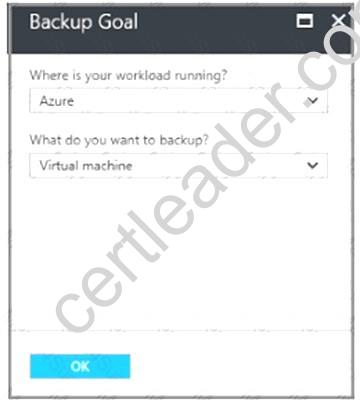
B3. From the What do you want to backup? menu, select Blob Storage, and click OK. B4. Finish the Wizard.
Task C. create a backup schedule
C1. Open the Microsoft Azure Backup agent. You can find it by searching your machine for Microsoft Azure Backup.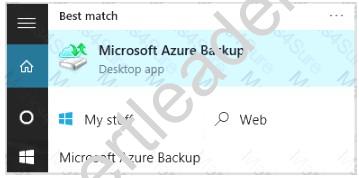
C2. In the Backup agent's Actions pane, click Schedule Backup to launch the Schedule Backup Wizard.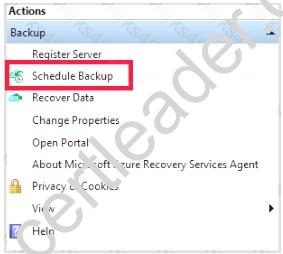
C3. On the Getting started page of the Schedule Backup Wizard, click Next. C4. On the Select Items to Backup page, click Add Items.
The Select Items dialog opens.
C5. Select Blob Storage you want to protect, and then click OK. C6.In the Select Items to Backup page, click Next.
On the Specify Backup Schedule page, specify Schedule a backup every day, and click Next.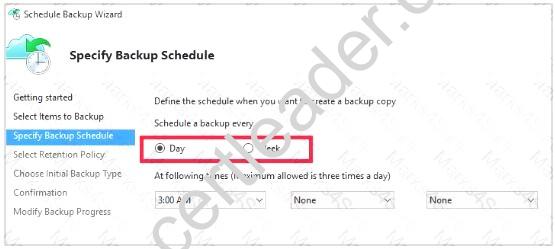
C7. On the Select Retention Policy page, set it to 14 days, and click Next.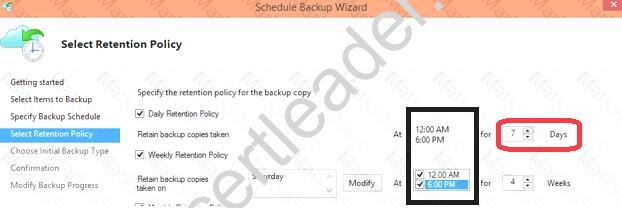
C8. Finish the Wizard. References:
https://docs.microsoft.com/en-us/azure/backup/backup-configure-vault
NEW QUESTION 15
You need to resolve the Active Directory issue. What should you do?
- A. From Active Directory Users and Computers, select the user accounts, and then modify the User PrincipalName value.
- B. Run idfix.exe, and then use the Edit action.
- C. From Active Directory Domains and Trusts, modify the list of UPN suffixes.
- D. From Azure AD Connect, modify the outbound synchronization rule.
Answer: B
Explanation: IdFix is used to perform discovery and remediation of identity objects and their attributes in an on-premises Active Directory environment in preparation for migration to Azure Active Directory. IdFix is intended for the Active Directory administrators responsible for directory synchronization with Azure Active Directory.
Scenario: Active Directory Issue
Several users in humongousinsurance.com have UPNs that contain special characters. You suspect that some of the characters are unsupported in Azure AD.
References: https://www.microsoft.com/en-us/download/details.aspx?id=36832
NEW QUESTION 16
You have an Azure subscription named Subscription1. Subscription1 contains a virtual machine named VM1. You install and configure a web server and a DNS server on VM1.
VM1 has the effective network security rules shown in the following exhibit.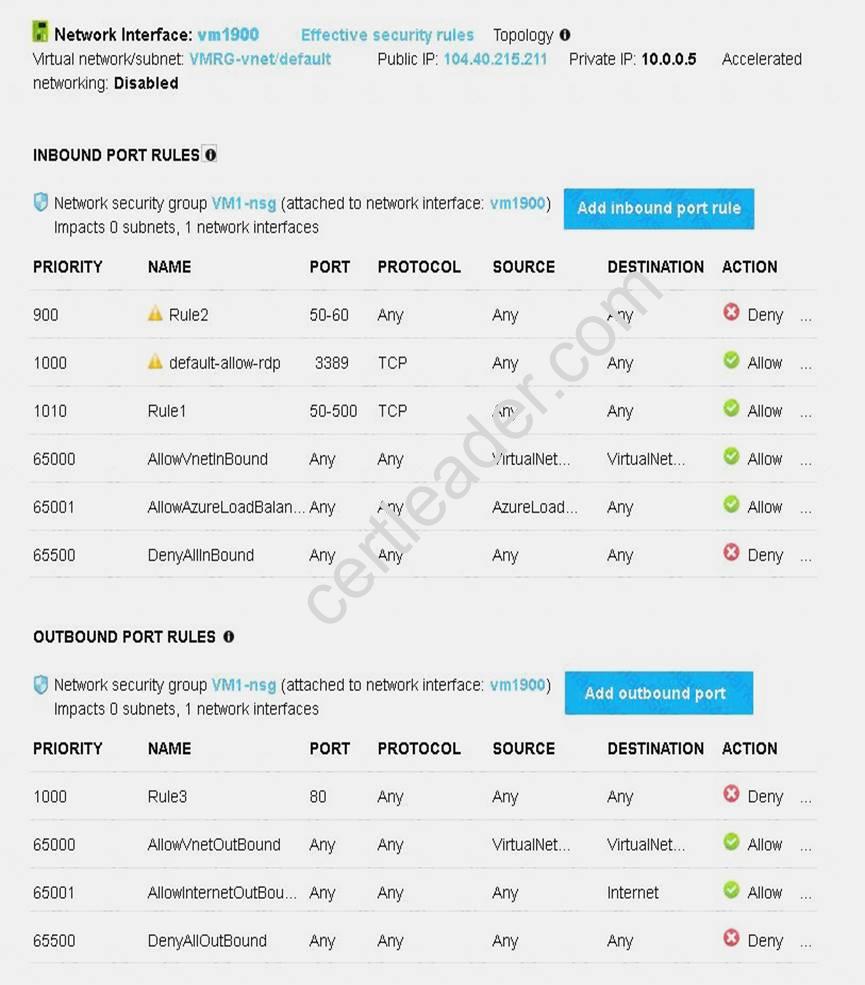
Use the drop-down menus to select the answer choice that completes each statement based on the information presented in the graphic.
NOTE: Each correct selection is worth one point.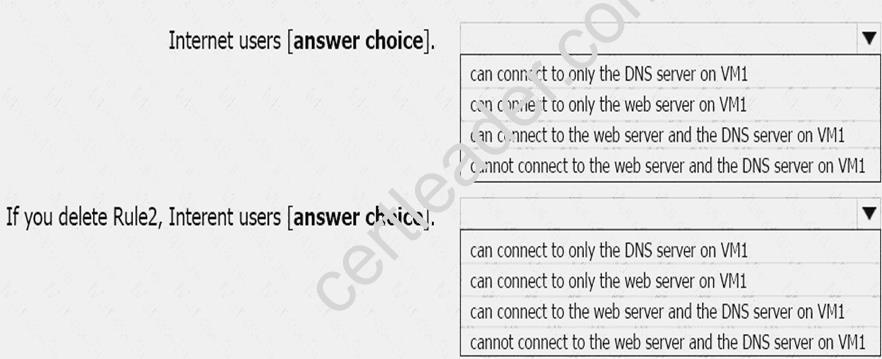
Answer:
Explanation: 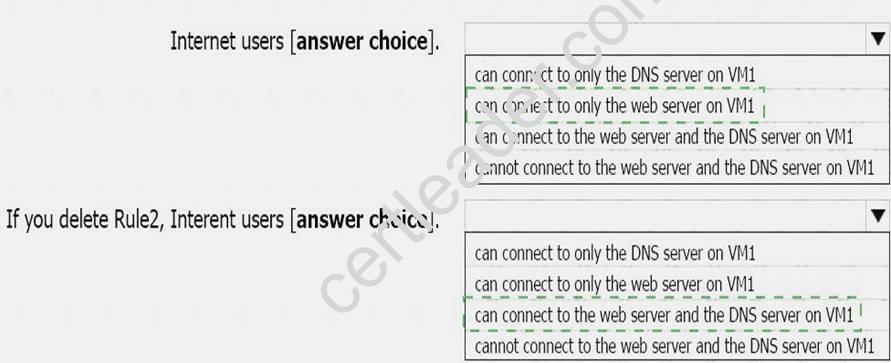
NEW QUESTION 17
Overview
The following section of the exam is a lab. In this section, you will perform a set of tasks in a live environment. While most functionality will be available to you as it would be in a live environment, some functionality (e.g., copy and paste, ability to navigate to external websites) will not be possible by design.
Scoring is based on the outcome of performing the tasks stated in the lab. In other words, it doesn’t matter how you accomplish the task, if you successfully perform it, you will earn credit for that task.
Labs are not timed separately, and this exam may have more than one lab that you must complete. You can use as much time as you would like to complete each lab. But, you should manage your time appropriately to ensure that you are able to complete the lab(s) and all other sections of the exam in the time provided.
Please note that once you submit your work by clicking the Next button within a lab, you will NOT be able to return to the lab.
To start the lab
You may start the lab by clicking the Next button.
You plan to connect several virtual machines to the VNET01-USEA2 virtual network.
In the Web-RGlod8095859 resource group, you need to create a virtual machine that uses the Standard_B2ms size named Web01 that runs Windows Server 2021. Web01 must be added to an availability set.
What should you do from the Azure portal?
Answer:
Explanation: Step 1. Choose Create a resource in the upper left-hand corner of the Azure portal.
Step 2. In the Basics tab, under Project details, make sure the correct subscription is selected and then choose Web-RGlod8095859 resource group
Step 3. Under Instance details type/select: Virtual machine name: Web01
Image: Windows Server 2021 Size: Standard_B2ms size Leave the other defaults.
Step 4. Finish the Wizard
100% Valid and Newest Version AZ-100 Questions & Answers shared by Simply pass, Get Full Dumps HERE: https://www.simply-pass.com/Microsoft-exam/AZ-100-dumps.html (New 106 Q&As)