100% Guarantee AZ-220 Questions Pool 2021
Your success in Microsoft AZ-220 is our sole target and we develop all our AZ-220 braindumps in a way that facilitates the attainment of this target. Not only is our AZ-220 study material the best you can find, it is also the most detailed and the most updated. AZ-220 Practice Exams for Microsoft Microsoft Other Exam AZ-220 are written to the highest standards of technical accuracy.
Free demo questions for Microsoft AZ-220 Exam Dumps Below:
NEW QUESTION 1
You have an Azure IoT hub that uses a Device Provisioning Service instance to automate the deployment of Azure IoT Edge devices.
The IoT Edge devices have a Trusted Platform Module (TPM) 2.0 chip.
From the Azure portal, you plan to add an individual enrollment to the Device Provisioning Service that will use the TPM of the IoT Edge devices as the attestation mechanism.
Which detail should you obtain before you can create the enrollment.
- A. the scope ID and the Device Provisioning Service endpoint
- B. the primary key of the Device Provisioning Service shared access policy and the global device endpoint
- C. the X.509 device certificate and the certificate chain
- D. the endorsement key and the registration ID
Answer: D
Explanation:
The TPM simulator's Registration ID and the Endorsement key, are used when you create an individual enrollment for your device.
Reference:
https://docs.microsoft.com/en-us/azure/iot-edge/how-to-auto-provision-simulated-device-linux
NEW QUESTION 2
What should you do to identify the cause of the connectivity issues?
- A. Send cloud-to-device messages to the IoT devices.
- B. Use the heartbeat pattern to send messages from the IoT devices to iothub1.
- C. Monitor the connection status of the device twin by using an Azure function.
- D. Enable the collection of the Connections diagnostics logs and set up alerts for the connected devices count metric.
Answer: D
Explanation:
Scenario: You discover connectivity issues between the IoT gateway devices and iothub1, which cause IoT devices to lose connectivity and messages.
To log device connection events and errors, turn on diagnostics for IoT Hub. We recommend turning on these logs as early as possible, because if diagnostic logs aren't enabled, when device disconnects occur, you won't have any information to troubleshoot the problem with.
Step 1:
*1.Sign in to the Azure portal.
*2.Browse to your IoT hub.
*3.Select Diagnostics settings.
*4.Select Turn on diagnostics.
*5. Enable Connections logs to be collected.
*6. For easier analysis, turn on Send to Log Analytics (see pricing).
Step 2:
Set up alerts for device disconnect at scale
To get alerts when devices disconnect, configure alerts on the Connected devices (preview) metric. Reference:
https://docs.microsoft.com/bs-cyrl-ba/azure/iot-hub/iot-hub-troubleshoot-connectivity
NEW QUESTION 3
How should you complete the GROUP BY clause to meet the Streaming Analytics requirements?
- A. GROUP BY HoppingWindow(Second, 60, 30)
- B. GROUP BY TumblingWindow(Second, 30)
- C. GROUP BY SlidingWindow(Second, 30)
- D. GROUP BY SessionWindow(Second, 30, 60)
Answer: B
Explanation:
Scenario: You plan to use a 30-second period to calculate the average temperature reading of the sensors. Tumbling window functions are used to segment a data stream into distinct time segments and perform a
function against them, such as the example below. The key differentiators of a Tumbling window are that they repeat, do not overlap, and an event cannot belong to more than one tumbling window.
InAnswers:
A: Hopping window functions hop forward in time by a fixed period. It may be easy to think of them as Tumbling windows that can overlap, so events can belong to more than one Hopping window result set.
Reference:
https://docs.microsoft.com/en-us/azure/stream-analytics/stream-analytics-window-functions
NEW QUESTION 4
You have 100 devices that connect to an Azure IoT hub.
You plan to use Azure functions to process all the telemetry messages from the devices before storing the messages.
You need to configure the functions binding for the IoT hub.
Which two configuration details should you use to configure the binding? Each Answer presents part of the solution.
NOTE: Each correct selection is worth one point.
- A. the name of the resource group that contains the IoT hub
- B. the IoT hub's connection string shared access key that has Service connect permissions
- C. the connection string of the Azure Event Hub-compatible endpoint from the IoT Hub built-in endpoints
- D. the Azure Event-Hub compatible name
Answer: CD
Explanation:
EventHubName: Functions 2.x and higher. The name of the event hub. When the event hub name is also present in the connection string, that value overrides this property at runtime.
Connection: The name of an app setting that contains the connection string to the event hub's namespace. Copy this connection string by clicking the Connection Information button for the namespace, not the event hub itself. This connection string must have send permissions to send the message to the event stream.
Reference:
https://docs.microsoft.com/en-us/azure/azure-functions/functions-bindings-event-iot-output
NEW QUESTION 5
You plan to deploy an Azure IoT hub. The IoT hub must support the following: Three Azure IoT Edge devices 2,500 IoT devices Each IoT device will spend a 6 KB message every five seconds.
You need to size the IoT hub to support the devices. The solution must minimize costs. What should you choose?
- A. one unit of the S1 tier
- B. one unit of the B2 tier
- C. one unit of the B1 tier
- D. one unit of the S3 tier
Answer: D
Explanation:
\ 2500* 6 KB * 12 = 180,000 KB/minute = 180 MB/Minute.
B3, S3 can handle up to 814 MB/minute per unit. Incorrect Answers:
A, C: B1, S1 can only handle up to 1111 KB/minute per unit B: B2, S2 can only handle up to 16 MB/minute per unit.
Reference:
https://docs.microsoft.com/en-us/azure/iot-hub/iot-hub-scaling
NEW QUESTION 6
Note: This question is part of a series of questions that present the same scenario. Each question in the series contains a unique solution that might meet the stated goals. Some question sets might have more than one correct solution, while others might not have a correct solution.
After you answer a question in this question, you will NOT be able to return to it. As a result, these questions will not appear in the review screen.
You have devices that connect to an Azure IoT hub. Each device has a fixed GPS location that includes latitude and longitude.
You discover that a device entry in the identity registry of the IoT hub is missing the GPS location.
You need to configure the GPS location for the device entry. The solution must prevent the changes from being propagated to the physical device.
Solution: You add the desired properties to the device twin. Does the solution meet the goal?
- A. Yes
- B. No
Answer: A
Explanation:
Device Twins are used to synchronize state between an IoT solution's cloud service and its devices. Each device's twin exposes a set of desired properties and reported properties. The cloud service populates the desired properties with values it wishes to send to the device. When a device connects it requests and/or subscribes for its desired properties and acts on them.
Reference:
https://azure.microsoft.com/sv-se/blog/deep-dive-into-azure-iot-hub-notifications-and-device-twin/
NEW QUESTION 7
You create a new IoT device named device1 on iothub1. Device1 has a primary key of Uihuih76hbHb. How should you complete the device connection string? To answer, select the appropriate options in the
answer area.
NOTE: Each correct selection is worth one point.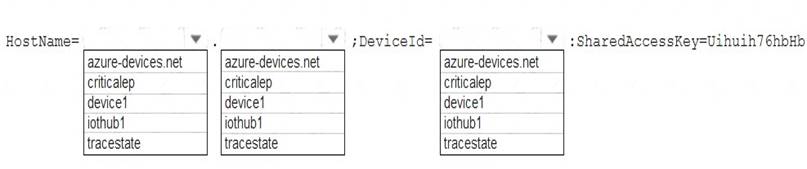
- A. Mastered
- B. Not Mastered
Answer: A
Explanation:
Box 1: iothub1
The Azure IoT hub is named iothub1.
Box 2: azure-devices.net
The format of the device connection string looks like:
HostName={YourIoTHubName}.azure-devices.net;DeviceId=MyNodeDevice;SharedAccessKey={YourShared Box 1: device1
Device1 has a primary key of Uihuih76hbHb. Reference:
https://docs.microsoft.com/en-us/azure/iot-hub/quickstart-control-device-dotnet
NEW QUESTION 8
You have an Azure IoT hub.
You need to recommend a solution to scale the IoT hub automatically. What should you include in the recommendation?
- A. Create an SMS alert in IoT Hub for the Total number of messages used metric.
- B. Create an Azure function that retrieves the quota metrics of the IoT hub.
- C. Configure autoscaling in Azure Monitor.
- D. Emit custom metrics from the IoT device code and create an Azure Automation runbook alert.
Answer: B
Explanation:
Note: IoT Hub is scaled and priced based on an allowed number of messages per day across all devices connected to that IoT Hub. If you exceed the allowed message threshold for your chosen tier and number of units, IoT Hub will begin rejecting new messages. To date, there is no built-in mechanism for automatically scaling an IoT Hub to the next level of capacity if you approach or exceed that threshold.
Reference:
https://docs.microsoft.com/en-us/samples/azure-samples/iot-hub-dotnet-autoscale/iot-hub-dotnet-autoscale/
NEW QUESTION 9
You have an Azure IoT hub.
You plan to deploy 1,000 IoT devices by using automatic device management. The device twin is shown below.
You need to configure automatic device management for the deployment.
Which target Condition and Device Twin Path should you use? To answer, select the appropriate options in the answer area.
NOTE: Each correct selection is worth one point.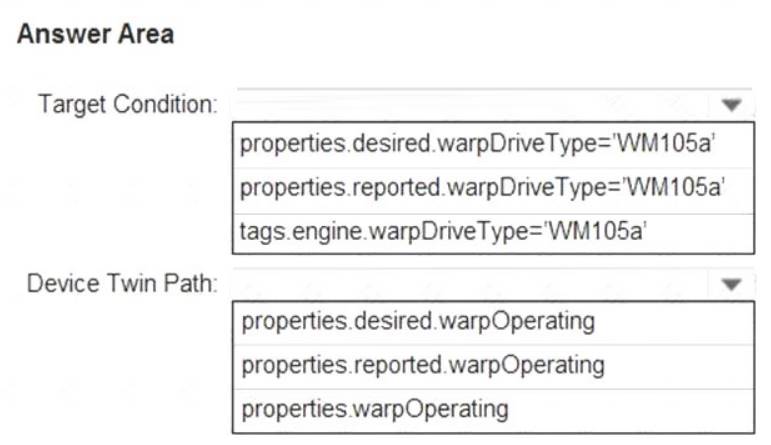
- A. Mastered
- B. Not Mastered
Answer: A
Explanation:
Box 1: tags.engine.warpDriveType='VM105a'
Use tags to target twins. Before you create a configuration, you must specify which devices or modules you want to affect. Azure IoT Hub identifies devices and using tags in the device twin, and identifies modules using tags in the module twin.
Box 2: properties.desired.warpOperating
The twin path, which is the path to the JSON section within the twin desired properties that will be set. For example, you could set the twin path to properties.desired.chiller-water and then provide the following
JSON content:
{
"temperature": 66,
"pressure": 28
}
Reference:
https://docs.microsoft.com/en-us/azure/iot-hub/iot-hub-automatic-device-management
NEW QUESTION 10
Note: This question is part of a series of questions that present the same scenario. Each question in the series contains a unique solution that might meet the stated goals. Some question sets might have more than one correct solution, while others might not have a correct solution.
After you answer a question in this question, you will NOT be able to return to it. As a result, these questions will not appear in the review screen.
You have an Azure IoT solution that includes an Azure IoT hub, a Device Provisioning Service instance, and 1,000 connected IoT devices.
All the IoT devices are provisioned automatically by using one enrollment group. You need to temporarily disable the IoT devices from the connecting to the IoT hub.
Solution: From the IoT hub, you change the credentials for the shared access policy of the IoT devices. Does the solution meet the goal?
- A. Yes
- B. No
Answer: B
Explanation:
Reference:
https://docs.microsoft.com/bs-latn-ba/azure/iot-dps/how-to-unprovision-devices
NEW QUESTION 11
You have an Azure IoT hub that is being taken from prototype to production.
You plan to connect IoT devices to the IoT hub. The devices have hardware security modules (HSMs). You need to use the most secure authentication method between the devices and the IoT hub. Company
policy prohibits the use of internally generated certificates. Which authentication method should you use?
- A. an X.509 self-signed certificate
- B. a certificate thumbprint
- C. a symmetric key
- D. An X.509 certificate signed by a root certification authority (CA).
Answer: D
Explanation:
Purchase X.509 certificates from a root certificate authority (CA). This method is recommended for production environments.
The hardware security module, or HSM, is used for secure, hardware-based storage of device secrets, and is the most secure form of secret storage. Both X.509 certificates and SAS tokens can be stored in the HSM
Reference:
https://docs.microsoft.com/en-us/azure/iot-dps/concepts-security
NEW QUESTION 12
You have an Azure Stream Analytics job that connects to an Azure IoT hub named Hub1445 as a streaming data source. Hub1445 is configured as shown in the exhibit. (Click the Exhibit tab.)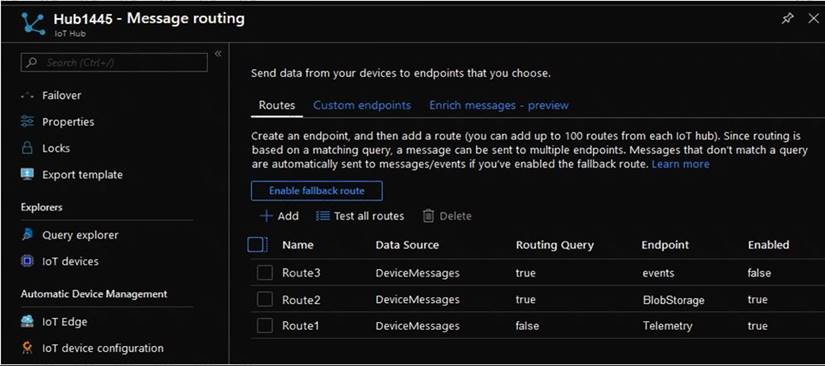
The Stream Analytics job fails to receive any messages from the IoT hub. What should you do to resolve the issue?
- A. Change the Route1 route query to true.
- B. Enable the Route3 route.
- C. Disable the Route2 route.
- D. Enable the fallback route.
Answer: A
Explanation:
The device telemetry is usually passed as JSON from the device through the IoT Hub - this is handled nicely by Azure Streaming Analytics queries.
The IoT Hub message routing should be configured as follows: Data source: Device Telemetry Messages Routing query: true (as the routing query is an expression that evaluates to true or false for each received message, the simplest way to send all messages to the endpoint is to just supply true as the query). Reference:
https://darenmay.com/blog/azure-iot-streaming-analytics-data-lake-analytics-and-json/
NEW QUESTION 13
You have an IoT device that gathers data in a CSV file named Sensors.csv.
You deploy an Azure IoT hub that is accessible at ContosoHub.azure-devices.net. You need to ensure that Sensors.csv is uploaded to the IoT hub.
Which two actions should you perform? Each correct answer presents part of the solution.
- A. Upload Sensors.csv by using the IoT Hub REST API.
- B. From the Azure subscription, select the IoT hub, select Message routing, and then configure a route to storage.
- C. From the Azure subscription, select the IoT hub, select File upload, and then configure a storage container.
- D. Configure the device to use a GET request to ContosoHub.azure-devices.net/devices/ContosoDevice1/ files/notifications.
Answer: AC
Explanation:
C: To use the file upload functionality in IoT Hub, you must first associate an Azure Storage account with your hub. Select File upload to display a list of file upload properties for the IoT hub that is being modified.
For Storage container: Use the Azure portal to select a blob container in an Azure Storage account in your current Azure subscription to associate with your IoT Hub. If necessary, you can create an Azure Storage account on the Storage accounts blade and blob container on the Containers
A: IoT Hub has an endpoint specifically for devices to request a SAS URI for storage to upload a file. To start the file upload process, the device sends a POST request to {iot hub}.azure-devices.net/devices/{deviceId}/ files with the following JSON body:
{
"blobName": "{name of the file for which a SAS URI will be generated}"
}
Reference:
https://github.com/MicrosoftDocs/azure-docs/blob/master/articles/iot-hub/iot-hub-configure-file-upload.md
NEW QUESTION 14
You develop a custom Azure IoT Edge module named temperature-module.
You publish temperature-module to a private container registry named mycr.azurecr.io
You need to build a deployment manifest for the IoT Edge device that will run temperature-module. Which three container images should you define in the manifest? Each correct answer presents part of the
solution.
NOTE: Each correct selection is worth one point.
- A. mcr.microsoft.com/azureiotedge-simulated-temperature-sensor:1.0
- B. mcr.microsoft.com/azureiotedge-agent:1.0
- C. mcr.microsoft.com/iotedgedev:2.0
- D. mycr.azurecr.io/temperature-module:latest
- E. mcr.microsoft.com/azureiotedge-hub:1.0
Answer: BDE
Explanation:
Each IoT Edge device runs at least two modules: $edgeAgent and $edgeHub, which are part of the IoT Edge runtime. IoT Edge device can run multiple additional modules for any number of processes. Use a deployment manifest to tell your device which modules to install and how to configure them to work together.
Reference:
https://docs.microsoft.com/en-us/azure/iot-edge/module-composition
NEW QUESTION 15
You have 10,000 IoT devices that connect to an Azure IoT hub. The devices do not support over-the-air (OTA) updates.
You need to decommission 1,000 devices. The solution must prevent connections and autoenrollment for the decommissioned devices.
Which two actions should you perform? Each correct answer presents part of the solution. NOTE: Each correct selection is worth one point.
- A. Update the connectionState device twin property on all the devices.
- B. Blacklist the X.509 root certification authority (CA) certificate for the enrollment group.
- C. Delete the enrollment entry for the devices.
- D. Remove the identity certificate from the hardware security module (HSM) of the devices.
- E. Delete the device identity from the device registry of the IoT hub.
Answer: BC
Explanation:
B: X.509 certificates are typically arranged in a certificate chain of trust. If a certificate at any stage in a chain becomes compromised, trust is broken. The certificate must be blacklisted to prevent Device Provisioning Service from provisioning devices downstream in any chain that contains that certificate.
C: Individual enrollments apply to a single device and can use either X.509 certificates or SAS tokens (in a real or virtual TPM) as the attestation mechanism. (Devices that use SAS tokens as their attestation mechanism can be provisioned only through an individual enrollment.) To blacklist a device that has an individual enrollment, you can either disable or delete its enrollment entry.
To blacklist a device that has an individual enrollment, you can either disable or delete its enrollment entry. Reference:
https://docs.microsoft.com/en-us/azure/iot-dps/how-to-revoke-device-access-portal
NEW QUESTION 16
......
100% Valid and Newest Version AZ-220 Questions & Answers shared by Surepassexam, Get Full Dumps HERE: https://www.surepassexam.com/AZ-220-exam-dumps.html (New 0 Q&As)